
Compare Video Conferencing Solutions Providers UK
Compare Meeting Quality, Guest Access, Collaboration, Recordings, Captions, Rooms, Interoperability, Security, Administration, Support And Complete Cost
Compare video conferencing business UK providers by host and attendee licensing, meeting duration and participant limits, browser and application joining, external guest access, audio and video quality, bandwidth adaptation, screen and content sharing, whiteboards, breakout rooms, polls, chat, live captions, translation, recording, transcription, AI meeting assistance, moderation, waiting rooms, authentication, encryption, data processing, retention, accessibility, webinars, meeting-room systems, hardware certification, calendar integration, cross-platform interoperability, administration, analytics, service availability, implementation, training, support, contract terms and complete user-plus-room cost. Give every provider the same host population, meeting pattern, attendee mix, room estate, external-guest requirements, recording policy, accessibility needs and security assumptions before comparing proposals.
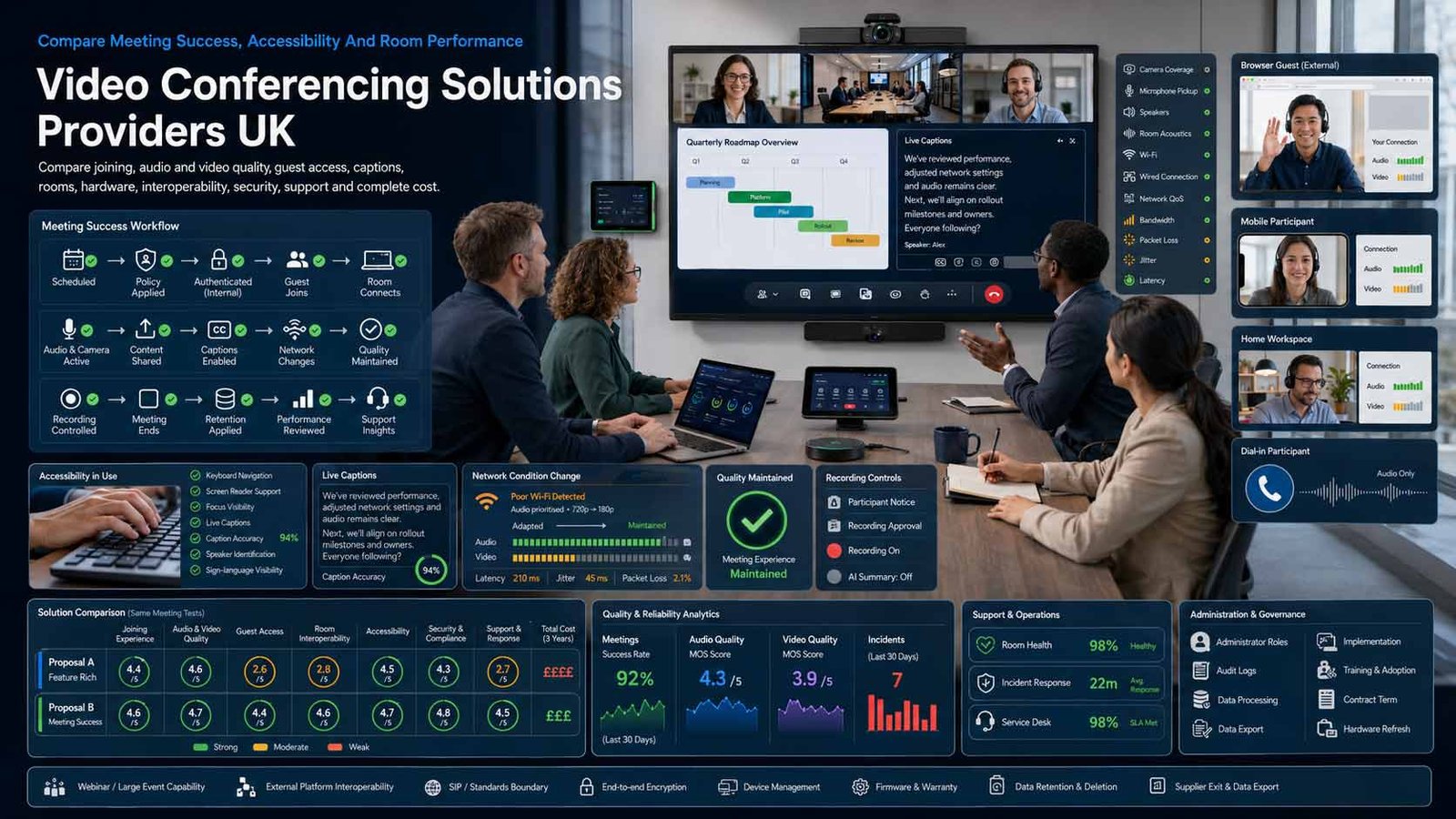
Buy A Reliable Meeting Environment, Not Just A Host Licence
A useful solution should let employees, customers, partners and room participants join quickly, communicate clearly, collaborate accessibly and leave a controlled record where recording is justified.
- Model real internal, external, hybrid and room-based meetings
- Test joining, audio, video, captions, content and recovery
- Define recording, AI, retention, guest and security policies
- Compare licences, rooms, hardware, support and administration together
A business video conferencing solution provides real-time audio, video and content collaboration for people joining from computers, mobile devices, telephones or meeting rooms. Depending on the platform and licence, it may include browser joining, screen sharing, whiteboards, chat, reactions, polls, breakout rooms, captions, translation, recording, transcription, meeting summaries, webinars, room systems, dial-in audio, administration, analytics and interoperability with external platforms or legacy endpoints.
The right solution depends on who hosts meetings, who attends, how often external guests join, meeting sizes and duration, room estate, devices, network conditions, geographic reach, language, accessibility, recording and retention, confidentiality, identity, customer experience, interoperability, existing productivity tools, internal support capability and the cost of migration or duplication.
This page compares dedicated video conferencing and meeting solutions. It does not compare UCaaS or VoIP phone systems. A provider may sell meetings alongside messaging, telephony or contact-centre products, but this comparison evaluates only the online meeting, room and video-collaboration requirement.
Choose The Right Video Conferencing Operating Model
Match the solution to meeting scale, guest access, room estate, confidentiality, interoperability and internal administration.
| Operating Model | What It Usually Includes | Best-Fit Question |
|---|---|---|
| Standalone Cloud Meeting Platform | Licensed hosts create meetings for internal and external participants using desktop, mobile and browser clients. | Does the platform provide the required meeting experience without forcing unrelated services? |
| Productivity-Suite Meeting Service | Video meetings are included with email, calendars, files, chat, documents, identity and administration. | Will existing licences and user workflows make the suite option simpler and cheaper? |
| Small-Business Web Meeting Service | Simple scheduling, browser joining, screen sharing, recordings and support with lower administrative complexity. | Can external guests join reliably without downloads, accounts or confusing permissions? |
| Enterprise Meeting And Webinar Platform | Large meetings, webinars, advanced administration, compliance, analytics, translation, AI and formal support. | Which enterprise controls are necessary, and which increase cost without improving meetings? |
| Meeting-Room Platform | Certified cameras, microphones, speakers, controllers, room licences, calendars, device management and one-touch joining. | Does the room experience work for both the home platform and common external meetings? |
| Interoperability And Video Gateway | Existing SIP or H.323 room systems connect to Microsoft Teams, Google Meet, Zoom, Webex or external tenant meetings. | Can the business preserve room investment without creating a confusing guest-join workflow? |
| Private, Self-Hosted Or Sovereign Video | The organisation controls deployment, media location, updates, identity, logging and integration in its chosen environment. | Does the confidentiality or sovereignty requirement justify the additional operational responsibility? |
| Managed Video Conferencing Service | Design, licences, room installation, support, monitoring, adoption, lifecycle management and interoperability are provided under one agreement. | Are provider responsibilities, service levels, hardware ownership, refresh and exit clearly defined? |
Eight Areas That Determine Video Conferencing Fit
Use the same meeting patterns, room scenarios, recording rules, accessibility tests and service requirements for every provider.
Comparison Criterion
Meeting Quality, Network And Device Experience
Compare audio clarity, echo and noise suppression, camera resolution, framing, backgrounds, bandwidth adaptation, packet-loss recovery, latency, low-bandwidth modes, mobile behaviour, browser support, virtual desktops, firewalls, proxy requirements and device switching. Test ordinary business networks and real endpoints, not a provider-controlled connection.
Comparison Criterion
Joining, Guests, Identity And Moderation
Assess calendar invitations, links, browser access, downloads, accounts, waiting rooms, passwords, meeting locks, verified users, anonymous guests, lobbies, host and co-host roles, presenter control, participant removal, chat permissions, file sharing, screen sharing, external domains and recovery when the organiser is absent.
Comparison Criterion
Collaboration, Events And Meeting Workflow
Review screen and application sharing, remote control, whiteboards, annotation, chat, reactions, hand raising, polls, breakout rooms, notes, agendas, tasks, Q&A, webinars, registration, branding, live streaming, attendance reports and post-meeting follow-up. Separate interactive meetings from broadcast-style events.
Comparison Criterion
Captions, Translation, Accessibility And Inclusion
Compare live captions, speaker identification, caption languages, translated captions, sign-language visibility, keyboard control, screen-reader labels, focus order, high contrast, text scaling, meeting chat, transcripts, alternative dial-in, joining instructions and host controls that support disabled participants. Automatic captions must be tested for the required terminology and accents.
Comparison Criterion
Recording, Transcription, AI And Information Governance
Assess local and cloud recording, who can initiate it, participant notification, separate audio, layouts, transcription, summaries, action items, AI assistants, consent or lawful basis, access, sharing, download, watermarking, retention, legal hold, deletion, search, eDiscovery, data location, model use and the handling of confidential or special-category information.
Comparison Criterion
Meeting Rooms, Hardware And Interoperability
Compare small, medium and large room designs; USB and appliance systems; cameras; microphones; speakers; controllers; displays; acoustic treatment; room calendars; one-touch joining; certified devices; device management; guest platforms; SIP and H.323; mobile content sharing; installation; warranties; spares and refresh.
Comparison Criterion
Security, Privacy, Administration And Resilience
Review single sign-on, multifactor authentication, administrator roles, policies, external access, encryption in transit, end-to-end encryption options and limitations, key management, waiting rooms, meeting identifiers, abuse reporting, application updates, audit logs, data processing, subprocessors, international transfers, incident response, status history, continuity and account recovery.
Comparison Criterion
Licensing, Implementation, Support And Exit
Compare host, organiser, attendee, room, webinar, storage, recording, audio, AI, translation and support licences; annual commitments; minimums; migration; configuration; integrations; room rollout; training; adoption; help desk; service levels; analytics; renewal; price changes; data export; hardware reuse; transition and deletion.
Measures To Define Before Selecting A Meeting Platform
Translate quality, security and collaboration claims into auditable meeting, room, accessibility and service evidence.
| Measure | What It Should Define | Evidence To Request | Common Weakness |
|---|---|---|---|
| Successful meeting start | Whether host and guests join with usable audio and video within the required time | Invitation, device, browser or app path, identity, lobby, media test and start time | The host joins successfully but external guests cannot pass the lobby |
| Audio and video quality | Whether communication remains intelligible under realistic network and room conditions | Latency, packet loss, bandwidth, device, noise, echo, video quality and recovery | Headline HD capability hides poor audio on ordinary business connections |
| External guest experience | Whether customers and partners can join without unnecessary accounts, software or permissions | Browser test, mobile test, supported versions, dial-in, consent, lobby and troubleshooting | Internal users have a good experience while external users abandon |
| Accessibility | Whether disabled participants can join, understand, contribute and obtain alternatives | Keyboard, screen reader, captions, transcript, focus, chat, sign-language view and dial-in | Captions exist but are inaccurate or inaccessible to the participant |
| Recording governance | Whether recordings and transcripts are created, accessed and retained lawfully and securely | Purpose, notice, initiation, access, storage, retention, sharing, deletion and audit | Recording is enabled by default without an approved need |
| Room usability | Whether room users can start and join meetings without specialist support | Calendar, one-touch join, camera, microphones, controls, external platform and recovery | An expensive room works only with the organisation’s home platform |
| Security administration | Whether meeting and account controls are configured, monitored and reviewed | SSO, MFA, roles, guest policy, waiting room, encryption, updates, logs and incident route | Security features are licensed but not enabled consistently |
| Interoperability | Whether devices, rooms and external meeting platforms connect predictably | Supported platforms, SIP or H.323, guest join, licence, feature loss and fallback | Interop permits joining but disables content sharing or captions |
| Operational reliability | Whether service incidents, device faults and user problems are recovered quickly | Availability, status, support, response, device monitoring, escalation and continuity | The cloud service is available but room equipment remains offline |
| Data and contract portability | Whether recordings, transcripts, settings, devices and users can move cleanly | Export, retention, room reuse, licences, notice, transition and verified deletion | The business can export recordings but cannot reuse room hardware |
Video Conferencing Providers UK Businesses Can Consider
Shortlist providers whose guest experience, meeting quality, accessibility, rooms, interoperability, governance, support and commercial model fit the organisation. Confirm current written terms before award.
Provider Profile
Zoom Meetings And Zoom Rooms
Zoom provides cloud video meetings for internal and external participants, with desktop, mobile and browser access, collaboration, captions, recordings, AI-assisted meeting functions and the Zoom Rooms room-system proposition. Include it where simple guest joining, broad market familiarity, meetings and dedicated room deployments are important. Confirm the exact Zoom Workplace plan, host and room licences, participant and duration limits, recording and storage, AI availability, webinars, audio, end-to-end-encryption implications, data regions, administration, room hardware, support, annual commitment, add-ons and migration.
Review official Zoom Meetings informationProvider Profile
Microsoft Teams Meetings And Teams Rooms
Microsoft Teams provides video meetings through standalone Teams offerings and Microsoft 365 plans, with calendars, chat, files, collaboration, recordings, transcripts, live captions, identity controls and Teams Rooms. Include its meeting proposition where Microsoft 365, Entra ID and Outlook are already central to the organisation. Confirm whether Teams is included in the chosen Microsoft licence, meeting and attendee limits, guest access, recordings, transcription, AI or Teams Premium features, audio conferencing, room licences, certified devices, external platform joining, policy configuration, support and complete Microsoft-stack cost.
Review official Microsoft Teams video-conferencing informationProvider Profile
Google Meet And Google Meet Hardware
Google Meet provides browser and application-based video meetings through Google Workspace and related editions, with calendar integration, captions, recordings and other advanced features depending on the plan. Google Meet hardware supports dedicated rooms under separate device licensing. Include it where Gmail, Calendar, Drive and Google identity are already standard. Confirm Workspace edition, attendee limit, recording and transcript availability, external guests, dial-in, live streaming, Gemini features and consent, admin policies, hardware licences, certified devices, interoperability, support, storage and contract structure.
Review official Google Meet informationProvider Profile
Cisco Webex Meetings
Cisco Webex Meetings provides cloud video conferencing with external joining, screen sharing, whiteboards, captions, recordings, polling and Q&A, Slido engagement, AI features and enterprise administration. Webex also supports room devices and broader collaboration products, but this profile evaluates the meetings proposition only. Include it where formal meeting controls, enterprise deployment, events, room systems or security options are important. Confirm Meet versus Suite licensing, host allocation, attendee limits, recording storage, AI, translation, webinars, audio add-ons, devices, interoperability, support, service levels, data processing, term and renewal.
Review official Cisco Webex informationProvider Profile
GoTo Meeting
GoTo Meeting provides online video meetings with screen sharing, browser joining, collaboration, cloud recording, transcription, security and account administration. Include it where a business wants a dedicated web-meeting service without making a broader productivity suite the centre of the deployment. Confirm current plan availability in the UK, organiser and attendee limits, meeting duration, downloads, browser functions, recordings, storage, transcripts, dial-in and toll-free audio, integrations, single sign-on, encryption options, support, annual commitment and any dependency on other GoTo products.
Review official GoTo Meeting informationProvider Profile
Zoho Meeting
Zoho Meeting provides cloud meetings and webinars with browser joining, screen sharing, recordings, collaboration, moderation, organisation administration, security controls and mobile applications. Include it where a smaller business wants a competitively packaged standalone service or already uses the Zoho business-software ecosystem. Confirm host and attendee bands, meeting and webinar differences, recording storage, dial-in and toll-free charges, AI features, guest joining, branding, integrations, security, data processing, support, annual pricing, add-ons, migration and export.
Review official Zoho Meeting informationProvider Profile
Whereby Meetings
Whereby provides browser-based video meeting rooms designed for simple guest access without requiring participants to download an application or create an account for ordinary joining. Include it where client-facing meetings, interviews, consultations or branded browser rooms are more important than complex enterprise collaboration. Confirm the current Meetings plan, room and participant limits, host and admin model, recordings, transcription, breakout or collaboration functions, branding, privacy, data location, browser compatibility, support, contract flexibility and whether the feature set remains sufficient as meeting scale grows.
Review official Whereby Meetings informationProvider Profile
Pexip
Pexip provides video-meeting infrastructure, private and self-hosted deployment options and interoperability that can connect existing room systems with platforms including Microsoft Teams and other external meeting environments. Include it where an organisation needs sovereign deployment, controlled media, classified or high-assurance meetings, multiple platform estates or preservation of SIP and H.323 room investment. Confirm the selected Pexip service, hosting model, capacity, regions, identity, room and platform coverage, guest experience, feature limitations, administration, monitoring, security, implementation partner, licences, support and operational responsibility.
Review official Pexip informationWhat Changes Video Conferencing Cost
Compare complete user, meeting, room, audio, storage, implementation and support cost—not the lowest host price.
| Cost Driver | Why It Changes Spend | What A Comparable Quote Should Show |
|---|---|---|
| Host and user licensing | Some services licence every user, only organisers, active hosts, administrators or a wider productivity suite | User categories, minimum seats, simultaneous meetings, reassignment, inactive users and annual true-up |
| Meeting size, duration and event capacity | Larger meetings, longer sessions, webinars, live streaming and registration can require higher plans or add-ons | Attendee bands, duration, concurrent events, external guests, panelists and overflow |
| Recording, transcription and AI | Cloud storage, transcription, summaries, translation, search and AI assistance may be limited by plan, geography or usage | Included storage, retention, downloads, languages, AI entitlement, consent controls and overage |
| Dial-in and audio conferencing | Local and toll-free numbers, call-me, dial-out and carrier minutes can add variable charges | Countries, numbers, host or participant payment, commitments, per-minute rates and emergency fallback |
| Meeting rooms and hardware | Room licences, cameras, microphones, speakers, controllers, displays, installation and support can exceed user-licence cost | Room types, hardware bill, warranties, installation, configuration, management, spares and refresh |
| Interoperability and gateways | Connecting legacy rooms or multiple meeting platforms can require specialist licences and infrastructure | Platforms, endpoints, capacity, domains, hosting, support, feature loss and external tenant scenarios |
| Implementation and migration | Identity, policies, calendars, recordings, rooms, integrations, training and adoption require structured work | Discovery, configuration, migration, room rollout, testing, acceptance, training and project rates |
| Security, compliance and data requirements | Enhanced identity, encryption, regional processing, eDiscovery, legal hold, audit, private deployment and retention can change plan or architecture | Controls, editions, regions, processors, assurance, customer duties and specialist configuration |
| Support and managed service | Premium support, meeting assistance, room monitoring, onsite response and 24-hour coverage create recurring cost | Hours, response, named contacts, room support, service credits, onsite rates and exclusions |
| Contract, renewal and exit | Annual commitments, suite bundling, minimums, price increases, recordings, devices and transition affect lifecycle cost | Term, reduction rights, renewal, notice, export, room reuse, migration assistance and deletion |
| Indicative Commercial Model | Typical Position | What Must Be Confirmed |
|---|---|---|
| Standalone Per-Host Subscription | Licensed organisers host meetings while invited participants usually join without a paid licence | Confirm host reassignment, concurrent meetings, attendee limits, recordings, support and annual commitment |
| Per-User Productivity Suite | Meetings are bundled with email, calendars, files, chat, identity and other applications | Allocate only the meeting-relevant cost and avoid double-paying for overlapping suites |
| User Licences Plus Room Estate | Desktop and mobile users are supplemented by room licences, certified hardware and device management | Build a room-by-room bill including installation, network, support, warranty, spares and refresh |
| Enterprise Or Private Deployment | Platform, capacity, interoperability, implementation and support are quoted for scale, sovereignty or complexity | Require a full architecture, responsibility matrix, capacity model, service levels and exit plan |
Match The Platform To The Meeting Environment
The right shortlist depends on guest types, meeting scale, rooms, accessibility, recording, confidentiality, external platforms and support capability.
Small Business With Client And Team Meetings
Prioritise reliable browser joining, simple invitations, strong audio, screen sharing, captions, recordings where justified, low administrative effort, predictable host licensing and responsive support. Avoid enterprise complexity that participants will not use.
Growing Hybrid Business With Several Meeting Rooms
Prioritise calendar and identity integration, certified room systems, one-touch joining, external guest experience, captions, device management, room monitoring, consistent policies, adoption and a clear hardware-refresh plan.
Training, Consultation Or Customer-Facing Operation
Prioritise accessible joining, waiting rooms, branding, registration, breakout rooms, polls, recording controls, transcripts, consent, client confidentiality, browser and mobile testing, support during live sessions and evidence of attendance.
Enterprise, Public-Sector Or High-Assurance Organisation
Prioritise identity, external-domain policies, meeting classification, encryption choices, regional or private deployment, data retention, eDiscovery, interoperability, room estate, formal service levels, incident response, accessibility assurance and controlled change.
How To Compare Video Conferencing Proposals
Issue one requirements pack containing host and user counts, internal and external participant mix, meeting duration and size distribution, simultaneous meetings, rooms, hardware, calendars, identity, supported devices, browsers, guest and anonymous access, collaboration, captions, languages, dial-in, recording, transcription, AI, webinars, retention, legal hold, data regions, external meeting platforms, security, accessibility, network constraints, implementation, support and contract period. Require a scripted meeting and room demonstration rather than a feature presentation.
- Every provider runs the same internal, guest and room scenarios
- Audio, video, captions, content and recovery are measured
- Recording, AI, guest and security policies are demonstrated
- Accessibility and external-platform joining are tested
- Licences, rooms, hardware, audio and support are itemised
- Three-year cost uses the same growth and refresh assumptions
Compare The Same Hybrid Meeting
Ask each provider to host employees, a browser guest, a mobile participant and a meeting room; share video and detailed content; use captions; admit a late guest; recover from poor bandwidth; record only after notice; transfer host control and join an external-platform meeting.
A high participant limit is not useful when guests cannot join, room microphones fail, captions are inaccurate or the business cannot control recordings.
Six Questions To Put To Every Video Conferencing Provider
The answers expose unclear licensing, poor guest and room joining, uncontrolled recordings, weak policy enforcement, accessibility gaps and hidden lifecycle cost.
Who Needs A Paid Licence And What Does It Permit?
Ask which users require host, organiser, attendee, room, webinar, storage, AI or audio licences, and how reassignment, simultaneous meetings, guests and annual true-up work.
How Will External Guests And Meeting Rooms Join?
Test browser and app joining, accounts, lobbies, dial-in, mobile devices, one-touch rooms, legacy endpoints, external tenant meetings, unsupported browsers and troubleshooting.
What Happens To Recordings, Transcripts And AI Outputs?
Confirm purpose, participant notice, who can start recording, storage location, model use, access, sharing, download, retention, legal hold, deletion, eDiscovery, export and administrator audit.
How Are Security And Privacy Policies Enforced?
Request identity, MFA, roles, waiting rooms, passwords, external access, encryption, end-to-end options, updates, data processing, regions, subprocessors, incidents, logs and policy reporting.
Can Disabled Participants Use The Full Meeting Journey?
Demonstrate keyboard and screen-reader joining, captions, speaker identification, focus, text sizing, chat, sign-language view, dial-in, materials, recordings, transcripts and consistent support.
What Is The Complete Three-Year Cost And Exit Plan?
Obtain user, room, hardware, storage, audio, webinar, AI, implementation, support, integration, annual-increase, refresh, migration and exit costs, plus data export and hardware reuse.
A Seven-Stage Video Conferencing Provider Evaluation
Move from real meetings and room tests to measurable production evidence rather than choosing a platform from familiarity or participant limits.
- Create a verified meeting baseline covering hosts, users, guests, customers, meeting sizes, duration, concurrent sessions, rooms, devices, external platforms, network conditions, recordings, captions, languages, dial-in, incidents, support contacts, current licences, hardware and accountable owners.
- Define the meeting and governance model. Decide which platform is primary, who can organise meetings, how external and anonymous guests join, which meetings may be recorded, how AI features are authorised, what requires stronger security and how participants obtain accessible alternatives.
- Prepare a prioritised requirement catalogue covering meeting quality, joining, collaboration, events, captions, accessibility, recordings, AI, rooms, hardware, interoperability, identity, security, privacy, administration, analytics, implementation, support, pricing and exit.
- Issue one supplier brief and demonstration script with the same users, browser guest, mobile participant, room, external platform, poor-bandwidth condition, caption requirement, recording scenario, security policy, support incident and three-year commercial assumptions.
- Shortlist providers by actual meeting fit, guest usability, audio and video performance, room capability, accessibility, governance, security, interoperability, administration, service reliability, support, financial stability and referenceable customers with comparable meeting patterns.
- Complete due diligence and a controlled pilot. Test ordinary networks, browsers, mobile devices, room systems, external meetings, captions, screen readers, recording and deletion, AI controls, identity, policy enforcement, service desk, device management and complete data export.
- Implement through identity and policy configuration, room rollout, network readiness, support procedures, organiser training, accessible meeting guidance, recording governance, adoption and baseline analytics. Review quality, guest failure, accessibility, incidents, licences and room health before renewal.
Video Conferencing Solutions Comparison Checklist
Use this table before appointing, migrating or renewing a business video conferencing provider.
| No. | Requirement | Evidence To Obtain Before Award | Confirmed |
|---|---|---|---|
| 01 | Meeting and room baseline complete | Hosts, users, guests, meeting sizes, duration, concurrency, rooms, devices, recordings, captions and owners | |
| 02 | Service boundary approved | Video meetings scope clearly excludes UCaaS and VoIP phone-system procurement | |
| 03 | Licence model reconciled | Hosts, organisers, users, rooms, webinars, storage, audio, AI, minimums and reassignment | |
| 04 | Guest and external joining tested | Browser, app, accounts, lobby, mobile, dial-in, external domains, unsupported devices and fallback | |
| 05 | Meeting quality proven | Audio, video, screen sharing, detailed content, noise, echo, bandwidth, latency and recovery | |
| 06 | Collaboration and event features accepted | Whiteboards, chat, polls, Q&A, breakout rooms, registration, streaming, reports and follow-up | |
| 07 | Accessibility journey approved | Keyboard, screen reader, captions, languages, focus, text, sign-language view, dial-in and transcript | |
| 08 | Recording and AI governance complete | Purpose, notice, initiation, consent or lawful basis, access, storage, model use, retention and deletion | |
| 09 | Meeting-room design and support approved | Room sizes, cameras, microphones, controllers, displays, acoustics, network, monitoring, warranty and spares | |
| 10 | Interoperability tested | External meeting platforms, SIP or H.323 endpoints, guest join, feature loss, content and fallback | |
| 11 | Security and privacy due diligence complete | Identity, MFA, roles, waiting rooms, encryption, updates, logs, processors, regions and incidents | |
| 12 | Administration and analytics accepted | Policies, templates, device management, quality reports, attendance, audit, licence and service health | |
| 13 | Implementation and adoption contracted | Configuration, migration, rooms, testing, training, organiser guidance, help desk and acceptance | |
| 14 | Three-year commercial model complete | Users, hosts, rooms, hardware, storage, audio, webinar, AI, support, refresh and internal resource | |
| 15 | Contract, data and exit controlled | Term, renewal, reduction, notice, recordings, transcripts, settings, room reuse, transition and deletion |
Common Video Conferencing Buying Mistakes
Most avoidable problems begin with familiarity-led selection, incomplete cost models, weak room design, uncontrolled recordings or guest and accessibility testing left until launch.
| Mistake | Why It Creates Risk | Better Control |
|---|---|---|
| Choosing the platform employees already know without testing guests | External customers and partners may face downloads, accounts, lobbies or unsupported browsers | Test every important guest journey |
| Comparing only headline host prices | Room licences, hardware, storage, audio, webinars, support and suite duplication can dominate cost | Build a three-year whole-estate model |
| Buying cameras without assessing acoustics | An expensive camera cannot correct echo, poor microphone placement or loud rooms | Design audio and room environment first |
| Enabling recording for convenience | Images, voices, opinions, chat and shared information create substantial privacy and retention obligations | Record only for a justified approved purpose |
| Assuming automatic captions meet every need | Accuracy varies by accent, language, terminology, audio and speaker overlap | Test required scenarios and provide alternatives |
| Ignoring interoperability until after room rollout | Rooms may join only the home platform or lose content and controls in external meetings | Test real external-platform meetings |
| Using one security policy for every meeting | Public events, ordinary teamwork and confidential discussions have different identity and recording risks | Classify meetings and apply proportionate controls |
| Allowing unrestricted anonymous access | Uninvited participants, disruptive users and data exposure become harder to control | Use lobbies, identity and organiser controls |
| Treating cloud uptime as the full service level | Rooms, headsets, browsers, firewalls and local support can fail while the platform remains available | Measure end-to-end meeting success |
| Leaving recordings and room hardware until exit | The business may lose data or replace reusable equipment unnecessarily | Plan export, deletion and hardware reuse before signing |
Frequently Asked Questions
Answers to common questions from UK businesses comparing online meetings, guest access, rooms, recordings, accessibility, security and pricing.
What Is A Business Video Conferencing Solution?
A business video conferencing solution enables people to meet using live audio, video and shared content from computers, mobile devices, telephones or meeting rooms. Paid plans can add longer meetings, larger audiences, recordings, captions, administration, security, webinars, rooms and support.
What Is The Difference Between Video Conferencing And UCaaS?
Video conferencing focuses on online meetings, room participation and visual collaboration. UCaaS combines several communications services, commonly including business telephony, messaging, presence and meetings. This page compares the video-meeting requirement only and does not compare UCaaS or VoIP phone systems.
Do External Participants Need A Paid Licence?
Usually not. Paid licences are commonly assigned to hosts, organisers or internal users, while invited participants join as guests. However, account, browser, application, lobby, webinar and authentication requirements vary. Businesses should test the exact external journey before purchase.
How Much Do Video Conferencing Solutions Cost In The UK?
Cost can include host or user licences, meeting rooms, hardware, recordings, storage, webinars, dial-in audio, translation, AI features, implementation, support and annual commitments. A fair comparison uses the same user, meeting, room and growth profile across every provider.
What Internet Connection Is Needed For Video Conferencing?
Requirements depend on video quality, number of participants, content sharing, room devices and simultaneous users. Platforms adapt to changing bandwidth, but reliable audio, sensible Wi-Fi or wired design, capacity planning, traffic management and testing on real business connections remain important.
Can Video Meetings Be Recorded?
Yes, many platforms support recording and transcription, but the organisation should have a valid purpose, lawful basis where personal data is involved, clear participant information, restricted access, appropriate retention and secure deletion. Taking minutes may be less intrusive for some meetings.
Are Video Conferencing Platforms Secure?
Major platforms provide security controls, but outcomes depend on product design, selected plan, configuration and user behaviour. Compare identity, MFA, waiting rooms, passwords, guest policies, encryption, updates, audit logs, recording access, data processing, incident response and organiser training.
What Accessibility Features Should A Platform Have?
Important features include keyboard navigation, screen-reader support, live captions, speaker identification, readable chat, visible focus, text scaling, sign-language visibility, transcripts, dial-in options and an accessible way to obtain help. Automatic captions should be tested for required languages and terminology.
How Should A Business Choose Video Conferencing Hardware?
Start with room size, seating, acoustics, camera coverage, microphone pickup, speakers, displays, accessibility, network and the meeting platforms the room must join. Compare USB and appliance systems, certified devices, installation, management, warranty, spares, support and refresh.
How Should UK Businesses Compare Video Conferencing Providers?
Give every provider the same host population, guest scenarios, meeting sizes, rooms, devices, recording policy, caption and accessibility needs, external-platform tests, security controls, support requirements and three-year cost assumptions. Compare end-to-end meeting success, not feature count alone.
Official Guidance And Provider Resources
Reviewed by Bhav Giva, Founder & Lead Analyst at CompareServices.co.uk, on 1 August 2026.
Use current NCSC, ICO, W3C and provider documentation to verify security, recording, data protection, accessibility, plans, participant limits, room licences, interoperability, AI features, pricing and contract terms. Meeting platforms and packages change frequently. Obtain cybersecurity, privacy, accessibility, employment, legal or sector-specific advice where required.
- NCSC — How To Secure Online Meetings
- NCSC — Video Conferencing Guidance
- ICO — Recording And Sharing Online Meetings
- W3C — Accessibility Of Remote Meetings
- W3C — Live Captions Accessibility
- Zoom — Virtual Meetings
- Microsoft — Teams Video Conferencing
- Google — Google Meet
- Cisco — Webex Meetings
- GoTo — GoTo Meeting
- Zoho — Zoho Meeting
- Whereby — Browser-Based Meetings
- Pexip — Video Conferencing And Interoperability