
Compare Dash Cams (Commercial) Providers UK
Compare Camera Coverage, Image Quality, Evidence Retrieval, Cloud Access, AI Alerts, Privacy, Installation, Support, Storage And Complete Vehicle Cost
Compare commercial dash cams UK providers by road-facing, rear, side, cargo and driver-facing coverage; image resolution; low-light and high-dynamic-range performance; number-plate and incident detail; continuous and event recording; local and cloud storage; automatic upload; live viewing; evidence retrieval; timestamps; GPS metadata; tamper resistance; audio controls; parking mode; AI event detection; in-cab alerts; coaching workflows; privacy modes; worker and passenger transparency; retention; access; subject-right support; cybersecurity; installation; vehicle compatibility; warranties; replacements; support; monthly subscriptions; hardware ownership; data export; contract terms and complete lifecycle cost. Give every provider the same vehicle types, camera positions, operating hours, incident scenarios, privacy restrictions, retrieval targets and service assumptions before comparing proposals.
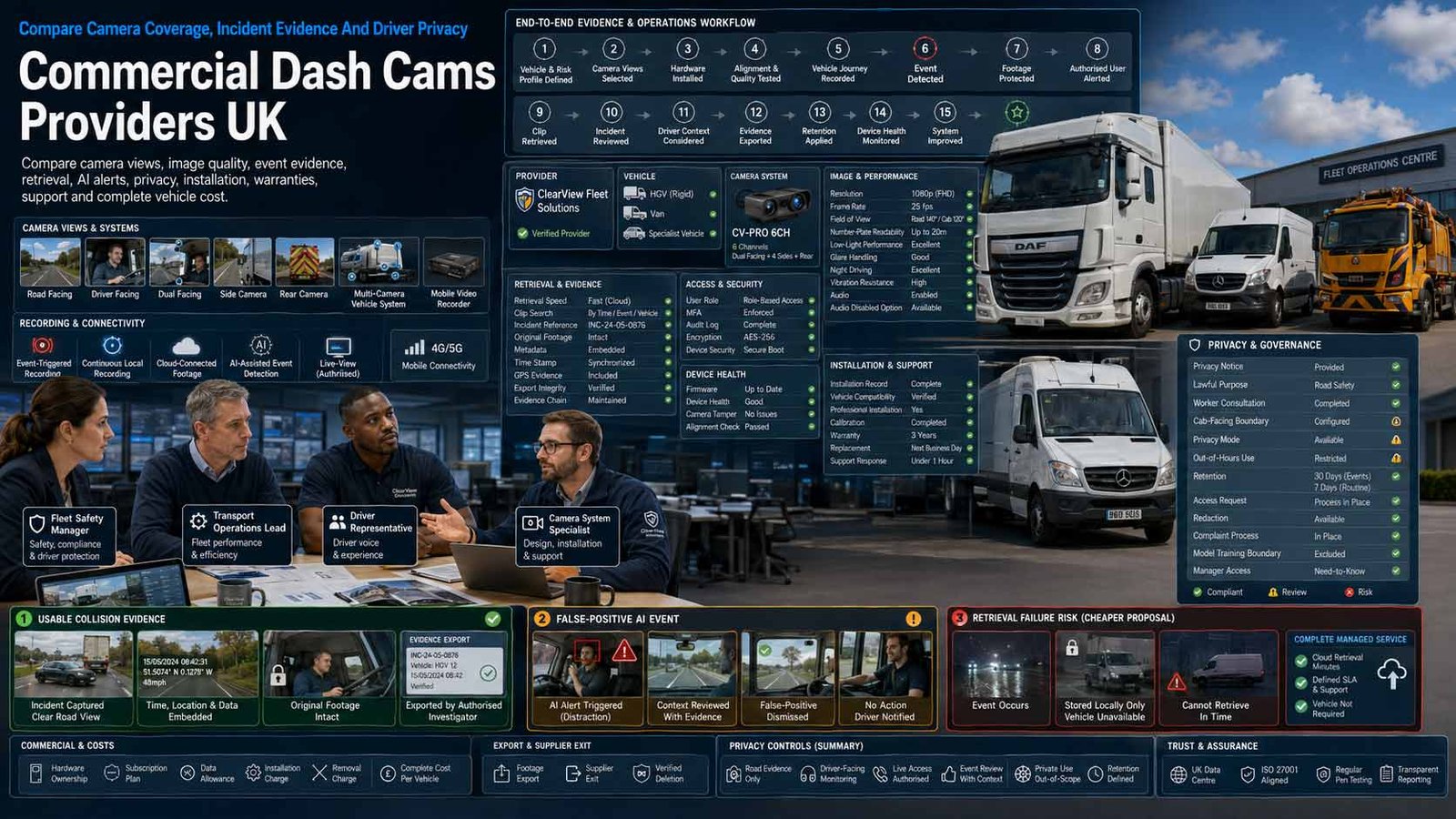
Buy Reliable Evidence And Safe Operation, Not Just A Camera
A commercial camera system should capture the right view, preserve usable footage, protect drivers and passengers, survive vehicle conditions and make authorised retrieval quick when an incident occurs.
- Define purpose, camera views and incident evidence before hardware
- Test number plates, low light, glare, vibration and audio settings
- Document worker monitoring, privacy, access and retention controls
- Compare installation, storage, support, replacement and exit together
A commercial dash cam is an in-vehicle camera and recording system deployed by an organisation to capture road, cab, rear, side, cargo or surrounding views for defined business purposes. Depending on the solution, footage may stay on a memory card, upload automatically after an event, be retrieved remotely through a secure portal, support live viewing, combine several cameras through a mobile digital video recorder or use artificial intelligence to detect specified road and driver events.
The right solution depends on vehicle type, operating environment, road exposure, passengers, cargo, lone working, incident frequency, insurance and claims process, required camera views, image detail, driving hours, connectivity, storage, urgency of retrieval, driver relationship, private use, data sensitivity, AI risk, installation capability, internal reviewers and the organisation’s ability to act fairly on recorded evidence.
This page compares commercial dash cams and in-vehicle video evidence systems. It does not compare vehicle tracking or fleet management. Location, routing, dispatch, fuel, maintenance, driver-hours and general fleet operations remain outside scope even when a camera provider bundles those functions with its wider platform.
Choose The Right Commercial Dash Cam Operating Model
Match the camera and evidence model to vehicle risk, footage urgency, privacy and operational capability.
| Operating Model | What It Usually Includes | Best-Fit Question |
|---|---|---|
| Local-Storage Road-Facing Dash Cam | A forward camera records continuously to removable media, with impact or manual event protection and local download. | Can the business retrieve reliable footage quickly enough without cloud connectivity? |
| Front-And-Rear Or Dual-Channel System | Two synchronised views cover the road ahead and rear, cargo area, passenger area or another priority zone. | Which second view is necessary and proportionate for the stated purpose? |
| Cloud-Connected Event Camera | Selected incidents upload automatically using mobile connectivity and can be reviewed through a secure portal. | Which events upload, how fast, and what happens when connectivity is unavailable? |
| Dual-Facing AI Dash Cam | Road and driver-facing cameras use computer vision to detect configured behaviours and can provide in-cab alerts or review queues. | Is inward-facing monitoring necessary, fair and accurate for the specific risk? |
| Multi-Camera Commercial Vehicle System | Several road, side, rear, cab or load cameras record to an in-vehicle DVR for broader incident coverage. | Can the system capture all required views without becoming a separate manoeuvring or fleet-management project? |
| Parking And Security Recording System | Motion, impact or low-power recording can capture incidents, vandalism or interference while the vehicle is parked. | How are power drain, private use, public surveillance and retention controlled? |
| Passenger, Taxi Or Specialist-Vehicle Camera | Cabin, door, passenger or multi-zone recording supports defined safety, safeguarding, dispute or security requirements. | Which licensing, sector, audio, signage and privacy rules apply to the operation? |
| Managed Video Evidence Service | Hardware, installation, connectivity, storage, alerts, evidence retrieval, support, replacement and reporting are delivered under one service. | Does the provider improve evidence handling without locking footage and configuration into its platform? |
Eight Areas That Determine Commercial Dash Cam Fit
Use the same vehicles, views, incidents, privacy controls, retrieval targets and support requirements for every provider.
Comparison Criterion
Purpose, Camera Coverage And Proportionality
Define each purpose before choosing views: collision evidence, false-claim defence, driver safety, passenger protection, cargo security, vandalism or incident investigation. Compare road, rear, side, cab and load views, but collect only what is necessary. Driver-facing, passenger-facing and audio recording require stronger justification than road-only capture.
Comparison Criterion
Image, Audio And Evidential Quality
Compare resolution, frame rate, lens angle, high dynamic range, low-light performance, infrared, number-plate capture, motion blur, glare, weather, vibration, timestamp, location metadata, event markers, synchronisation, audio control and export quality. Test real routes, night conditions, dirty windscreens and representative speeds.
Comparison Criterion
Recording, Storage And Evidence Retrieval
Assess continuous loop recording, event locking, manual capture, local media, mobile upload, cloud storage, live view, missing-footage alerts, event duration, pre- and post-trigger buffer, search, download, sharing, watermarking, audit log, hash or integrity evidence, retention and deletion. Define the retrieval target after an incident.
Comparison Criterion
AI Detection, Alerts And Fair Review
Review supported detections, confidence thresholds, false positives, in-cab warnings, event queues, human review, driver challenge, coaching workflow, model updates, bias, performance by vehicle, light, clothing and driver characteristics, and whether an alert records evidence beyond the stated purpose. AI output should inform proportionate review, not become automatic proof of misconduct.
Comparison Criterion
Worker, Passenger And Public Privacy
Assess lawful purpose, transparency, driver consultation, signage, privacy notices, data minimisation, audio, private use, privacy mode, special-category or sensitive context, subject access, complaints, sharing, disclosure, retention, access control and DPIA screening. The employer remains accountable even when the provider stores or analyses footage.
Comparison Criterion
Installation, Reliability And Vehicle Compatibility
Compare windscreen placement, driver sight line, hardwiring, ignition and battery protection, tamper-resistant mounting, cable routing, commercial-vehicle voltage, CAN or diagnostic connections, heat, vibration, ingress protection, camera alignment, calibration, SD-card endurance, health checks, installation records, deinstallation and vehicle replacement.
Comparison Criterion
Security, Connectivity And System Control
Review device identity, encrypted transfer and storage, administrator roles, multifactor authentication, tenant separation, mobile network, remote access, live-view controls, firmware signing and updates, vulnerabilities, audit logs, API access, exports, supplier support access, incident response, backup, data locations, subprocessors and secure disposal.
Comparison Criterion
Commercial Model, Support, Warranty And Exit
Compare hardware purchase or rental, installation, SIM and data, cloud storage, AI modules, live view, extra cameras, users, support, warranties, advance replacement, maintenance, vehicle moves, minimum quantity, contract term, price review, insurance requirements, evidence assistance, data export, open incidents, hardware ownership and verified deletion.
Measures To Define Before Selecting Commercial Dash Cams
Translate camera, AI and cloud claims into auditable image, evidence, privacy, installation and service performance.
| Measure | What It Should Define | Evidence To Request | Common Weakness |
|---|---|---|---|
| Required field of view | Whether the camera captures the event area without unnecessary intrusion | Vehicle drawing, lens, mounting point, sample footage, blind areas and purpose | A wide-angle claim hides distortion or missing detail |
| Number-plate and incident detail | Whether evidence remains usable in motion, glare, darkness and poor weather | Day, night, opposing headlights, rain, speed, freeze-frame and export samples | Nominal 4K resolution does not guarantee readable incident detail |
| Recording completeness | Whether the system records, protects and retrieves the relevant period | Loop period, trigger, buffer, media health, upload, missing-data alert and audit log | An impact event begins after the important action has already occurred |
| Evidence integrity | Whether downloaded footage can be traced and explained | Original file, timestamp, device, metadata, access log, export process and integrity check | A compressed clip is shared without the original or audit history |
| AI event quality | Whether alerts reflect real risk rather than noise | Definition, threshold, confidence, false positives, false negatives, sample and human review | Managers assume an AI label is conclusive evidence |
| Privacy compliance | Whether recording is justified, transparent, limited and controlled | Purpose, lawful basis, DPIA, notices, signage, access, retention, rights and complaints | Cameras are installed before employees are informed |
| Installation quality | Whether each camera remains safe, aligned, powered and operational | Installer record, photographs, alignment, power, calibration, health test and warranty | A camera moves after installation and records the dashboard |
| Retrieval speed | Whether authorised staff can obtain complete footage when it is needed | Incident workflow, permissions, search, upload time, support and service target | The clip exists locally but the vehicle is unavailable for days |
| System security | Whether devices and footage resist unauthorised access or alteration | MFA, roles, encryption, updates, logging, testing, incident response and deletion | Shared administrator accounts provide no accountability |
| Portability and exit | Whether footage, settings and open cases can transfer cleanly | Export, metadata, users, configurations, retention, hardware, notice and deletion | Only selected event clips can be exported before account closure |
Commercial Dash Cam Providers UK Businesses Can Consider
Shortlist providers whose camera coverage, footage quality, evidence retrieval, privacy, installation, support and commercial structure fit the vehicles and purpose. Confirm current written terms before award.
Provider Profile
Samsara AI Dash Cams
Samsara provides connected road-facing and dual-facing AI dash cams with high-definition video, event detection, in-cab alerts, remote video retrieval and cloud-based review. Include its camera proposition where a business wants connected evidence, configurable safety events and structured review across many vehicles. This profile does not evaluate Samsara’s wider tracking or fleet platform. Confirm camera model, road and cab views, detection catalogue, false-positive review, privacy controls, live access, upload window, retention, storage, installation, device health, data processing, licences, minimums, support and complete footage export.
Review official Samsara AI Dash Cams informationProvider Profile
Webfleet Video
Webfleet Video combines connected dash cams with event video, AI detections, driver alerts and configurable privacy controls. Include the camera service where a business wants road-facing or dual-view evidence and cloud retrieval with defined incident and driver-safety workflows. This profile excludes the broader Webfleet tracking and fleet-management proposition. Confirm camera model, supported views, event definitions, privacy mode, continuous versus event access, live streaming, retention, mobile connectivity, installation, hardware replacement, user permissions, data processing, subscription structure, implementation and exit.
Review official Webfleet fleet dash cam informationProvider Profile
Verizon Connect Integrated Video
Verizon Connect offers connected road-facing, dual-facing and extended-view camera options with AI-assisted event review, driver alerts, cloud footage and video access. Include the camera proposition where an organisation wants multiple camera views and incident evidence under a managed service. This profile does not assess Verizon Connect’s wider vehicle-tracking functions. Confirm UK product availability, camera and DVR configuration, AI detections, event classification, live view, privacy mode, storage, retention, access, installation, data use, support, warranty, monthly charges and the ability to export original footage and metadata.
Review official Verizon Connect dash cam informationProvider Profile
VisionTrack Connected Dashcams
VisionTrack provides connected dash cams, AI-enabled cameras, multi-camera systems and mobile video recorders for commercial vehicles. Include it where a business needs road, cab, side, rear or more complex vehicle coverage with remote communication, event review and secure video download. Confirm the exact hardware, number of channels, recording quality, AI events, live view, connectivity, local and cloud storage, evidence export, privacy, administrator roles, installation partner, vehicle compatibility, warranty, replacement, subscription, support response and end-of-contract data handling.
Review official VisionTrack connected dashcam informationProvider Profile
SureCam
SureCam provides connected commercial dash cams, live streaming, event footage, AI alerts, cloud access and multi-camera options, with UK pricing presented on a per-vehicle monthly basis for selected packages. Include it where a small or mid-sized operation wants an integrated camera service with published entry pricing and remote evidence retrieval. Confirm the minimum vehicle count, camera views, hardware ownership, installation, included storage and data, live-stream limits, AI functions, event accuracy, privacy, GPS dependency, support, warranty, annual term, price changes and export of original footage.
Review official SureCam UK informationProvider Profile
Teletrac Navman Smart Dashcams
Teletrac Navman provides smart dash cams and video telematics with road and driver-facing options, Video AI, event footage and driver-coaching workflows. Include the camera proposition where an organisation wants configurable commercial-vehicle cameras and structured review through an established provider. This profile excludes wider tracking, dispatch and fleet-management functions. Confirm camera model, AI capabilities, event definitions, in-cab alerts, continuous recording, video recall, privacy settings, installation, service availability, data retention, access, false-positive review, hardware replacement, pricing, contract and full video export.
Review official Teletrac Navman smart dashcam informationProvider Profile
Lytx Fleet Dash Cams
Lytx provides commercial dash cams and video-safety services including DriveCam and Surfsight camera propositions, continuous or event recording, AI detections, in-cab alerts and review or coaching workflows. Include it where a larger or higher-risk vehicle operation wants an established video-safety method and managed review capability. Confirm which Lytx product is proposed, camera views, event capture, continuous access, AI definitions, human review, coaching service, privacy and audio options, retention, installation, connectivity, security, support, contract minimum, fees and complete evidence portability.
Review official Lytx fleet dash cam informationProvider Profile
Brigade Electronics Dashcams
Brigade Electronics supplies commercial-vehicle dash cams, AI connected dashcams, mobile digital video recorders and multi-camera recording systems for vans, HGVs and specialist vehicles. Include it where robust hardware, additional camera channels, local evidence or commercial-vehicle compatibility is more important than an all-in-one software platform. Confirm the selected recorder and cameras, resolution, channels, local and connected storage, AI and 4G options, audio, GPS metadata, power, environmental rating, installation, recording duration, media maintenance, downloads, warranty, technical support and whether cloud services require separate agreements.
Review official Brigade Electronics dashcam informationWhat Changes Commercial Dash Cam Cost
Compare cost per protected vehicle across hardware, installation, connectivity, storage, AI, support, replacements and exit.
| Cost Driver | Why It Changes Spend | What A Comparable Quote Should Show |
|---|---|---|
| Camera type and number of channels | Road-only, front and rear, dual-facing, side, cargo and multi-camera systems require different hardware and installation | Vehicle-by-vehicle camera layout, device models, accessories, recorders, displays and spare equipment |
| Purchase, rental or managed hardware | Some providers sell hardware, others include it in a monthly service or recover cost over a minimum term | Ownership, upfront cost, rental, loss, damage, return, replacement, refresh and early termination |
| Installation and vehicle complexity | Hardwiring, commercial voltage, multiple cameras, trailers, bodywork, CAN connections and specialist access change labour | Per-vehicle installation, travel, out-of-hours work, downtime, certification, deinstallation and moves |
| Connectivity and cloud access | Automatic upload, live viewing and remote retrieval use mobile data and cloud infrastructure | SIM, allowance, roaming, live-view limits, event uploads, weak-signal behaviour and overage |
| Storage and retention | Resolution, frame rate, camera count, continuous access and longer retention increase local and cloud capacity | Local duration, cloud days, event limits, archive, legal hold, download, deletion and additional storage |
| AI and managed review | Driver-facing detection, ADAS events, human validation, coaching workflows and analytics may be optional modules | Detection list, review method, users, events, false positives, coaching support and module charges |
| Users, portals and integrations | Administrator seats, insurer access, APIs, evidence links and automated workflows can change price and risk | User types, permissions, API calls, sharing, audit logs, integration, support and revocation |
| Support, warranty and replacement | Commercial operations may need advance replacement, remote diagnostics, installation support and urgent evidence help | Hours, response, warranty, exclusions, replacement target, engineer visits, media and accessory cover |
| Privacy and assurance requirements | DPIA assistance, privacy modes, custom retention, regional processing, security assurance and role design can require specialist work | Controls, documentation, configuration, consultancy, testing, evidence and customer responsibilities |
| Term, vehicle change and exit | Minimum vehicles, multi-year commitments, price review, vehicle disposal and footage migration affect lifecycle cost | Minimum quantity, term, renewals, reductions, vehicle swaps, hardware return, export and deletion |
| Indicative Commercial Model | Typical Position | What Must Be Confirmed |
|---|---|---|
| Hardware Purchase With Local Storage | The business buys cameras and memory media, with optional fitting and little or no recurring platform fee | Model professional installation, endurance media, replacement, manual checks, retrieval labour and secure disposal |
| Hardware Plus Cloud Subscription | Purchased or subsidised cameras connect to a portal for event upload, health monitoring and remote retrieval | Confirm hardware ownership, data allowance, storage, users, AI, support, minimum term and annual changes |
| Per-Vehicle Managed Service | A monthly fee covers hardware, connectivity, platform, storage, support and selected functions | Itemise installation, extra cameras, live view, AI, replacement, minimum fleet, contract and return conditions |
| Multi-Camera Project And Support Agreement | Commercial vehicles receive designed camera and DVR systems with installation, maintenance and optional connectivity | Require a vehicle schedule, bill of materials, installation standard, warranty, support, storage and refresh plan |
Match The Camera System To The Vehicle And Evidence Need
The right shortlist depends on vehicle type, camera views, passengers, operating environment, retrieval urgency, privacy and internal review capability.
Small Business With Cars Or Vans
Prioritise reliable road-facing evidence, simple installation, high-endurance storage or automatic event upload, clear footage retrieval, sensible warranties and proportionate privacy controls. Avoid complex inward-facing AI where the risk does not justify it.
Passenger, Taxi Or Customer-Transport Operation
Prioritise safeguarding purpose, cabin coverage, audio decision, signage, passenger information, access control, night and infrared performance, incident retrieval, complaints, retention and any licensing-authority rules that apply to the operation.
Delivery, Service Or Mobile Workforce
Prioritise road and rear or cargo evidence, parking incidents, remote clip retrieval, tamper resistance, starter and leaver controls, private-use arrangements, driver communication, fast replacement and support that reduces vehicle downtime.
HGV, Construction Or Specialist Vehicles
Prioritise commercial-grade power and mounting, several camera channels, harsh-environment reliability, side and rear recording, DVR capacity, time synchronisation, long operating hours, installation quality, evidence export, engineer support and hardware spares.
How To Compare Commercial Dash Cam Proposals
Issue one requirements pack containing vehicle types, numbers, voltage, usage, operating hours, private use, passengers, camera views, incident history, target evidence, day and night conditions, desired upload time, storage, retention, AI events, audio position, live-view rules, users, insurer or police sharing, subject requests, installation locations, vehicle replacement cycle, support, warranty and contract period. Require sample footage and a controlled vehicle trial rather than a hardware specification alone.
- Every provider records the same day, night and incident scenarios
- Views, resolution, metadata and retrieval are demonstrated
- AI alerts are tested with false-positive and challenge workflows
- Privacy, worker monitoring, access and retention are evidenced
- Installation, health monitoring, replacement and support are explicit
- Three-year cost uses the same vehicles and camera layout
Compare The Same Incident Evidence
Ask each provider to capture a road event in daylight and darkness, retrieve the original and shareable clip, show pre- and post-event footage, identify access history, explain an AI alert, demonstrate loss of connectivity, process a subject-access scenario and replace a failed camera.
A high-resolution camera is not a better business system when it misses the incident, records the wrong view, cannot be retrieved or creates disproportionate monitoring risk.
Six Questions To Put To Every Commercial Dash Cam Provider
The answers expose unnecessary surveillance, weak image evidence, slow retrieval, untested AI, unreliable installations and hidden lifecycle charges.
What Exact Purpose Does Each Camera And View Serve?
Require a vehicle-by-vehicle layout linking road, rear, side, cab, passenger or cargo views to a documented purpose, evidence need and proportionality decision.
Can You Prove Footage Quality In Our Real Conditions?
Request unedited day, night, rain, glare, motorway, urban, vibration and number-plate samples from comparable vehicles, plus original-file and export quality.
How Are Recording, Upload And Retrieval Controlled?
Confirm loop duration, event triggers, buffers, missing-footage alerts, local and cloud storage, live access, weak-signal behaviour, search, audit logs, sharing, retention and deletion.
How Are Drivers, Passengers And Private Use Protected?
Ask for DPIA support, notices, consultation, signage, privacy mode, audio controls, access roles, subject rights, complaints, private-use settings and evidence of lawful configuration.
What Happens When AI, Hardware Or Installation Is Wrong?
Define false-positive review, driver challenge, human approval, calibration, health alerts, support response, advance replacement, engineer attendance, warranty, deinstallation and corrective action.
What Is The Complete Cost And Exit Position?
Obtain hardware, fitting, SIM, storage, AI, users, support, replacements, extra cameras, vehicle moves, annual increases and early termination, plus footage export, hardware ownership and deletion.
A Seven-Stage Commercial Dash Cam Provider Evaluation
Move from real vehicles and incident tests to maintainable evidence rather than choosing cameras from resolution or AI feature claims.
- Create a verified vehicle and incident baseline covering vehicle types, numbers, operating conditions, passengers, private use, existing cameras, incident and claim patterns, required views, retrieval delays, footage users, support cases, vehicle changes and accountable owners.
- Define each camera purpose and service boundary. Decide which views are necessary, whether audio or inward-facing recording can be justified, what AI may detect, when live viewing is permitted, how private use works and which broader tracking or fleet functions are explicitly excluded.
- Prepare a prioritised requirement catalogue covering image quality, field of view, local recording, cloud upload, evidence integrity, retrieval, AI, privacy, access, retention, installation, health monitoring, security, warranty, replacement, support, pricing and exit.
- Issue one supplier brief and trial plan with the same vehicle classes, camera positions, day and night routes, glare, rain, incident markers, connectivity loss, AI scenarios, subject request, support failure and three-year commercial assumptions.
- Shortlist providers by exact camera fit, commercial-vehicle experience, sample-footage quality, evidence workflow, privacy design, AI validation, installation network, system security, support, warranty, financial stability and referenceable customers with comparable vehicles.
- Complete due diligence and a controlled pilot. Test alignment, power, image detail, pre- and post-event footage, local and cloud retrieval, AI false positives, privacy mode, administrator roles, access logging, mobile outage, camera health, evidence sharing and replacement.
- Implement through approved DPIA and notices, driver communication, installer standards, acceptance photographs, role-based access, retention, incident procedure, AI-review rules, support, asset register and scheduled health checks. Review evidence quality, complaints, false alerts, failures, costs and provider fit before renewal.
Commercial Dash Cams Comparison Checklist
Use this table before appointing, installing or renewing a commercial dash cam provider.
| No. | Requirement | Evidence To Obtain Before Award | Confirmed |
|---|---|---|---|
| 01 | Vehicle and incident baseline complete | Vehicle types, quantities, hours, passengers, private use, incidents, required evidence, users and owners | |
| 02 | Service boundary approved | Dash cam scope does not become vehicle tracking or fleet-management procurement | |
| 03 | Purpose and camera views documented | Road, rear, side, cab, passenger and cargo views linked to necessary stated purposes | |
| 04 | Image and evidence quality proven | Day, night, glare, rain, motion, plates, metadata, original file, export and integrity | |
| 05 | Recording and retrieval model accepted | Loop, trigger, buffer, local duration, upload, live view, search, logs, sharing and response target | |
| 06 | AI and alert governance approved | Events, thresholds, accuracy, false positives, human review, driver challenge, updates and coaching | |
| 07 | Worker and passenger privacy complete | DPIA, lawful purpose, notices, consultation, signage, audio, private use, access, rights and complaints | |
| 08 | Retention and disclosure controlled | Default and incident retention, legal hold, insurer, police, third-party sharing, subject requests and deletion | |
| 09 | Installation design accepted | Placement, sight line, power, cabling, voltage, vibration, weather, calibration, photographs and deinstallation | |
| 10 | Camera health and maintenance agreed | Media, storage, alignment, firmware, connectivity, fault alert, inspection, replacement and asset records | |
| 11 | Security and data-processing due diligence complete | MFA, roles, encryption, isolation, locations, subprocessors, remote access, incidents and disposal | |
| 12 | Evidence and incident workflow tested | Notification, retrieval, review, preservation, sharing, case record, access history and closure | |
| 13 | Support, warranty and replacement contracted | Hours, response, engineer, advance replacement, exclusions, accessories, vehicle downtime and escalation | |
| 14 | Three-year commercial model complete | Hardware, fitting, SIM, storage, AI, users, support, replacements, moves, growth and internal resource | |
| 15 | Contract, data and exit controlled | Term, renewal, reduction, hardware ownership, open incidents, footage export, transition and deletion |
Common Commercial Dash Cam Buying Mistakes
Most avoidable problems begin with specification-led buying, unnecessary surveillance, untested retrieval, overreliance on AI or poor installation control.
| Mistake | Why It Creates Risk | Better Control |
|---|---|---|
| Buying on resolution alone | Lens, exposure, motion, position and export compression can matter more than a headline pixel count | Test real incident footage |
| Installing inward-facing cameras by default | Cab recording can create disproportionate worker and passenger monitoring | Document necessity and alternatives |
| Recording audio without a specific need | Continuous in-cab audio is highly intrusive and difficult to justify | Disable unless clearly necessary |
| Relying only on impact triggers | Near misses, gradual collisions, vandalism or manual incidents may not activate the expected event | Use suitable continuous buffers and manual capture |
| Assuming cloud upload means complete footage | Connectivity, event rules and upload limits can leave the required period only on the vehicle | Test outage and retrieval scenarios |
| Treating AI alerts as misconduct proof | Models can misclassify posture, phone use, seat belts, fatigue or road context | Require human review and challenge |
| Using shared portal accounts | The business cannot establish who viewed, downloaded or changed evidence | Use individual roles, MFA and logs |
| Ignoring private use of company vehicles | Continuous recording outside work may conflict with the stated purpose and employee expectations | Configure and document privacy arrangements |
| Skipping installation acceptance | Poor alignment, power, glare and cable faults can make an expensive system ineffective | Photograph and test every installation |
| Waiting until exit to test footage export | Evidence, metadata, AI events and configuration may be locked into the provider platform | Test complete portability before signing |
Frequently Asked Questions
Answers to common questions from UK businesses comparing commercial dash cams, connected cameras, AI video, privacy, installation and pricing.
What Is A Commercial Dash Cam?
A commercial dash cam is an in-vehicle camera and recording system used by a business for defined purposes such as collision evidence, driver or passenger safety, cargo security, vandalism investigation or false-claim defence. Systems can use local storage, cloud upload, several cameras and AI event detection.
Are Business Dash Cams Legal In The UK?
Businesses can use dash cams when they have a justified purpose and comply with applicable data-protection, employment and sector requirements. They should tell affected people, collect only necessary footage, control access, set retention and support individual rights. More intrusive monitoring requires stronger justification.
Do Businesses Need To Tell Drivers About Dash Cams?
Yes. Drivers should receive clear information about what is recorded, why, when, whether audio or inward-facing views are used, who can access footage, retention, sharing, rights, complaints and any private-use arrangements. Consultation may also be appropriate before introducing worker monitoring.
Do Commercial Dash Cams Need A DPIA?
A data protection impact assessment may be required where the planned monitoring is likely to create high risk, particularly with systematic worker monitoring, inward-facing cameras, audio, AI analysis, vulnerable passengers, large-scale deployment or sensitive contexts. Screening and the decision should be documented.
Should A Business Use Driver-Facing Cameras?
Only where the specific purpose and risk justify the added intrusion and less intrusive alternatives are insufficient. The business should test necessity, proportionality, AI accuracy, access, retention, private use, driver challenge and how footage will be used in coaching or disciplinary processes.
How Much Do Commercial Dash Cams Cost In The UK?
Cost can include camera hardware, additional views, installation, mobile connectivity, cloud storage, AI modules, live viewing, portal users, support, replacements, vehicle moves and contract commitments. Compare complete cost per protected vehicle using the same camera layout and service assumptions.
What Video Quality Should A Commercial Dash Cam Have?
Resolution is only one factor. Compare lens, frame rate, field of view, high dynamic range, low-light performance, motion, number-plate detail, glare, timestamp, metadata and export quality. Require sample footage from similar vehicles in real operating conditions.
How Long Should A Business Keep Dash Cam Footage?
There is no single retention period suitable for every purpose. Routine footage should normally be overwritten or deleted after the shortest period that meets the documented need, while relevant incident footage may be preserved for a specific claim, investigation or legal requirement. Retention should be reviewed.
Can Dash Cam Footage Be Shared With Insurers Or Police?
Footage may be shared where there is an appropriate lawful reason and the disclosure is necessary and proportionate. The business should preserve the original, record what was shared, use secure transfer, limit unrelated footage and consider the rights of drivers, passengers and other identifiable people.
How Should UK Businesses Compare Commercial Dash Cam Providers?
Give every provider the same vehicles, camera views, day and night tests, incident scenarios, retrieval target, AI requirements, privacy controls, installation conditions, support level and three-year cost assumptions. Compare usable evidence and governance, not resolution or feature count alone.
Official Guidance And Provider Resources
Reviewed by Bhav Giva, Founder & Lead Analyst at CompareServices.co.uk, on 1 August 2026.
Use current ICO, HSE, GOV.UK and provider documentation to verify vehicle surveillance, worker monitoring, privacy, installation, camera capability, storage, AI, pricing, support and contract requirements. Products, detections, cloud services and fees change. Obtain data-protection, employment, insurance, road-safety, cybersecurity or sector-specific advice where required.
- ICO — Dashcams And UK GDPR For Small Businesses
- ICO — Surveillance In Vehicles
- ICO — Monitoring Workers And Dashcams
- ICO — Data-Protection Principles For Video Surveillance
- HSE — Safe Vehicle Manoeuvring And Driver Visibility
- GOV.UK — In-Vehicle Camera Position And Driving-Test Recording Rules
- Samsara — AI Dash Cams And Video
- Webfleet — Commercial Dash Cams
- Verizon Connect — Integrated Video Dash Cams
- VisionTrack — Connected Dashcams
- SureCam — UK Fleet Dash Cams
- Teletrac Navman — Smart Dashcams
- Lytx — Fleet Dash Cams
- Brigade Electronics — Commercial-Vehicle Dashcams