
Compare Workflow Automation / RPA Providers UK (2026)
Compare Workflows, Integrations, Robots, Governance, Reliability And Cost
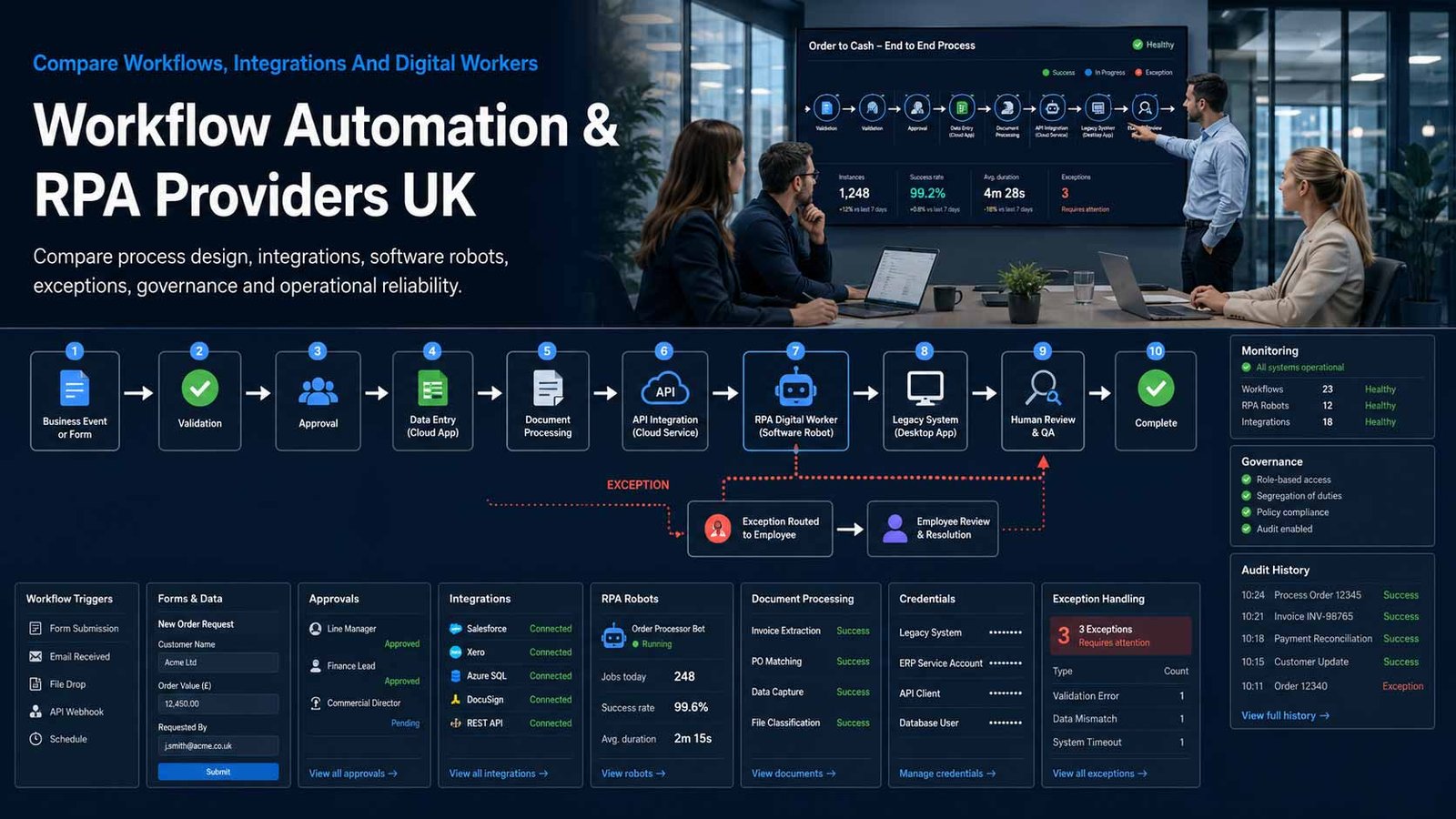
Compare business workflow automation in the UK by triggers, integrations, forms, approvals, RPA robots, desktop and cloud execution, credentials, exception handling, audit, testing, governance, monitoring, support and total cost. Evaluate providers against the same process volumes, systems and controls before automating finance, HR, customer service, operations or legacy application work.
Automate A Stable Process, Not Its Confusion
Automation can execute work consistently, but it also scales unclear rules, weak data and missing ownership when the process is not designed first.
- Define the trigger, outcome, owner, rules, exceptions and evidence
- Prefer reliable APIs and native connectors before desktop imitation
- Keep human approval where judgement, authority or risk requires it
- Measure failures, rework, cycle time and value after deployment
Workflow automation executes a defined sequence of tasks, decisions, approvals and data movements across people and systems. Robotic process automation uses software robots to reproduce rule-based actions that a person would otherwise perform through an application’s user interface. API automation, integration, forms, document processing, business rules and human tasks can be combined with RPA where a complete process crosses modern and legacy systems.
The best technical method depends on the process. A cloud workflow may react to a form or database event and call supported application connectors. An unattended robot may process high-volume back-office transactions through an application without an API. An attended robot may assist an employee during a customer interaction. A governed orchestration layer may coordinate all three.
This page does not compare generic project-management software. Project tools organise tasks, milestones and delivery work for people; automation platforms execute predefined actions and move transactions between systems. It also does not replace the separate Business AI Solutions page: deterministic rules and robots remain the primary focus here, even when platforms offer document AI, copilots or agent features.
Choose The Right Automation Method For Each Process
Workflow, integration and RPA capabilities may sit in one platform, but they have different reliability, governance and operating requirements.
| Automation Model | What It Usually Does | Best-Fit Question |
|---|---|---|
| App-to-app workflow automation | Uses connectors, events, webhooks and APIs to move data or trigger actions between cloud applications | Are the required applications and actions supported natively, and what happens when a connector changes? |
| Human approval workflow | Routes requests, forms, documents and decisions to authorised people with reminders, escalation and audit history | Can the platform represent delegation, absence, segregation of duties, rejection, rework and evidence without custom work? |
| Unattended RPA | Runs software robots on scheduled or queued work without a user present, often through desktop or browser interfaces | How are robot machines, credentials, queues, concurrency, application changes, failures and recovery controlled? |
| Attended RPA | Assists an employee in real time by collecting data, navigating systems or completing repetitive screen actions | Does the automation improve the user’s work without blocking the desktop, exposing credentials or creating hard-to-support variations? |
| Document and email automation | Classifies documents, extracts fields, validates information and routes exceptions into a wider workflow | What accuracy, confidence, human review, data handling and retraining evidence applies to the actual documents? |
| Process orchestration | Coordinates people, APIs, applications, robots, documents and decisions across an end-to-end business outcome | Can the platform maintain state, deadlines, compensation, visibility and ownership when one component fails? |
| Desktop and legacy application bridge | Uses screen, selector, terminal or application-object interactions where supported APIs are unavailable | How resilient is the automation to interface, browser, resolution, version and timing changes? |
| Managed automation service | A specialist provider discovers, builds, monitors and maintains automations under an agreed operating model | Who owns process decisions, source code, credentials, documentation, licences, change approval and the ability to transfer service? |
Eight Areas That Determine Workflow Automation And RPA Fit
Use the same process and operational criteria for every provider so connector counts, AI labels and fast demonstrations do not hide reliability or governance gaps.
Comparison Criterion
Process Fit, Discovery And Prioritisation
Compare process mapping, task or process mining, opportunity assessment, volume capture, exception analysis and benefit tracking. The platform or provider should identify processes that are stable, rules-based and valuable rather than automating every visible manual task.
Comparison Criterion
Connectors, APIs And Data Handling
Review native connectors, custom connectors, webhooks, REST, SOAP, databases, files, email, queues, on-premises gateways and data transformation. Confirm limits, authentication, retries, schema changes, pagination, rate limits and the system of record for each data element.
Comparison Criterion
Desktop And Browser RPA
Assess attended and unattended robots, selectors, computer vision, Citrix or virtual desktop support, terminal interaction, browser extensions, machine templates, session control and application testing. Require a maintenance plan for interface and version changes.
Comparison Criterion
Forms, Human Tasks And Business Rules
Compare forms, approvals, queues, assignment, delegation, escalation, service deadlines, decision tables, rework, comments, attachments and mobile actions. Human intervention should be designed into the process rather than treated as an unexpected automation failure.
Comparison Criterion
Credentials, Identity And Access
Review service accounts, robot identities, vaults, managed credentials, multifactor authentication, certificate or token use, delegated access, least privilege, session isolation and administrator roles. Avoid shared personal accounts and undocumented bypasses.
Comparison Criterion
Testing, Exceptions And Operational Resilience
Assess development, test and production separation, source control, reusable components, automated testing, exception taxonomy, retries, compensation, checkpoints, idempotency, queues, monitoring, failover and disaster recovery. A fast demo is not evidence of reliable production operation.
Comparison Criterion
Governance, Audit And Change Control
Compare role-based access, environment strategy, approval gates, maker controls, code review, solution inventories, dependency tracking, audit logs, data policies, release management and centre-of-excellence support. Governance should enable safe delivery without hiding unowned citizen automations.
Comparison Criterion
Analytics, Support And Lifecycle Cost
Review run history, success, duration, queue, capacity, value, alerts, root-cause evidence, licences, infrastructure, support and implementation services. Compare build and ongoing change cost, not only the first automation or advertised user price.
Measures To Define Before An Automation Contract Is Signed
Translate efficient, scalable and intelligent into measurable processing, exception, control and value outcomes.
| Measure | What It Should Define | Evidence To Request | Common Weakness |
|---|---|---|---|
| Automation success rate | The proportion of initiated transactions completed correctly without unplanned human repair | Started, completed, business-rejected, technical-failed, retried and manually resolved outcomes | A retried transaction is counted as successful while customer delay and manual effort remain hidden |
| Straight-through processing | How much eligible work completes without human touch while preserving required approvals | Eligible population, automated completion, planned review, exception and exclusion reasons | The denominator excludes difficult cases and overstates the automated percentage |
| Cycle-time improvement | Elapsed time from valid trigger to accepted business outcome | Baseline, automated duration, waiting time, human queue, percentile and peak-volume result | Robot processing time is reported while approval and exception queues are ignored |
| Exception and rework rate | How often business rules, data quality, application errors or design gaps require correction | Exception type, owner, age, cause, resolution, recurrence and improvement action | All exceptions are grouped together and the process owner cannot identify preventable causes |
| Robot and workflow availability | Whether required execution capacity, machines, gateways, queues and services remain available | Scheduled hours, capacity, outage, degraded service, queued work, recovery and dependency | Platform uptime is used even though the customer gateway or robot machines were unavailable |
| Change failure rate | How often releases or source-system changes break or degrade automations | Release, test coverage, production defects, rollback, affected transactions and root cause | Teams repair selectors in production without recording change-related failure |
| Credential and access compliance | Whether bots and workflows use approved identities and least-privilege access | Robot accounts, owner, vault, entitlement, review, failed login and emergency exception | Bots continue using former employee accounts because access ownership was never formalised |
| Human decision performance | Whether approvals and exception decisions occur within the process service target | Assignment, due time, delegation, escalation, decision, rework and authorised-role evidence | Automation is blamed for slow completion when human tasks remain unowned |
| Value realised | The verified financial or service benefit after licences, support, exceptions and internal effort | Baseline labour, avoided work, quality, speed, cost, run volume and finance-approved assumptions | Projected hours are treated as cash savings without workload or staffing change |
| Automation health and ownership | Whether every live automation has an accountable process and technical owner, documentation and recovery plan | Inventory, owner, criticality, dependencies, last test, support, review and retirement status | Unowned automations continue running until an application or employee change causes failure |
Workflow Automation And RPA Providers UK Businesses Can Consider
Shortlist platforms whose automation method, application coverage, governance and commercial model fit the processes. Confirm current editions, capacity and pricing directly before award.
Provider Profile
Microsoft Power Automate
Microsoft’s cloud and desktop automation platform combines cloud flows, approvals, connectors, desktop flows and attended or unattended RPA within the Power Platform ecosystem. Include it where Microsoft 365, Dynamics, Teams, SharePoint, Dataverse or Windows are central. Confirm Premium, Process or Hosted Process licensing, connector tiers, action capacity, hosted machines, gateway requirements, environment governance and the support needed beyond entitlements already bundled with Microsoft licences.
Review official Power Automate informationProvider Profile
UiPath
Enterprise automation platform spanning process discovery, workflow orchestration, attended and unattended robots, document processing, testing, integration and agentic capabilities. Include UiPath where complex desktop automation, central robot operations, a broad automation programme or legacy application coverage are priorities. Confirm the exact platform modules, user and robot roles, cloud or self-managed deployment, infrastructure, document and AI consumption, implementation partner, centre-of-excellence effort and ongoing support.
Review official UiPath platform informationProvider Profile
Automation Anywhere
Cloud-native enterprise automation platform combining RPA, orchestration, document automation and newer agentic process-automation capabilities. Include it where unattended automation, browser-based development and enterprise bot governance matter. Confirm Automation 360 or current platform packaging, cloud and on-premises options, bot runner capacity, workspaces, credentials, document processing, agent components, regional service availability, implementation skills and migration from older Automation Anywhere versions.
Review official Automation Anywhere productsProvider Profile
SS&C Blue Prism
Enterprise intelligent-automation platform with digital workers, process intelligence, orchestration, document automation and governance capabilities. Include Blue Prism where controlled, centrally managed RPA and established enterprise automation operating models are important. Confirm the precise Blue Prism products proposed, cloud or customer-managed architecture, runtime capacity, development roles, control-room operations, process and document modules, implementation partner, upgrade path and the operational resource required to maintain resilient automations.
Review official Blue Prism productsProvider Profile
Workato
Enterprise orchestration and integration platform designed to connect applications, data, workflows, APIs, people and AI-enabled processes through governed automations. Include Workato where reliable app-to-app integration and end-to-end orchestration are more important than extensive desktop RPA. Confirm available connectors, on-premises agent needs, recipe and task model, workspace and environment governance, API management, data handling, enterprise support and whether legacy UI automation requires another product.
Review official Workato platform informationProvider Profile
Nintex
Process-automation platform covering workflow automation, digital forms, document generation, process management, RPA and cloud or on-premises orchestration options. Include Nintex where approval-heavy processes, documents, forms and business-led workflow design matter. Confirm the exact Nintex cloud, K2, RPA and document products, user and workflow licensing, connector coverage, on-premises dependencies, environment management, AI features, migration from legacy Nintex products and partner capability.
Review official Nintex platform informationProvider Profile
Zapier
No-code workflow and AI-orchestration platform with a broad application-integration catalogue, multi-step workflows, forms, tables and enterprise administration options. Include Zapier where SMEs need rapid cloud app-to-app automation without a large developer team. Confirm task consumption, polling frequency, premium applications, paths and branching, tables, agents, enterprise controls, data handling, support and whether high-volume, stateful or legacy desktop processes exceed the platform’s intended design.
Review official Zapier informationProvider Profile
Make
Visual-first no-code automation platform for designing multi-step scenarios across cloud applications, data services and newer AI or agent workflows. Include Make where transparent visual logic, data transformation and flexible SME integration are priorities. Confirm operation consumption, execution frequency, error handling, data-store use, team and enterprise governance, on-premises connectivity, scenario ownership, support and whether the process needs human case management or desktop RPA beyond Make’s integration model.
Review official Make product informationWhat Changes Workflow Automation And RPA Cost
The public licence price rarely includes process redesign, robot infrastructure, implementation, exception handling and ongoing maintenance.
| Cost Driver | Why It Changes Spend | What A Comparable Proposal Should Show |
|---|---|---|
| User, maker and developer licences | Platforms may charge for people who build, run, approve or administer workflows, with different rights by role | Named roles, quantities, included capabilities, minimums, non-production users and three-year growth |
| Robot and process capacity | Attended, unattended, hosted and concurrent robots or process licences may use different measures | Required sessions, schedules, queues, peak volume, machines, capacity headroom and failover |
| Tasks, actions or operations | App-to-app platforms often meter each successful action, operation or task, making process design and volume important | Actions per transaction, daily and seasonal volume, retries, loops, polling, allowance and overage |
| Connectors and premium applications | Databases, ERP, CRM, custom APIs, on-premises gateways and premium applications may require higher plans or add-ons | Every system, connector tier, API, gateway, custom component, volume limit and support owner |
| Development and test environments | Controlled delivery may require separate environments, runner machines, virtual desktops, databases, gateways and source-control tooling | Development, test, production, disaster recovery, infrastructure, licences, access and refresh process |
| Process discovery and implementation | Mapping, redesign, rules, data cleanup, exception design, build, test and deployment usually exceed the software subscription | Discovery, process definition, build, integrations, acceptance, documentation, customer tasks and exclusions |
| Document, AI and agent consumption | OCR, document extraction, generative AI, process mining and agent capabilities may use credits, pages, tokens or separate licences | Use case, volume, model, confidence, human review, consumption, limits and fallback |
| Managed service and support | Monitoring, incident handling, application-change repair, bot operations, optimisation and service reporting may be separately charged | Service hours, included automations, incident targets, change allowance, release support and chargeable work |
| Maintenance and process change | Source-system releases, browser updates, changed forms, new rules and volume growth create recurring automation work | Assumed releases, maintenance hours, regression tests, minor changes, major changes and ownership |
| Contract reduction and exit | Automation ownership, source files, credentials, infrastructure, environment transfer and licence commitments affect switching | Ownership, export, documentation, dependencies, transition assistance, notice, deletion and final support |
How The Process Estate Changes The Shortlist
The right platform depends on application architecture, transaction volume, desktop dependency, internal skills and how broadly automation will be governed.
Microsoft 365 And Dynamics Environment
Prioritise Power Automate connectors, approvals, Dataverse, Windows desktop flows, gateways, environment strategy, existing licence rights and governance that prevents unowned personal flows.
SME Connecting Cloud Applications
Prioritise rapid app connectors, visual design, webhooks, clear usage pricing, error handling, shared ownership, documented workflows and escalation when a connector or API changes.
Legacy Back-Office Operations
Prioritise resilient desktop RPA, unattended queues, credential vaulting, application support, virtual desktop compatibility, regression testing, exception workbenches and managed robot operations.
Enterprise Automation Programme
Prioritise process discovery, reusable components, orchestration, separation of duties, source control, testing, multi-environment deployment, operational dashboards, centre-of-excellence controls and partner capacity.
How To Compare Automation Proposals
Give every provider the same process definition, transaction volumes, applications, interfaces, credentials, decisions, exceptions, service targets, audit requirements, environments and support assumptions. Require the response to show the preferred automation method and why desktop RPA is used where an API or native integration is unavailable.
- The process outcome, owner, rules and exception paths are explicit
- Every system and connector maps to a supported integration method
- Robot, action, AI and infrastructure capacity is normalised
- Credentials, approvals, logs and segregation are demonstrated
- Regression testing and source-system change are included
- Source code, documentation and transition are covered at exit
Make Every Provider Automate The Same Exceptions
A polished happy-path demonstration proves little. Give each finalist valid, duplicate, incomplete, rejected, unavailable-system and changed-rule transactions.
Compare how the platform pauses, retries, compensates, escalates and preserves evidence before comparing design speed.
Six Questions To Put To Every Automation Provider
The answers expose fragile design, hidden consumption, weak credential controls and difficult service transfer before the agreement starts.
Why Is This Automation Method Appropriate?
Ask why the provider chose API, connector, workflow, attended RPA, unattended RPA or document automation and what would make that choice change.
How Are Exceptions And Partial Failures Controlled?
Request duplicate prevention, validation, retries, queue handling, compensation, human review, business rejection, technical failure and reconciliation.
How Are Credentials And Privileged Actions Protected?
Confirm robot identities, vaults, least privilege, multifactor limitations, approvals, service accounts, token renewal, administrator roles and emergency access.
What Capacity And Licences Are Required?
Map users, makers, robots, processes, machines, tasks, actions, documents, AI consumption, environments and peak volumes to named commercial units.
Who Maintains Automations When Systems Change?
Confirm source-system release monitoring, regression tests, incident ownership, minor changes, redesign, support hours, documentation and service charges.
What Can We Take With Us At Exit?
Confirm source code, packages, workflows, credentials, documentation, test evidence, infrastructure, dependencies, exports, licence transfer and transition assistance.
A Seven-Stage Workflow Automation And RPA Evaluation
Move from verified process evidence to controlled production operation rather than buying bots and searching for work afterwards.
- Inventory manual and automated processes, transaction volumes, systems, data, owners, service targets, failures, controls and current workarounds.
- Select opportunities using stability, rules, value, exception rate, data quality, technical feasibility and change frequency rather than effort alone.
- Redesign the process with clear triggers, outcomes, rules, human decisions, reconciliation, audit evidence and recovery before choosing a tool.
- Issue one written brief and obtain comparable architecture, licence, implementation, governance, support and three-year commercial responses.
- Run a production-like pilot using representative volumes, users, systems, exceptions, credentials, releases, failure conditions and performance measures.
- Deploy in controlled stages with environments, source control, approval, regression testing, monitoring, runbooks, rollback and process-owner acceptance.
- Operate through an automation inventory, value review, incident and exception analysis, credential review, release testing, optimisation and retirement governance.
Workflow Automation / RPA Comparison Checklist
Use this table before approving an automation platform, implementation programme or managed bot service.
| No. | Requirement | Evidence To Obtain Before Award | Confirmed |
|---|---|---|---|
| 01 | Process outcome, owner and baseline agreed | Trigger, result, volume, cycle time, cost, quality, owner, customers and current evidence | |
| 02 | Process stability and automation suitability assessed | Rules, variants, exceptions, data quality, system change, judgement and exclusion reasons | |
| 03 | Preferred integration method justified | API, connector, event, file, database, workflow, attended robot or unattended robot rationale | |
| 04 | End-to-end process and exception model approved | Steps, states, decisions, approvals, deadlines, retries, rejection, reconciliation and recovery | |
| 05 | System and connector coverage demonstrated | Applications, versions, APIs, gateways, browsers, virtual desktops, rate limits and ownership | |
| 06 | Credential and access design accepted | Robot identities, vault, least privilege, tokens, service accounts, approval and emergency process | |
| 07 | Development, test and production separated | Environments, data, roles, source control, deployment, configuration and rollback | |
| 08 | Testing and application-change process agreed | Unit, integration, volume, exception, security, regression, acceptance and release monitoring | |
| 09 | Monitoring and operational support demonstrated | Run history, alerts, queues, failures, reprocessing, service hours, escalation and cause review | |
| 10 | Human tasks and segregation tested | Assignment, delegation, absence, approval authority, rework, audit and service targets | |
| 11 | Data protection and retention mapped | Personal data, purpose, minimisation, locations, logs, access, retention, deletion and DPIA decision | |
| 12 | Licence and capacity model normalised | Users, makers, bots, processes, machines, actions, documents, AI, peak volume and growth | |
| 13 | Implementation and managed service scoped | Discovery, redesign, build, infrastructure, integration, documentation, training and customer tasks | |
| 14 | Three-year value and total cost approved | Licences, implementation, infrastructure, support, maintenance, exceptions, internal effort and benefit | |
| 15 | Ownership, transfer and retirement agreed | Source, packages, credentials, documentation, runbooks, data, assistance, notice and deletion |
Common Workflow Automation And RPA Buying Mistakes
Most avoidable failures begin with poor process selection, fragile desktop design or a value case that excludes exceptions and maintenance.
| Mistake | Why It Creates Risk | Better Control |
|---|---|---|
| Automating an unclear process | The platform executes conflicting rules and missing ownership more quickly | Stabilise and redesign the process before building |
| Choosing RPA where a supported API exists | Interface automation is usually more fragile and harder to maintain | Prefer native integration and justify desktop robots |
| Buying project-management software for execution automation | Task boards can assign work but may not perform transactions across systems | Compare tools designed to execute workflows, integrations and robots |
| Ignoring exception volume | Manual repair remains high and projected value is not realised | Measure exceptions and design human handling |
| Using personal accounts for bots | Access breaks when employees move and privileged actions become hard to audit | Use owned robot identities and managed credentials |
| Testing only the happy path | Duplicate, incomplete and unavailable-system cases fail after launch | Test business and technical exceptions at production-like volume |
| Allowing uncontrolled citizen automation | Important flows become unowned, duplicated and dependent on individual employees | Use environments, ownership, inventories and governance |
| Treating projected hours as cash savings | Time released does not automatically reduce cost or improve service | Define measurable operational outcomes and finance-approved value |
| Ignoring source-system releases | Browser, application and field changes break automations unexpectedly | Monitor releases and run regression tests |
| Deferring ownership and exit | The business cannot maintain or transfer packages, credentials and documentation | Secure complete technical and operational ownership before award |
Frequently Asked Questions
Answers to common questions from UK businesses comparing workflow, integration and robotic process-automation platforms.
What Is Workflow Automation?
Workflow automation uses software to execute a defined sequence of tasks, rules, approvals and data movements with reduced manual intervention. It may connect applications through APIs, route work to people, update records, generate documents, send notifications and preserve process evidence.
What Is Robotic Process Automation?
Robotic process automation uses software robots to perform rule-based computer actions that a person would otherwise complete, such as opening applications, copying data, entering transactions and downloading reports. RPA is especially relevant when a usable API or native integration is unavailable.
What Is The Difference Between Workflow Automation And RPA?
Workflow automation coordinates a process across applications, data and people. RPA imitates user actions through desktop or browser interfaces. A complete process may use both: workflow orchestration for triggers, decisions and state, and robots for legacy-system steps that cannot be reached through APIs.
Is Workflow Automation The Same As Project Management Software?
No. Project-management software organises human work through tasks, owners, dates and milestones. Workflow automation executes predefined actions, decisions and data movements. Some products overlap, but businesses seeking transaction automation should compare integration, robot, exception and governance capabilities rather than boards alone.
Which Business Processes Are Suitable For RPA?
Good candidates are repetitive, rules-based, sufficiently stable, high-volume and supported by consistent digital data. Examples include data transfer, reconciliations, report preparation and legacy application updates. Processes with frequent judgement, poor data or rapidly changing interfaces need redesign or another method.
Should A Business Use APIs Or Desktop Robots?
Use a reliable supported API or native connector where practical because it is normally less dependent on visual interfaces and user sessions. Use desktop RPA where required systems lack suitable integration. The provider should justify the method and document maintenance, testing and fallback.
How Much Does Workflow Automation Cost?
Cost may include users, makers, robots, processes, tasks, actions, machines, connectors, documents, AI consumption, implementation, support and maintenance. Compare three-year cost per successful transaction or process outcome using real volume, retries, exceptions and source-system change.
How Should Automation Credentials Be Managed?
Use owned robot or service identities, least privilege and an approved credential vault or token process. Avoid personal employee accounts and embedded passwords. Define multifactor-authentication constraints, access reviews, token renewal, emergency access, logging and prompt removal when an automation retires.
How Should Workflow Automations Be Tested?
Test normal transactions, duplicates, missing data, rejected decisions, unavailable systems, slow responses, permission failures, changed interfaces, peak volume, retries, recovery and reconciliation. Separate development, test and production, maintain source control and repeat regression tests after relevant system changes.
How Should A UK Business Compare Automation Providers?
Give every provider the same process, systems, volumes, rules, exceptions, credentials, service targets and audit requirements. Compare the proposed method, configured exception demonstration, required licences, implementation, governance, three-year cost, ownership and exit—not only connector counts or a fast happy-path demo.
Provider Information And UK Automation-Governance Resources
Reviewed by Bhav Giva, Founder & Lead Analyst at CompareServices.co.uk, on 16 July 2026.
Use official provider documentation to confirm current platform names, licences, capacity, connectors, deployment options, data locations, support and contractual terms. Automation and AI packaging can change during a procurement cycle.
- ICO — Data Protection Impact Assessments
- ICO — Data Minimisation
- NCSC — Logging For Security Purposes
- NCSC — Using SaaS Securely
- Microsoft — Power Automate
- UiPath — Automation Platform
- Automation Anywhere — Products
- SS&C Blue Prism — Products
- Workato — Enterprise Orchestration
- Nintex — Process Automation
- Zapier — Workflow Automation
- Make — Visual Workflow Automation