
Compare IT Asset Management / MDM Providers UK (2026)
Compare Device Inventory, Enrolment, Policy, Applications, Compliance And Retirement
Compare mobile device management for UK businesses by device discovery, ownership records, automated enrolment, configuration, application deployment, compliance, remote actions, patch and operating-system controls, BYOD separation, reporting, integrations, retirement and total cost. Evaluate providers against the same Windows, Apple, Android, ChromeOS and rugged-device requirements before replacing spreadsheets or fragmented management tools.
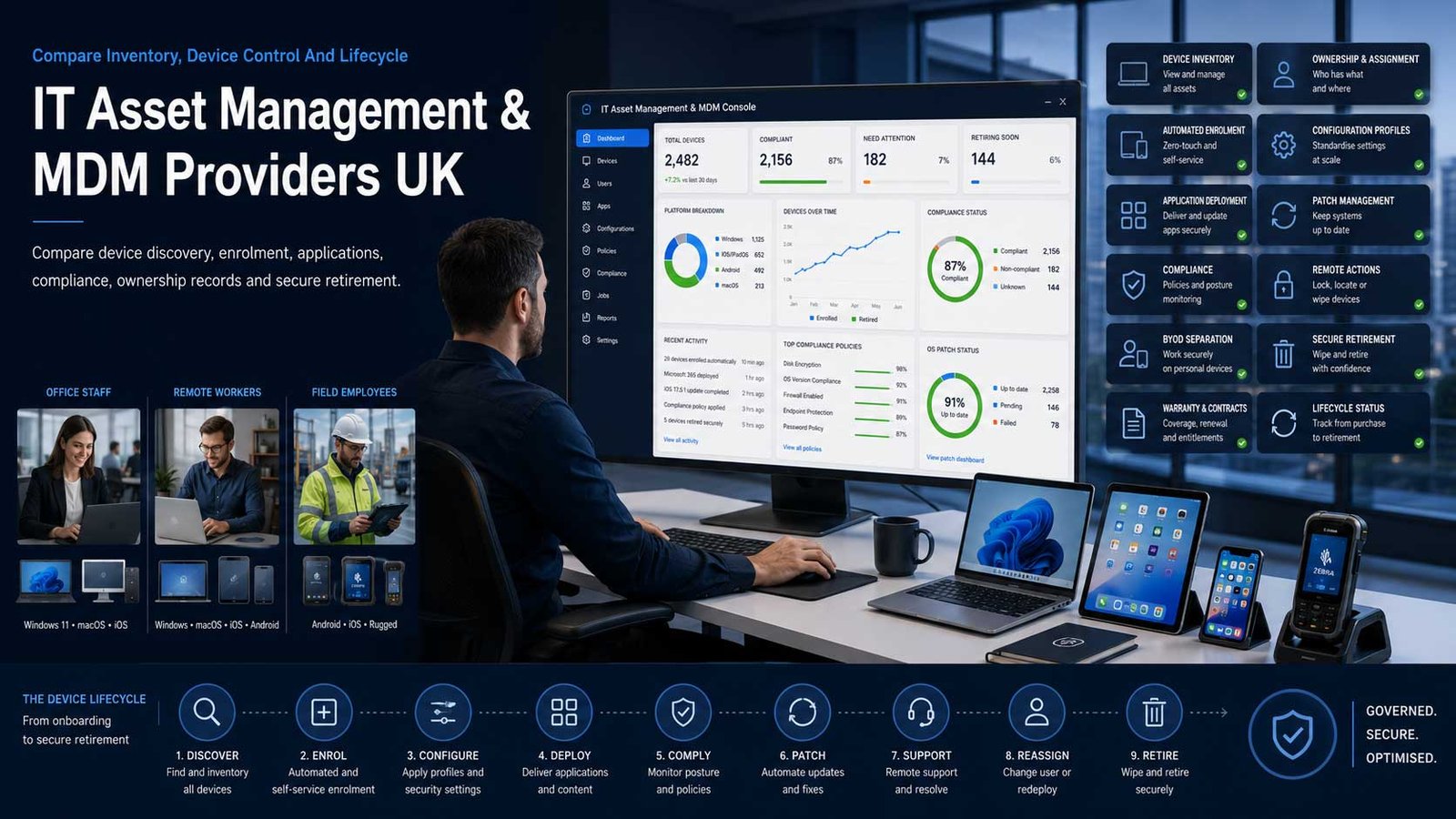
ITAM And MDM Must Describe The Same Live Estate
An inventory record without control becomes stale, while a management console without commercial and ownership data cannot support lifecycle decisions.
- Define the authoritative device, user, owner, location and lifecycle records
- Enrol supported devices through repeatable, low-touch processes
- Apply policy by ownership, role, platform and business risk
- Retire devices with access removal, data handling and evidence
Mobile device management controls how business devices are enrolled, configured, updated, monitored and retired. Unified endpoint management extends the same approach across smartphones, tablets, laptops, desktops, rugged devices and other supported endpoints. IT asset management adds ownership, financial, contractual, warranty, assignment and lifecycle context.
The right system should answer operational questions without manual reconciliation: which device belongs to which user, whether it is managed, what policy applies, which applications are installed, whether it is up to date, when support ends and what must happen when the user or device leaves the organisation.
This page does not compare endpoint-security-only products or generic inventory databases. Antivirus, endpoint detection and response, managed detection and wider security operations belong in the Cyber Security category. Simple barcode or stock systems that cannot enrol, configure, monitor and remotely act on devices do not meet this page’s primary MDM and lifecycle-control intent.
Choose The Device-Control Model Before The Product
MDM, UEM, application management and ITAM overlap, but they solve different parts of the device lifecycle.
| Management Model | What It Usually Covers | Best-Fit Question |
|---|---|---|
| Mobile device management | Enrols and controls smartphones and tablets through operating-system management frameworks | Does the platform cover the required iOS, iPadOS, Android and ownership models without forcing complete device control for every user? |
| Unified endpoint management | Extends management across mobile, Windows, macOS, ChromeOS, Linux, rugged and selected specialist devices | Are the required operating systems equally mature, or are important controls available only on the vendor’s strongest platform? |
| Apple-focused management | Uses Apple Business Manager, automated enrolment and Apple-native controls for Mac, iPhone, iPad and other Apple devices | Does the organisation need Apple-first depth, or would a mixed-platform tool reduce duplicated administration? |
| Windows and Microsoft-centred management | Connects Windows provisioning, Microsoft identity, applications, policy and access through the Microsoft ecosystem | Are non-Windows devices and non-Microsoft identities adequately supported, and which licences are required? |
| Frontline and rugged-device management | Controls handheld terminals, scanners, kiosks, shared devices, AOSP hardware and purpose-built mobile equipment | Can the provider manage the exact manufacturer, operating mode, remote-control need and unreliable-network conditions? |
| Application management without full enrolment | Protects and configures supported business applications on personally owned or lightly managed devices | Which company data and app controls remain possible without managing the whole device, and how are privacy expectations communicated? |
| Integrated endpoint operations and ITAM | Combines device management with software deployment, patching, remote support, hardware inventory and licence information | Does the wider platform improve one authoritative record, or create a complex suite with overlapping modules and ownership? |
| Managed MDM service | A specialist partner configures, monitors and administers the chosen platform under an agreed service boundary | Which policy decisions remain with the customer, how are changes approved and how quickly can the business recover administrator control? |
Eight Areas That Determine ITAM And MDM Fit
Use the same lifecycle criteria for every provider so device counts and security labels do not hide weak enrolment, ownership or retirement controls.
Comparison Criterion
Device Discovery And Authoritative Inventory
Compare automated discovery, enrolment records, serials, hardware, operating systems, installed software, user, owner, location, warranty, purchase, contract and lifecycle fields. Require reconciliation with identity, procurement, HR, ITSM and DaaS records so inactive and duplicate devices are visible.
Comparison Criterion
Automated Enrolment And Provisioning
Review Windows Autopilot, Apple Business Manager, Android Enterprise, Chrome Enterprise, OEM enrolment, QR, token and zero-touch options. Confirm user-driven versus technician-driven setup, shared devices, re-enrolment, lost enrolment tokens and what happens when a supplier or tenant changes.
Comparison Criterion
Configuration, Restrictions And Connectivity
Assess password or passcode, encryption, Wi-Fi, VPN, certificates, email, browser, camera, storage, peripherals, update and kiosk controls. Policies should be modular, versioned and assigned by platform, ownership, role and risk without creating conflicting profiles.
Comparison Criterion
Application And Software Lifecycle
Compare managed application catalogues, required and optional apps, app configuration, licensing, updates, removal, application protection and self-service. Review Windows, Apple and mobile software separately because installation, patch and rollback capabilities differ.
Comparison Criterion
Compliance, Access And Remote Actions
Assess device-health rules, compliance states, conditional access, lock, locate, lost mode, wipe, selective wipe, passcode reset, quarantine and remote assistance. Confirm platform limitations, privacy notices, approvals and how stale or offline devices are handled.
Comparison Criterion
Patch, Operating-System And Support Control
Review operating-system update rings, deadlines, deferrals, restart behaviour, firmware, third-party patching, remote control, diagnostics, scripts and remediation. Keep the focus on management evidence rather than comparing standalone endpoint-security products.
Comparison Criterion
BYOD, Shared And Specialist Devices
Compare personal-device separation, work profiles, application-only management, shared-device sign-in, kiosk, frontline, rugged, AOSP, wearable and IoT support. Require clear privacy boundaries, ownership records and exit actions for every model.
Comparison Criterion
Reporting, Integrations And Administration
Review dashboards, data freshness, APIs, exports, audit history, role-based administration, multi-tenancy, notifications, automation and connectors to identity, ITSM, HR, procurement, DaaS and security tools. Confirm who owns policy design and ongoing administration.
Measures To Define Before An MDM Contract Is Signed
Translate visibility, control and compliance into measurable enrolment, inventory, policy and retirement outcomes.
| Measure | What It Should Define | Evidence To Request | Common Weakness |
|---|---|---|---|
| Inventory coverage | The proportion of approved devices represented by a current authoritative record | HR, procurement, network, identity and MDM reconciliation with documented exceptions | The console reports only enrolled devices and ignores equipment that was never enrolled |
| Enrolment completion | Whether new and reset devices complete the approved management process before productive use | Request, assignment, enrolment, policy, application, compliance and user-acceptance timestamps | A device is recorded as deployed even though required profiles or applications failed |
| Record accuracy | Whether serial, user, owner, location, status, warranty and contract information match reality | Sample audit, duplicate rate, unmatched users, stale assignments and correction owner | Technical inventory is current but commercial ownership and user assignment are not |
| Policy compliance | Whether devices meet the defined configuration, encryption, update and access requirements | Policy version, applicable population, compliant, grace, excluded and remediation states | One compliance percentage combines platforms with materially different controls |
| Operating-system currency | Whether supported devices remain within approved update and end-of-support rules | Version distribution, deadline, deferral, unsupported devices, exception and replacement plan | Updates are technically available but repeatedly postponed without owner or deadline |
| Application deployment success | Whether required software reaches the correct devices and remains current | Assigned, installed, failed, pending, removed, licence and rollback evidence | The system records assignment rather than successful installation |
| Lost and leaver device closure | Whether access, applications, data, ownership and asset records are resolved promptly | Notification, lock or wipe, account action, collection, sanitisation, record closure and exception age | The user account is disabled while the device remains active and assigned |
| Remote-action reliability | Whether lock, wipe, reset, remote support and remediation commands complete on representative devices | Command status, device connectivity, elapsed time, platform limitation and escalation | The business assumes remote wipe will work on devices that have not checked in for months |
| Administrator and audit control | Whether privileged access, policy changes and remote actions remain authorised and traceable | Role list, strong authentication, access review, change log, approvals and emergency access | Too many administrators can wipe or reconfigure the whole estate |
| Cost per actively managed device | The complete platform, implementation, integration, support and administration cost for devices under reliable control | Licence allocation, inactive records, module costs, service hours and internal workload | A low per-device licence is offset by duplicate tools and manual reconciliation |
IT Asset Management And MDM Providers UK Businesses Can Consider
Shortlist platforms whose operating-system depth, lifecycle records and administration model fit the estate. Confirm current editions, supported devices and pricing directly before award.
Provider Profile
Microsoft Intune
Cloud-based endpoint-management service for enrolling, configuring, updating and controlling devices and applications across Microsoft and supported non-Microsoft platforms. Include Intune where Microsoft 365, Entra identity, Windows Autopilot and conditional access are central. Confirm the required Microsoft licence, Apple and Android depth, third-party patching, remote support, device-only versus user licensing, reporting and the operational skill needed to manage policies safely.
Review official Intune informationProvider Profile
Jamf Pro
Apple-focused management platform for Mac, iPhone, iPad, Apple TV and other supported Apple devices, with automated enrolment, configuration, application lifecycle and detailed inventory. Include Jamf Pro where Apple fleet depth and Apple-native control matter. Confirm minimum scale, Jamf Now versus Pro, identity and security integrations, Windows or Android requirements, managed-service support and whether a separate ITAM record remains necessary.
Review official Jamf Pro informationProvider Profile
Kandji
Apple device-management and automation platform supporting macOS, iOS, iPadOS, tvOS and visionOS through Apple management frameworks and a macOS agent. Include Kandji where an Apple-first organisation values automated configuration, compliance and lifecycle workflows. Confirm supported operating-system versions, pricing structure, migration approach, application catalogue, endpoint-security modules, administrator roles, API access and asset-data integration.
Review official Kandji platform informationProvider Profile
Omnissa Workspace ONE UEM
Cloud-native unified endpoint-management platform for desktop, mobile, rugged, server and specialist devices across Windows, macOS, iOS, Android, Linux and ChromeOS. Include Workspace ONE where mixed estates, frontline devices or complex organisational structures require broad control. Confirm current Omnissa packaging, required add-ons, Intelligence and Assist options, server-management scope, deployment model, support and migration from legacy VMware-era contracts.
Review official Workspace ONE informationProvider Profile
IBM MaaS360
Unified endpoint-management platform for mobile and desktop devices with enrolment, application management, policy, analytics and optional native security capabilities. Include MaaS360 where a business wants cross-platform management, mobile-first administration or a smaller-business entry route. Confirm Fast Start versus wider MaaS360 editions, device support, security-module separation, service-provider availability, reporting, integration, support and total per-user or per-device licensing.
Review official MaaS360 informationProvider Profile
ManageEngine Endpoint Central
Unified endpoint-management platform combining desktop, laptop, server and mobile management with software deployment, patching, remote support and integrated asset-management functions. Include Endpoint Central where operational management and IT asset evidence need one platform. Confirm cloud or on-premises deployment, required editions and add-ons, mobile depth, third-party patching, remote support, asset and software-licence features, database administration and implementation capacity.
Review official Endpoint Central informationProvider Profile
Hexnode UEM
Cloud-based unified endpoint-management platform supporting mobile, desktop, kiosk, rugged, IoT and specialist devices across several operating systems. Include Hexnode where a smaller or distributed business needs broad device coverage and straightforward cloud administration. Confirm plan-specific capabilities, operating-system depth, remote control, kiosk and rugged support, integrations, device or user licensing, local support, data location and the boundary from newer security modules.
Review official Hexnode informationProvider Profile
SOTI MobiControl
Enterprise mobility-management platform designed for smartphones, tablets, rugged devices, handhelds, vehicle-mounted computers and other mobile-first operational equipment. Include SOTI where frontline, logistics, retail, field-service or purpose-built device support is more important than office-laptop management. Confirm supported manufacturers, remote-control capabilities, offline and unreliable-network behaviour, application deployment, licensing, implementation, support and integration with the wider SOTI platform.
Review official SOTI MobiControl informationWhat Changes IT Asset Management And MDM Cost
The advertised licence price is only one component. Edition dependencies, migration, application packaging, integrations and ongoing policy administration can materially change the budget.
| Cost Driver | Why It Changes Spend | What A Comparable Proposal Should Show |
|---|---|---|
| Device or user licensing | Some platforms licence per managed device, per user, per server or through a wider productivity or endpoint suite | Current users and devices, shared equipment, multiple devices per user, inactive records, servers, minimums and growth |
| Required edition and modules | Remote support, patching, analytics, application protection, privilege management, security, ITAM and service-provider features may require add-ons | Requirement-to-edition map showing every module, dependency and duplicated capability |
| Operating-system and device mix | Windows, Apple, Android, ChromeOS, Linux, rugged, kiosk and specialist-device support vary by provider and edition | Device population by platform, ownership, age, manufacturer, management mode and three-year change |
| Implementation and policy design | Tenant setup, enrolment, profiles, applications, compliance, roles, connectors and pilot testing require specialist effort | Discovery, configuration, documentation, pilot, acceptance, customer tasks and change-control scope |
| Migration from an existing MDM | Devices may need unenrolment, wipe, reset, user action, new tokens or staged re-enrolment depending on platform and ownership | Device-by-device migration path, downtime, data impact, user communication, coexistence and rollback |
| Integrations and authoritative records | Identity, HR, procurement, ITSM, DaaS, security, certificate and asset systems can add connectors and maintenance | System of record, fields, direction, frequency, API, middleware, reconciliation and failure ownership |
| Managed service and support | Policy administration, monitoring, application packaging, reporting, user support and vendor escalation may be separately charged | Included tasks, service hours, response, change allowance, named roles, reporting and chargeable work |
| Remote support and patching | Remote-control tools, third-party application patching, scripts and remediation may sit in premium plans | Supported platforms, licences, usage assumptions, privilege requirements, audit and service ownership |
| Training and ongoing administration | Device-management platforms change frequently and require operational ownership, testing and documentation | Administrator training, release review, test devices, policy owner, support capacity and improvement cadence |
| Contract change and exit | Annual commitment, licence reduction, data export, unenrolment, tenant transfer and device migration affect lifetime cost | Renewal basis, reduction rights, configuration export, API access, migration assistance and deletion process |
How The Device Estate Changes The Shortlist
The right platform depends on operating systems, ownership models, frontline requirements, existing identity services and the organisation’s ability to administer policy.
Microsoft-Centred SME
Prioritise Windows Autopilot, Microsoft identity, application deployment, update policy, conditional access, mobile application management and clear licensing within the existing Microsoft environment.
Apple-First Business
Prioritise Apple Business Manager, automated enrolment, macOS application and update control, FileVault evidence, Activation Lock handling, iPhone and iPad management, inventory depth and Apple specialist support.
Mixed Hybrid Workforce
Prioritise consistent ownership records, Windows, Apple and mobile coverage, BYOD separation, remote deployment, application management, compliance, remote support and integration with HR and ITSM.
Frontline Or Rugged Fleet
Prioritise manufacturer support, kiosk, shared sign-in, remote control, application distribution, location and network awareness, battery or health evidence and reliable management across intermittent connectivity.
How To Compare MDM Proposals
Give every provider the same device inventory, operating systems, ownership models, enrolment routes, applications, policies, compliance rules, remote actions, integrations, administrator roles and retirement scenarios. Require the response to separate core device management from security-only modules and generic asset databases.
- Every device type maps to a supported enrolment and management method
- Required controls are mapped to named editions and add-ons
- Migration includes device reset, re-enrolment and user effort
- Inventory and commercial records remain reconcilable and exportable
- Lost, BYOD, shared, leaver and retired-device scenarios are demonstrated
- Tenant transfer, unenrolment and configuration export are covered at exit
Make Every Provider Manage The Same Device Lifecycle
Ask each finalist to enrol the same representative Windows, Apple and mobile devices, apply policy, deploy an application, detect non-compliance, support the user, process a leaver and retire the device.
Compare device and administrator effort behind the result before comparing console design.
Six Questions To Put To Every MDM Provider
The answers expose platform gaps, add-on dependencies, weak asset ownership and difficult migration before the agreement starts.
Which Devices And Operating Systems Are Fully Supported?
Request a device matrix covering Windows, macOS, iOS, iPadOS, Android, ChromeOS, Linux, shared, rugged and personally owned equipment, with limitations.
How Will Devices Be Enrolled And Migrated?
Confirm zero-touch options, user actions, resets, tokens, coexistence, application impact, data handling, communication, failed enrolment and rollback.
Which Edition And Add-Ons Are Required?
Map inventory, application management, patching, remote support, analytics, conditional access, application protection and ITAM features to named licences.
Which System Holds The Authoritative Asset Record?
Define serial, user, owner, location, warranty, contract, lifecycle and status fields, then confirm integrations, reconciliation, exports and correction ownership.
How Are BYOD, Lost And Leaver Devices Handled?
Demonstrate privacy boundaries, selective wipe, lost mode, full wipe, offline devices, collection, access removal, sanitisation, evidence and exception handling.
What Happens When We Change Provider?
Confirm tenant and token ownership, configuration export, APIs, device unenrolment, re-enrolment, certificates, application licences, assistance, notice and data deletion.
A Seven-Stage ITAM And MDM Evaluation
Move from device and lifecycle evidence to controlled management rather than purchasing a licence and assuming every endpoint will become visible automatically.
- Inventory devices, users, owners, platforms, applications, contracts, warranties, current management, support status and known gaps.
- Define ownership models, enrolment, configuration, application, compliance, remote-action, patch, support, lifecycle and retirement requirements.
- Design the authoritative asset record and integrations across identity, HR, procurement, ITSM, DaaS, security and finance.
- Issue one written brief and obtain comparable edition, implementation, migration, managed-service and three-year commercial responses.
- Run a configured pilot across representative Windows, Apple, Android, BYOD, shared and specialist devices with measurable acceptance.
- Migrate in controlled waves with tokens, certificates, policies, applications, user communication, re-enrolment support, reconciliation and rollback.
- Operate with device and licence reviews, stale-record cleanup, policy testing, update governance, privileged-access review and retirement evidence.
IT Asset Management / MDM Comparison Checklist
Use this table before approving an endpoint-management platform, migration or managed administration service.
| No. | Requirement | Evidence To Obtain Before Award | Confirmed |
|---|---|---|---|
| 01 | Device estate and accountable owner agreed | Users, serials, ownership, platforms, locations, age, warranty, status and named service owner | |
| 02 | Authoritative IT asset record designed | Technical, user, commercial, warranty, contract, lifecycle and retirement fields with correction ownership | |
| 03 | Supported platform matrix accepted | Windows, Apple, Android, ChromeOS, Linux, rugged, kiosk, shared and personally owned device limitations | |
| 04 | Enrolment and provisioning routes tested | Autopilot, Apple, Android, Chrome, tokens, certificates, user flow, resets and failed-enrolment recovery | |
| 05 | Policy and compliance model approved | Ownership, role, platform, encryption, passcode, Wi-Fi, VPN, restrictions, updates and grace periods | |
| 06 | Application lifecycle demonstrated | Required, optional, configuration, licence, update, removal, self-service, failure and rollback | |
| 07 | Patch and operating-system rules accepted | Deadlines, deferrals, restart, supported versions, third-party applications, exceptions and reporting | |
| 08 | BYOD and privacy controls documented | Work profile or application management, user notice, selective wipe, support boundary and exit | |
| 09 | Lost, stolen and leaver workflows tested | Notification, lock, locate, wipe, access removal, offline handling, collection and evidence | |
| 10 | Remote support and administrator control tested | Remote actions, approvals, role-based access, strong authentication, audit and emergency access | |
| 11 | Integrations and reconciliation approved | Identity, HR, ITSM, procurement, DaaS, security, APIs, direction, frequency and failure handling | |
| 12 | Migration and coexistence plan priced | Current MDM, resets, re-enrolment, applications, certificates, users, communication, pilot and rollback | |
| 13 | Managed service and internal administration agreed | Policy ownership, service hours, changes, packaging, monitoring, reporting, training and escalation | |
| 14 | Three-year total cost compared | Licences, add-ons, implementation, migration, integrations, managed service, internal effort and growth | |
| 15 | Exit, unenrolment and data handling agreed | Configuration export, tokens, tenant transfer, APIs, device migration, certificates, notice and deletion |
Common IT Asset Management And MDM Buying Mistakes
Most avoidable problems begin with incomplete inventory, assumed platform parity or a migration plan that excludes the physical devices and users.
| Mistake | Why It Creates Risk | Better Control |
|---|---|---|
| Buying an endpoint-security product as the asset system | Threat tools may not hold ownership, warranty, assignment and lifecycle evidence | Define ITAM and management records separately from security telemetry |
| Using a stock spreadsheet as MDM | A static list cannot enrol, configure, update or remotely act on live devices | Require active device-management controls and automated evidence |
| Counting only enrolled devices | Unmanaged, stale and unknown equipment remains outside the reported estate | Reconcile MDM with HR, identity, procurement and network sources |
| Assuming every operating system has feature parity | A provider may be strong on one platform and limited on another | Test the exact controls on representative devices |
| Creating overlapping configuration profiles | Conflicting settings cause failures that are difficult to diagnose | Use modular policy, assignment governance and test groups |
| Migrating without planning re-enrolment | Some devices require resets, user action, new tokens or application reconfiguration | Document the path and impact for every ownership and platform type |
| Ignoring BYOD privacy boundaries | Full-device control can be disproportionate and damage employee trust | Use clear policy, minimal control and application-level management where appropriate |
| Treating assignment as successful deployment | Applications and policies can remain pending or fail silently | Measure completion and user-ready acceptance |
| Leaving administrator access too broad | Privileged users can wipe, unlock or reconfigure large parts of the estate | Apply least privilege, strong authentication, audit and access review |
| Deferring retirement and exit planning | Old devices, certificates, tokens and provider dependencies remain active | Design unenrolment, data handling and migration before rollout |
Frequently Asked Questions
Answers to common questions from UK businesses comparing mobile, unified endpoint and device-lifecycle management platforms.
What Is Mobile Device Management?
Mobile device management is software and operating practice used to enrol, configure, monitor and remotely manage business smartphones and tablets. Modern unified endpoint-management platforms may extend the same controls to laptops, desktops, rugged devices, kiosks and other supported endpoints.
What Is The Difference Between ITAM And MDM?
IT asset management records ownership, assignment, commercial, warranty and lifecycle information. MDM controls device enrolment, configuration, applications, compliance and remote actions. The disciplines should share an authoritative device record, but neither automatically replaces all functions of the other.
What Is Unified Endpoint Management?
Unified endpoint management extends mobile management across several endpoint types and operating systems through one administrative platform. It can cover Windows, macOS, iOS, Android, ChromeOS, Linux, rugged and specialist devices, although capability depth varies by provider and platform.
Does A Small UK Business Need MDM?
A small business may need MDM when it issues mobile or laptop devices, handles business data remotely, supports home workers, uses personally owned devices or struggles to maintain updates and ownership records. The platform should remain proportionate to the estate and available administration capacity.
Can MDM Manage Personally Owned Devices?
Yes, but the method matters. Work profiles, application protection and selective wipe can separate business information from personal content more appropriately than full-device management. The organisation should provide a clear policy, minimise control and explain visibility and exit actions to users.
Can MDM Track The Location Of Devices?
Some platforms and operating systems support location or lost-mode features under specific conditions. Capability varies by platform, ownership, user permission, connection and policy. Location should be used lawfully, transparently and only where necessary for the business purpose.
Does MDM Replace Endpoint Security?
No. MDM can enforce configuration, updates, encryption and access requirements, but it does not automatically replace antivirus, endpoint detection and response, threat monitoring or incident-response services. Keep endpoint-security procurement on its dedicated Cyber Security pages.
How Much Does MDM Cost?
Cost may include per-user or per-device licences, premium modules, implementation, migration, application packaging, integrations, managed administration, support and internal testing. Compare three-year cost per actively managed device and identify duplicated features already included in Microsoft or other suites.
How Long Does An MDM Migration Take?
Timing depends on device count, ownership, operating systems, enrolment method, applications, certificates and whether devices must be reset. A controlled migration includes discovery, pilot groups, coexistence, user communication, re-enrolment support, reconciliation and rollback.
How Should A UK Business Compare MDM Providers?
Give every provider the same device inventory, operating systems, ownership models, enrolment, applications, policies, compliance, remote actions, integrations and retirement scenarios. Compare actual device tests, required editions, migration, administration, three-year cost and exit—not only feature lists.
Provider Information And UK Device-Management Resources
Reviewed by Bhav Giva, Founder & Lead Analyst at CompareServices.co.uk, on 16 July 2026.
Use official provider documentation to confirm current supported operating systems, editions, licences, data locations, integrations, service scope and contractual terms. Endpoint-management products change frequently as operating-system controls evolve.
- NCSC — Device Security Guidance
- NCSC — Managing Deployed Devices
- NCSC — Keeping Devices And Software Up To Date
- ICO — Disposal And Deletion
- GOV.UK — WEEE Regulations
- Microsoft — What Is Intune?
- Jamf — Jamf Pro
- Kandji — Platform
- Omnissa — Workspace ONE UEM
- IBM — MaaS360
- ManageEngine — Endpoint Central
- Hexnode — Unified Endpoint Management
- SOTI — MobiControl