
Compare Marketing Automation / CRM Automation Providers UK
Compare Data Models, Journey Automation, Lead Scoring, CRM Handoffs, Attribution, Governance, Implementation, Pricing And Exit
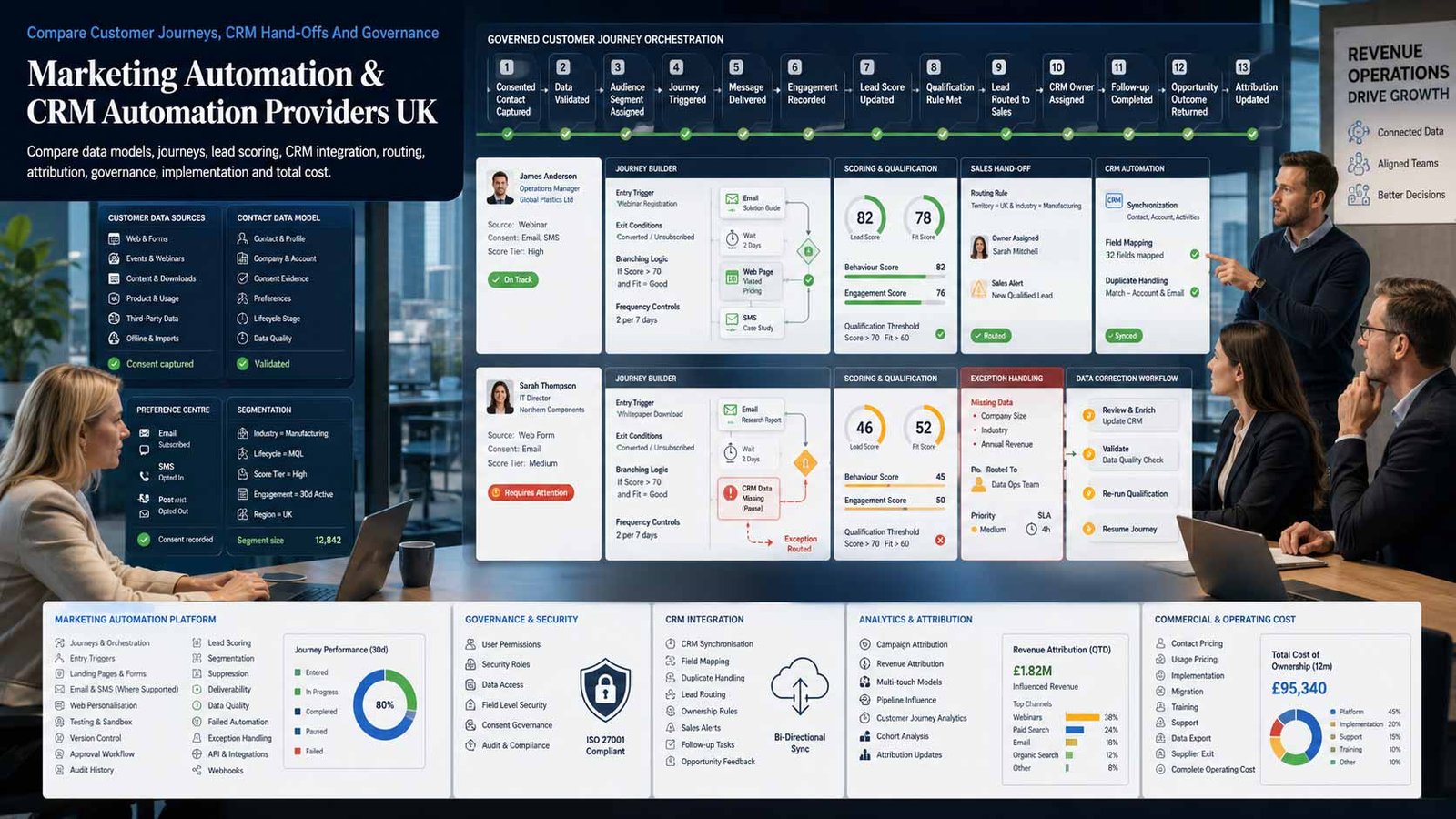
Compare marketing automation software UK providers by contact and account data, consent evidence, segmentation, behavioural triggers, lead scoring, customer journeys, CRM synchronisation, sales routing, tasks, pipeline updates, service hand-offs, reporting, attribution, permissions, integration resilience, implementation effort, pricing, ownership and supplier exit. Give every provider the same use cases, data volumes, user roles, channels, sales process, systems, compliance requirements and success measures.
Comparison Boundary
What This Marketing Automation Comparison Covers
This page evaluates software that connects marketing activity with CRM records and operational sales actions. The relevant capability is not simply sending messages. It is the controlled movement of people, companies, leads, opportunities and customers through defined lifecycle stages using data, rules, triggers, approvals and measurable hand-offs.
- Lead capture, enrichment, consent evidence and lifecycle-stage management
- Segmentation, behavioural triggers, lead and account scoring, nurture and routing
- CRM creation and updates, ownership assignment, sales tasks, alerts and service-level controls
- Multi-step journeys, branch logic, suppression, frequency rules and channel coordination
- Pipeline, revenue, attribution, data-quality and workflow-performance reporting
- Permissions, audit trails, testing, integrations, migration, ownership and exit portability
Keep Adjacent Software Decisions Separate
A newsletter tool may automate email sequences without managing the wider marketing-to-sales process. A standalone CRM may hold contacts and opportunities without providing sophisticated journey orchestration. Those are different buying decisions.
- Use an email-platform comparison where the requirement is mainly newsletters, templates, deliverability and subscriber pricing
- Use a CRM-software comparison where the primary need is contact, deal, pipeline and activity management
- Scope website, SEO, PPC and social-media delivery separately from the automation platform
- Include messaging channels only where they participate in governed, CRM-connected journeys
- Require suppliers to identify every external product, connector, licence and implementation dependency
Marketing Automation And CRM Automation Delivery Models
Choose the operating model before comparing feature lists. The same platform can create very different cost, control and implementation outcomes depending on architecture and responsibility.
| Model | How It Works | Best Fit | Critical Procurement Checks |
|---|---|---|---|
| All-in-one CRM and marketing platform | Marketing, sales and customer records operate on one platform or shared data layer | SMEs and scale-ups seeking fewer integrations and one administration model | Confirm edition boundaries, contact pricing, seat types, data model limits and export depth |
| Marketing automation connected to an established CRM | A specialist automation product synchronises with the existing CRM system of record | Businesses retaining Salesforce, Dynamics or another strategic CRM | Test field mapping, ownership rules, deduplication, sync latency, error recovery and deletion behaviour |
| B2B account-engagement platform | Journeys, scoring and sales hand-offs are designed around long, multi-person buying processes | B2B services, software, manufacturing and complex-consideration sales | Compare account structures, buying groups, campaign influence, lead qualification and sales visibility |
| B2C real-time journey orchestration | Profiles, events and permissions trigger high-volume customer journeys across channels | Retail, membership, travel, service and consumer organisations | Check identity resolution, event latency, channel limits, consent, frequency caps and capacity charges |
| Enterprise marketing automation suite | Advanced segmentation, governance, integrations and campaign operations support large teams | Complex organisations with multiple brands, regions, business units or data sources | Budget for specialist administration, solution architecture, testing, training and ongoing release management |
| SMB automation with built-in pipeline | Visual workflows, forms, scoring and a practical CRM layer are packaged for smaller teams | Growing businesses replacing spreadsheets and disconnected point tools | Test pipeline depth, permissions, reporting, data limits and whether complexity remains manageable |
| Agency-managed automation service | A partner licences, configures or operates journeys and reporting on behalf of the business | Teams needing implementation capacity or continuing campaign operations | Keep business ownership, named access, documentation, approval rights, exports and direct platform visibility |
| Co-managed automation operating model | Internal teams own strategy and data while a partner supplies specialist build, QA and optimisation | Businesses with capable marketing operations but limited technical capacity | Define change authority, support hours, release process, backlog ownership and handover requirements |
Eight Capabilities To Compare Before Choosing Marketing Automation Software
Score each provider against written business processes, representative data and named users. Avoid selecting a platform solely from a polished journey-builder demonstration.
Comparison Criterion
Customer, Company And Opportunity Data Model
Map contacts, companies, accounts, leads, opportunities, products, subscriptions, consent, lifecycle stages and custom objects before product selection. Confirm which record is authoritative, how duplicates are resolved, how history is retained and whether the model supports B2B relationships, B2C identities or both. A visually impressive workflow cannot compensate for fragmented or ambiguous customer data.
Comparison Criterion
Journey Builder, Triggers And Control Logic
Compare event triggers, scheduled entry, branching, waits, goals, re-entry, exclusions, frequency limits, time zones, business hours, approvals, reusable components and failure handling. Ask how a journey is tested before publication, how changes affect active participants, how versions are retained and how operations can pause or roll back a faulty automation.
Comparison Criterion
Lead Scoring, Qualification And Routing
Define explicit fit, behavioural engagement, negative scoring, account signals, thresholds, decay, disqualification, ownership, round-robin rules, territory logic and service-level timers. Sales teams should be able to understand why a record was prioritised. Require evidence that scoring can be monitored, challenged and recalibrated rather than treated as an unexplained black box.
Comparison Criterion
CRM Synchronisation And Sales Handoffs
Test creation, update and deletion behaviour across contacts, companies, leads, opportunities, owners, activities and campaign records. Confirm sync direction, latency, API limits, conflict rules, retries, error queues and alerts. The implementation must prevent duplicate records, missing assignments and marketing activity that sales users cannot see or act on.
Comparison Criterion
Consent, Preferences And Suppression
The platform must support the organisation’s lawful marketing design rather than promise compliance automatically. Compare purpose and channel preferences, consent evidence, legitimate-interest records where applicable, unsubscribe and objection handling, global suppression, frequency controls, data retention and deletion. Verify that every connected channel and imported audience follows the same approved rules.
Comparison Criterion
Integrations, APIs And Operational Resilience
List websites, forms, ecommerce systems, data warehouses, webinar tools, advertising platforms, call systems, customer-service applications and finance products that must connect. Distinguish native integrations from partner connectors and custom code. Test authentication, field coverage, API consumption, monitoring, retry behaviour, sandbox support, documentation and ownership of middleware.
Comparison Criterion
Attribution, Revenue And Workflow Measurement
Require reports that connect activity to qualified leads, accepted hand-offs, opportunities, pipeline, revenue, retention or another commercial outcome. Define attribution limitations and source-of-truth rules. The platform should also expose operational measures such as workflow errors, route time, stage progression, data completeness and manual work removed—not only opens, clicks or message volume.
Comparison Criterion
Security, Administration And Exit Portability
Compare single sign-on, multi-factor authentication, role design, field and business-unit permissions, audit logs, approval workflows, data location, processor terms, sub-processors, backups, retention, incident response and support. Before award, test exports for records, consent evidence, campaign membership, workflow definitions, assets, reports, configuration and integration documentation.
Measure Business Outcomes And Automation Health
Agree measures before implementation. Reporting should show whether data, workflows and sales hand-offs operate correctly as well as whether campaigns create commercial value.
| Control Area | Useful Measures | Evidence To Request |
|---|---|---|
| Data foundation | Duplicate rate; required-field completeness; identity match rate; sync exceptions | Sample records, mapping workbook, deduplication rules, error logs and ownership decisions |
| Consent and suppression | Preference coverage; unsubscribe propagation; objection handling; suppression accuracy | Consent schema, capture timestamps, preference-centre tests, suppression exports and audit evidence |
| Lead qualification | Qualified-lead rate; score distribution; false-positive review; accepted hand-off rate | Documented scoring model, sample calculations, threshold rationale, review cadence and sales feedback |
| Routing and speed | Time to assigned owner; unassigned records; SLA breaches; task completion | Workflow test results, queue reports, notification evidence and escalation configuration |
| Journey performance | Entry, completion, goal, drop-off, re-entry, exclusion and error rates | Journey diagrams, version history, test records, branch reporting and failure alerts |
| CRM integrity | Record conflicts; sync latency; failed updates; duplicate creation; ownership mismatch | Integration logs, reconciliation reports, retry queues, API monitoring and incident procedure |
| Commercial impact | Opportunity creation; pipeline influenced; conversion; revenue; retention or expansion | Agreed attribution model, CRM opportunity data, finance reconciliation and limitations statement |
| Operational efficiency | Manual steps removed; cycle time; campaign build time; exception workload | Before-and-after process map, task-volume evidence, administration hours and support backlog |
| Governance | Unauthorised changes; incomplete approvals; overdue access reviews; audit coverage | Role matrix, approval trail, access-review evidence, release log and change tickets |
| Portability | Completeness of exports; configuration documentation; dependency inventory; handover success | Test exports, data dictionary, asset register, integration catalogue, runbooks and exit checklist |
Marketing Automation And CRM Automation Platforms UK Businesses Can Consider
These profiles identify different comparison positions rather than declare a universal winner. Verify current editions, capacity, integrations, legal terms and implementation requirements directly with every shortlisted supplier.
Provider Profile
HubSpot Marketing Hub
HubSpot positions Marketing Hub as CRM-powered marketing automation with workflows, form and email automation, scoring and journey orchestration connected to its Smart CRM and wider customer platform. It can suit SMEs and scaling businesses seeking one environment for marketing, sales and service. Confirm the exact edition required for workflows, scoring, custom objects, attribution and permissions; marketing-contact charging; additional seats and credits; migration; data hosting choices; integration limits; implementation support; and what can be exported at exit.
Review official HubSpot marketing automationProvider Profile
Salesforce Marketing Cloud Account Engagement
Salesforce Marketing Cloud Account Engagement is a B2B marketing automation platform designed to align marketing and sales through Salesforce data, lead nurturing, scoring, segmentation and campaign engagement. It can suit organisations already standardised on Salesforce CRM and managing complex B2B buying cycles. Confirm the proposed product generation and edition, Data 360 or credit dependencies, account and prospect limits, Salesforce object synchronisation, campaign hierarchy, permissions, sandbox and deployment methods, specialist administration, implementation partner, complete subscription cost and exit extraction.
Review official Salesforce B2B automationProvider Profile
Microsoft Dynamics 365 Customer Insights – Journeys
Microsoft Dynamics 365 Customer Insights – Journeys supports real-time, trigger-based customer journeys and works within the Microsoft business-application ecosystem. It can suit organisations using Dynamics 365, Dataverse, Power Platform and Microsoft identity services. Confirm the current licensing and capacity model, Customer Insights Data requirements, event and interaction limits, Dataverse storage, channel services, consent design, Dynamics sales integration, Power Platform dependencies, outbound-marketing migration status, environment strategy, partner implementation, support and exportability.
Review official Dynamics 365 Customer InsightsProvider Profile
Adobe Marketo Engage
Adobe Marketo Engage is an enterprise marketing automation platform for personalised buyer engagement, lead management, campaign operations and pipeline growth. It can suit mature B2B marketing teams needing advanced programmes, integrations and governance. Confirm the database and activity volumes, workspaces and partitions, CRM connector, scoring and lifecycle model, campaign templates, reporting and attribution products, API quotas, sandbox and release process, specialist skills, implementation and managed-service requirements, add-ons, complete contract cost, data-retention rules and export depth.
Review official Adobe Marketo EngageProvider Profile
Oracle Eloqua Marketing Automation
Oracle Eloqua supports sophisticated cross-channel campaign design, lead management, segmentation, personalisation and reporting for enterprise marketing operations. It can fit complex B2B organisations with large datasets, structured campaign governance and multiple integrations. Confirm contact and email volumes, modules, environments, CRM integration, campaign canvas governance, lead scoring, account structures, API and app dependencies, identity and access, reporting, implementation partner, training, administration effort, contract term, support, data extraction and decommissioning plan.
Review official Oracle EloquaProvider Profile
ActiveCampaign
ActiveCampaign combines marketing automation, behavioural data, lead scoring, automated CRM actions and sales follow-up features. It can suit SMEs and mid-market teams seeking visual automation and a connected pipeline without enterprise-scale implementation. Confirm the selected product and plan, contact and message limits, CRM pipeline requirements, scoring, site and event tracking, WhatsApp or SMS dependencies, user permissions, attribution, native versus third-party integrations, migration, deliverability setup, support, account ownership and how automations and data are exported.
Review official ActiveCampaign platformProvider Profile
Zoho Marketing Automation And CRM Plus
Zoho offers Marketing Automation and broader CRM Plus capabilities covering lead nurturing, journeys, sales automation, visitor tracking, analytics and other customer-facing operations. It can suit businesses seeking an integrated suite and predictable administration across several functions. Confirm whether the proposal uses Marketing Automation, CRM Plus or separate applications; licence and user structure; contact and channel capacity; CRM data ownership; sync configuration; permissions; reporting; third-party integrations; data residency; implementation; support tier; app dependencies; exports and cancellation behaviour.
Review official Zoho Marketing AutomationProvider Profile
Brevo
Brevo presents an all-in-one customer-engagement platform combining marketing automation, CRM, email, SMS, WhatsApp, chat and transactional communication. It can suit SMEs that need connected journeys and practical sales follow-up within one environment. Confirm the exact products included, contact storage and send-volume charging, automation limits, pipeline depth, scoring and routing, channel availability and pass-through costs, consent and suppression design, dedicated sending options, integrations, user permissions, data location, support, migration, account ownership and export coverage.
Review official Brevo automationMarketing Automation Software Pricing Factors
A low entry price can become expensive when contacts, interactions, users, data, implementation and connectors grow. Compare a documented multi-year operating model rather than a headline subscription.
| Cost Component | What Changes The Cost | How To Normalise Proposals |
|---|---|---|
| Core platform subscription | May depend on edition, database size, marketing contacts, profiles, users, modules or a negotiated enterprise agreement | Request a written bill of materials showing every product, edition, metric, allowance and renewal basis |
| Marketing-contact or profile capacity | Some platforms distinguish stored records from chargeable marketing contacts or active profiles | Model current records, suppression data, expected growth, archived contacts and seasonal peaks |
| Message, interaction and channel usage | Email, SMS, WhatsApp, push, events, AI, data processing or journey interactions may be capacity- or credit-based | Separate included usage, pass-through carrier charges, overages, credit expiry and forecast assumptions |
| CRM and sales licences | Sales users, service users, administrators and light users can require different seat types | Map named roles and minimum permissions rather than buying one licence type for everyone |
| Implementation and data migration | Discovery, architecture, cleansing, mapping, consent migration, integration, build, testing and launch are often separate | Price a defined implementation backlog with acceptance criteria, dependencies and change-control rates |
| Integrations and middleware | Native connectors may be included, separately licensed or limited; middleware and custom APIs add recurring cost | List connector subscriptions, API capacity, hosting, monitoring, support and ownership of custom code |
| Content, templates and channel setup | Email templates, forms, landing pages, preference centres, domains, tracking, sender setup and assets require work | Separate reusable foundations from continuing campaign-production services |
| Data, analytics and attribution | Warehouses, customer-data products, BI connectors, advanced attribution and premium reporting may cost extra | Specify the source of truth, report ownership, data-refresh needs, storage and retention |
| Support, partner and administration | Vendor support, implementation partners, managed services and in-house platform administration are different costs | Model internal administrator time, support tier, service hours, backlog, training and release management |
| Renewal, uplift and exit | Annual uplifts, minimum terms, volume growth, add-ons and extraction work affect lifecycle cost | Compare a three-year scenario including growth, renewal assumptions, notice, transition and decommissioning |
Which Marketing Automation Model Fits The Requirement?
Platform fit depends on the existing CRM, buying cycle, data maturity, internal skills, governance and volume—not on company size alone.
Growing SME Replacing Manual Follow-Up
Prioritise usable workflows, practical CRM updates, clear ownership, templates, reliable integrations and administration that a small team can sustain. Avoid buying enterprise capability that remains unconfigured.
B2B Team With A Strategic CRM
Prioritise account and opportunity visibility, lead qualification, marketing-to-sales hand-offs, campaign influence, field synchronisation, sales adoption and a controlled data model.
B2C Or Membership Organisation
Prioritise event-driven journeys, identity resolution, preferences, frequency controls, channel coordination, high-volume performance, customer-service connections and retention use cases.
Multi-Brand Or Enterprise Operation
Prioritise business units, workspaces, permissions, reusable standards, regional autonomy, approval, audit, sandboxes, deployment, data architecture, integration monitoring and specialist support.
Compare The Same Automation Brief Across Every Provider
A fair comparison starts with one requirements pack. Supplier demonstrations should use representative records and execute the same priority workflows from entry trigger to CRM outcome.
Include In The Request
- Business objectives, lifecycle stages, lead definitions, sales process and service-level expectations
- Contact, company, account, opportunity, consent, product and custom-data requirements
- Priority journeys with entry, branches, actions, exclusions, goals, ownership and exception handling
- Current CRM, website, forms, ecommerce, analytics, service, finance and data integrations
- User roles, business units, approvals, support hours, security, data location and retention requirements
- Volumes for records, marketing contacts, interactions, messages, API calls, users and expected growth
- Implementation scope, migration, testing, training, documentation, managed services and exit outputs
Require A Proof Scenario
Ask each provider to demonstrate the same end-to-end scenario using sample data close to the real operation.
- Capture a lead with source, permissions and required company information
- Deduplicate or associate the person with the correct company and account
- Apply segmentation and explain the lead or account score
- Run a branched journey with suppression and frequency controls
- Create or update the CRM record, owner, task and service-level deadline
- Record sales acceptance, opportunity progression and commercial outcome
- Show failed-sync monitoring, audit history, report evidence and export
Six Questions To Ask Every Marketing Automation Provider
Written answers reveal architecture, governance and lifecycle cost more effectively than a generic product demonstration.
What Is The System Of Record?
Which application is authoritative for contacts, companies, opportunities, consent, products and lifecycle stage? Explain sync direction, conflict resolution and deletion behaviour.
How Is A Workflow Tested And Released?
Show sandboxes or test methods, representative records, approvals, version history, active-participant behaviour, rollback, monitoring and incident response.
How Does Lead Scoring Stay Explainable?
Document every input, weight, threshold, decay rule, exclusion and sales feedback process. Show how a user can understand why a record received its score.
What Happens When An Integration Fails?
Show queues, retries, alerts, ownership, reconciliation, API limits, support responsibility and how missed updates are recovered without duplicate records.
Which Costs Increase With Growth?
Identify contacts, profiles, interactions, sends, users, business units, AI credits, data storage, API usage, support, connectors, implementation and renewal uplift.
What Can We Export At Exit?
Demonstrate exports for customer records, consent history, suppression, campaign membership, assets, reports, workflow definitions, configuration and integration documentation.
A Seven-Stage Marketing Automation Procurement Process
Treat automation as an operating-model and data project. The software becomes valuable only when processes, users, responsibilities and evidence are designed with it.
Define commercial outcomes and service boundary
Agree whether the project must improve qualification, response speed, pipeline creation, conversion, onboarding, retention or another measurable result. Separate the platform decision from email-only or CRM-only procurement.
Map the current lifecycle and data
Document capture sources, records, lifecycle stages, ownership, hand-offs, exceptions, consent, suppression, integrations, reports and manual work. Identify the authoritative system for every important field.
Prioritise automation use cases
Select a small set of high-value journeys with clear entry triggers, actions, goals, owners and exception paths. Avoid recreating every historical campaign before the foundations are proven.
Issue one requirements and volume pack
Give suppliers the same data model, sample records, user roles, channels, integration list, usage volumes, security requirements, implementation scope and three-year growth assumptions.
Run proof scenarios and reference checks
Test the complete workflow, CRM synchronisation, permissions, reporting, error recovery and export. Speak with relevant customers whose architecture and operating maturity resemble yours.
Contract for implementation and acceptance
Define discovery outputs, data cleansing, configuration, integrations, migration, testing, training, documentation, support, security, acceptance evidence, change control and ownership.
Launch in controlled phases and govern continuously
Deploy priority workflows, monitor data and sync health, review scoring, inspect outcomes, control releases, remove unused access, document changes and maintain an exit-ready configuration register.
Marketing Automation And CRM Automation Buyer Checklist
Use this checklist before approving a subscription, implementation partner, managed service or migration programme.
| No. | Requirement | Evidence To Obtain Before Award | Confirmed |
|---|---|---|---|
| 01 | Service boundary and business outcomes approved | Connected marketing-and-sales automation scope, excluded email-only and CRM-only requirements, commercial goals and baseline measures | |
| 02 | Lifecycle and ownership map complete | Stages, definitions, entry and exit criteria, record owners, sales acceptance, service levels, exceptions and escalation | |
| 03 | Data model and source-of-truth decisions approved | Contacts, companies, accounts, opportunities, products, consent, custom objects, identifiers, history and deduplication | |
| 04 | Consent and suppression design approved | Purposes, channels, lawful-basis records, preferences, objections, unsubscribe, frequency, retention, deletion and audit evidence | |
| 05 | Priority journey specifications complete | Triggers, branches, delays, actions, goals, re-entry, exclusions, time zones, business hours, failure handling and owners | |
| 06 | Lead scoring and routing model documented | Fit, behaviour, negative signals, decay, thresholds, explainability, assignments, queues, territories, alerts and review cadence | |
| 07 | CRM synchronisation rules tested | Field maps, direction, conflict, deletion, ownership, activities, campaign records, latency, API capacity, retries and reconciliation | |
| 08 | Integration inventory and support ownership agreed | Websites, forms, ecommerce, events, advertising, service, finance, data and middleware connections with named owners | |
| 09 | Reporting and attribution framework accepted | Operational health, qualification, hand-offs, pipeline, revenue, retention, source-of-truth, attribution assumptions and limitations | |
| 10 | Security and access controls approved | SSO, MFA, roles, fields, business units, approvals, audit, access reviews, service accounts, data location and incident response | |
| 11 | Implementation and migration scope contracted | Discovery, cleansing, configuration, integrations, assets, consent, history, testing, training, launch, support and acceptance evidence | |
| 12 | Full bill of materials normalised | Products, editions, contacts, profiles, interactions, users, data, messages, credits, channels, connectors, support and services | |
| 13 | Administration and governance model resourced | Platform owner, data owner, workflow owner, release process, backlog, QA, monitoring, training and continuing optimisation | |
| 14 | AI and profiling controls documented | Approved uses, human review, explainability, sensitive data, model inputs, vendor features, monitoring, objections and risk assessment | |
| 15 | Exit and portability plan tested | Record exports, consent and suppression, assets, workflow specifications, reports, configuration, integrations, documentation and transition support |
Common Marketing Automation Buying Mistakes
Most failures arise from unclear process ownership, poor data, weak integration design or unrealistic implementation assumptions—not from the absence of another feature.
| Mistake | Why It Creates Risk | Better Control |
|---|---|---|
| Selecting from a feature demonstration | Sample journeys hide data quality, integration and operational ownership problems | Test representative data and end-to-end proof scenarios |
| Automating a broken process | The platform makes inconsistent definitions and poor hand-offs happen faster | Agree lifecycle stages, owners and exceptions first |
| Treating the CRM sync as a simple connector | Field conflicts, deletion, duplicates and API failures create unreliable records | Design and test a complete synchronisation contract |
| Using engagement as the only score | Opens and clicks do not establish fit, readiness or commercial value | Combine fit, behaviour, negative signals and sales feedback |
| Assuming software creates compliance | The business remains responsible for lawful, transparent and controlled processing | Approve consent, suppression, profiling and retention design |
| Buying too much platform too early | Complexity, specialist skills and unused modules increase cost without improving outcomes | Phase priority journeys and capacity |
| Ignoring administration workload | Workflows, data, integrations, releases and users deteriorate without ownership | Resource a platform owner and governance cadence |
| Comparing subscription price alone | Implementation, users, contacts, usage, connectors, support and growth can dominate cost | Model the complete three-year operating cost |
| Allowing agency-only access | The business becomes dependent on a supplier for data, changes and evidence | Keep company ownership and named user access |
| Leaving exit until cancellation | Workflows and configuration may not export in a directly reusable format | Maintain documentation and test exports during the contract |
Frequently Asked Questions
Answers to common questions from UK businesses comparing connected marketing automation and CRM automation platforms.
What Is Marketing Automation Software?
Marketing automation software uses customer data, rules, triggers and workflows to coordinate repeatable marketing activity. In this comparison, the relevant platforms also connect with CRM records and sales actions such as lead qualification, ownership assignment, tasks, opportunity updates and lifecycle reporting.
What Is The Difference Between Marketing Automation And A CRM?
A CRM normally manages customer, company, activity, lead, opportunity and pipeline records. Marketing automation normally manages segmentation, triggers, journeys, nurture, scoring and campaign activity. Some products combine both; others integrate a specialist automation platform with an established CRM.
Is Marketing Automation The Same As Email Marketing?
No. Email may be one channel inside an automated journey, but connected marketing automation also covers data capture, segmentation, behavioural events, scoring, CRM updates, routing, tasks, suppression, reporting and other channels. A newsletter-only requirement should be assessed separately.
Which Businesses Need Marketing And CRM Automation?
It is most useful where leads or customers move through repeatable stages, several systems or teams share responsibility, response time matters, data volumes make manual follow-up unreliable, and the organisation can define measurable lifecycle outcomes. Very small or irregular processes may be better improved before software is added.
How Should Lead Scoring Be Designed?
Use a documented combination of customer fit, behavioural evidence, negative signals, timing and sales feedback. Define thresholds, decay, exclusions and review cadence. Users should be able to understand why a record was scored, and performance should be checked against accepted leads, opportunities and outcomes.
Does Marketing Automation Make A Business UK GDPR And PECR Compliant?
No. A platform can provide consent fields, preference centres, suppression, retention and audit features, but the organisation remains responsible for its purposes, lawful basis, transparency, direct-marketing rules, profiling, processor arrangements and data-subject rights. Obtain specialist advice for the actual use case.
How Long Does Marketing Automation Implementation Take?
The schedule depends on data quality, journey complexity, integrations, migration, consent history, assets, security, testing, internal decisions and user readiness. A controlled first release can be smaller than a full transformation. Suppliers should quote against defined deliverables and acceptance evidence rather than a generic duration.
What Data Should Be Migrated?
Migrate only data that is necessary, accurate, appropriately retained and useful to the target processes. This may include contacts, companies, opportunities, lifecycle stages, owners, preferences, suppression, selected engagement history, campaign membership and key custom fields. Clean, map and test before production import.
How Should Marketing Automation Providers Be Compared?
Give each provider the same lifecycle map, sample data, workflows, CRM, integrations, users, volumes, governance and outcomes. Compare proof scenarios, data and sync integrity, scoring, consent, reporting, security, implementation, complete lifecycle cost, administration and exit portability—not only interface or feature count.
What Should Be Included In An Exit Plan?
Require business-owned access, record and consent exports, suppression data, asset files, workflow specifications, scoring rules, field maps, reports, integration documentation, API and service-account inventory, administrator handover, access removal, transition support and a final reconciliation of data and active journeys.
Official Guidance And Provider Sources
Use these sources to verify current privacy guidance, product positioning and platform capabilities. Product editions, limits, pricing and terms can change.
- ICO — Electronic Mail Marketing
- ICO — Business-To-Business Marketing
- ICO — Collect Information And Generate Leads
- ICO — Automated Decision-Making And Profiling
- ICO — Right To Object
- HubSpot — Marketing Automation Software
- Salesforce — Marketing Cloud Account Engagement
- Microsoft — Dynamics 365 Customer Insights
- Adobe — Marketo Engage
- Oracle — Eloqua Marketing Automation
- ActiveCampaign — Marketing Automation Platform
- Zoho — Marketing Automation
- Brevo — Marketing Automation