
Compare Email Security / Anti-Phishing Providers UK (2026)
Compare Phishing Defence, Impersonation Protection, Remediation, Domain Security And Cost
Compare email security for business UK by spam filtering, phishing and business email compromise detection, malicious-link protection, attachment analysis, impersonation defence, account-takeover signals, post-delivery remediation, outbound controls, DMARC support, Microsoft 365 or Google Workspace integration, reporting, administration, support and total cost. Evaluate providers against the same domains, users and mail flows before changing protection.
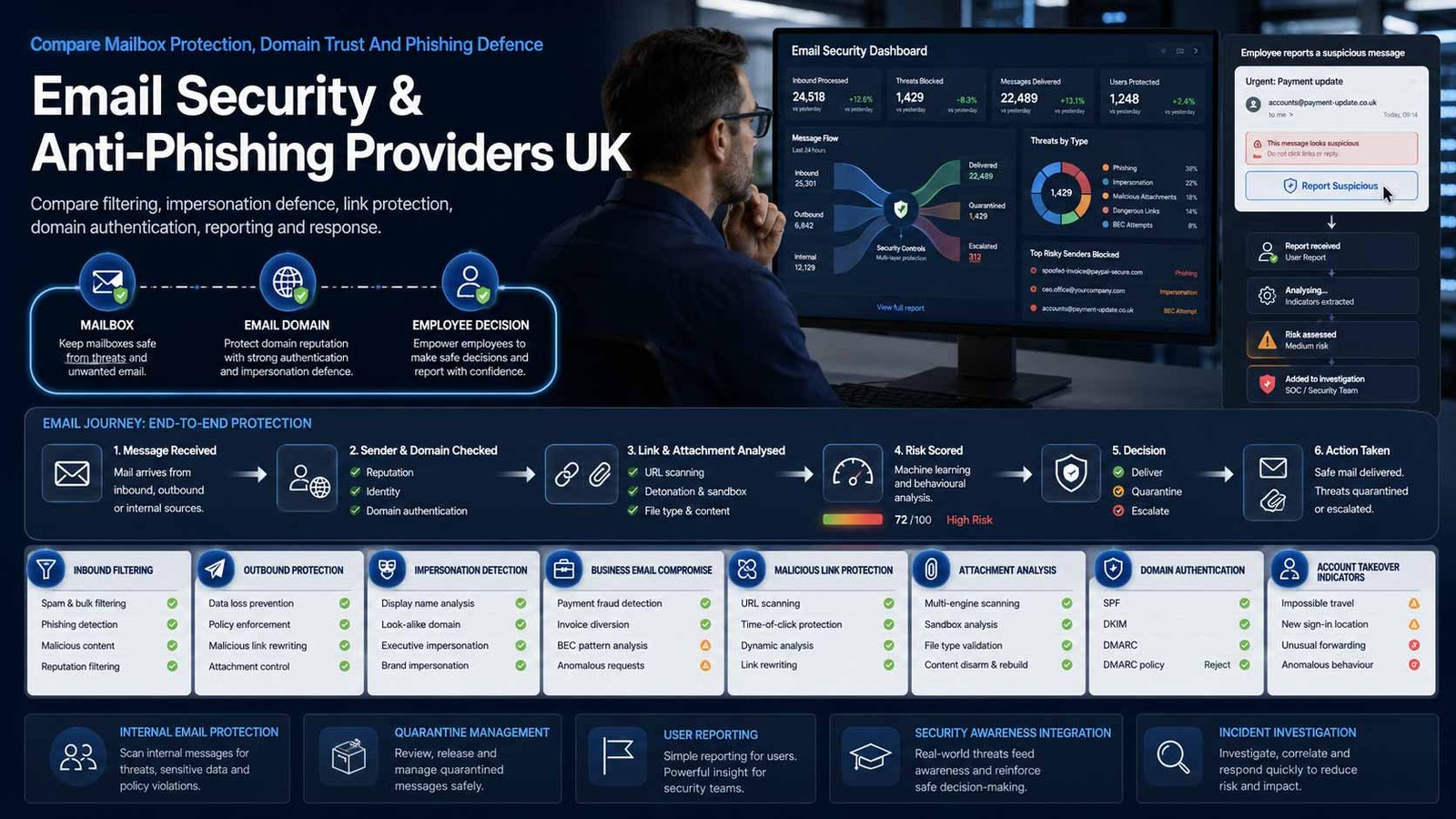
Protect The Mailbox, The Domain And The User Journey
Strong email security should stop malicious messages, reduce impersonation and help staff report or recover from threats that still reach the inbox.
- Protect inbound, internal and relevant outbound email flows
- Detect impersonation, payment diversion and compromised accounts
- Inspect links and attachments before and after delivery
- Implement SPF, DKIM and DMARC without blocking legitimate senders
Business email security uses layered controls to identify, block, quarantine and remediate malicious or unwanted messages. Core capabilities may include spam and malware filtering, impersonation and business email compromise detection, malicious URL inspection, attachment sandboxing, account-takeover signals, post-delivery search and removal, outbound policy, data-loss controls, reporting buttons and domain anti-spoofing.
Deployment architecture matters. A secure email gateway changes mail-routing records so messages pass through the provider before reaching Microsoft 365, Google Workspace or another mail platform. An API-based service integrates directly with the cloud mailbox and collaboration environment, often enabling internal-message inspection and post-delivery remediation. Some products combine both approaches.
This page does not compare email marketing software, newsletter delivery, campaign automation, customer journeys, contact lists or marketing analytics. It also does not compare employee-awareness platforms as the main product. Training and phishing simulation may be optional additions, but the comparison boundary remains technical protection of business email and collaboration messages.
Choose The Right Email Security Architecture
Gateway, API and native-cloud approaches affect mail flow, internal-message visibility, remediation and operational ownership.
| Deployment Model | What It Usually Provides | Best-Fit Question |
|---|---|---|
| Native cloud-email protection | Uses security controls already included with Microsoft 365 or Google Workspace, with optional higher security licences | Do existing licences and configuration provide the required protection, investigation and reporting depth? |
| Secure email gateway | Routes inbound and sometimes outbound mail through a cloud or appliance gateway before delivery | How are MX records, continuity, encryption, routing, failover and coexistence handled during migration? |
| API-integrated email security | Connects to Microsoft 365 or Google Workspace through APIs to inspect messages and remediate threats | Can the service inspect internal mail and remove delivered messages quickly without introducing mail-flow dependency? |
| Combined gateway and API protection | Uses pre-delivery filtering together with mailbox and collaboration visibility after delivery | Which capabilities depend on each architecture, and how are duplicate policies or alerts avoided? |
| Microsoft 365 security suite | Combines anti-phishing with collaboration protection, identity signals, investigation and automated response | Which Plan 1, Plan 2, E5 or add-on licences are required, and who will operate the advanced features? |
| SME packaged email protection | Provides simplified setup, policy and support for smaller user populations, often through an MSP | Does the package include sufficient impersonation, remediation and domain protection rather than only spam filtering? |
| Managed email security service | A provider configures policies, reviews alerts, handles changes and supports incidents around the chosen platform | Which administration and response tasks are included, and when does the service become broader MDR or MSSP work? |
| Email security with archive or continuity | Bundles threat protection with continuity, backup, archiving, encryption or compliance functions | Are bundled functions genuinely required, and can the email-security cost be compared separately? |
Eight Areas That Determine Email Security Fit
Use the same domains, users and threat scenarios for every provider so broad AI claims do not hide mail-flow or remediation gaps.
Comparison Criterion
Phishing, Impersonation And BEC Detection
Compare display-name impersonation, lookalike domains, executive and supplier impersonation, payment-language analysis, reply-chain attacks, QR codes, compromised internal accounts and relationship context. Require controls for finance, executives and other high-risk roles without excessive false positives.
Comparison Criterion
Malicious Links And Attachment Protection
Assess URL rewriting or time-of-click analysis, newly registered domains, credential-harvest detection, browser isolation, attachment sandboxing, file sanitisation, encrypted archive handling, macro and script controls and delayed detonation. Confirm user experience and evidence available to administrators.
Comparison Criterion
Spam, Malware And Bulk-Mail Accuracy
Review spam and malware detection, reputation, policy, quarantine, allow and block lists, bulk-mail handling and false-positive management. The service should reduce unwanted mail without hiding legitimate invoices, customer messages or automated business notifications.
Comparison Criterion
Internal Mail And Account-Takeover Detection
Compare visibility of messages sent between users, suspicious mailbox rules, impossible travel, abnormal sending, OAuth abuse, compromised account indicators and post-compromise search. Confirm which identity or collaboration licences and permissions are required.
Comparison Criterion
Post-Delivery Investigation And Remediation
Assess message search, campaign clustering, automated removal, manual purge, user-reported email analysis, retroactive detection, restoration, case evidence and integration with SIEM, ticketing or MDR. Confirm time to remove a message from every affected mailbox.
Comparison Criterion
Domain Authentication And Brand Protection
Review SPF, DKIM and DMARC discovery, legitimate-sender inventory, policy progression, reporting, lookalike-domain monitoring and protection of inactive domains. DMARC must be implemented carefully so valid services continue to send while spoofed mail is rejected.
Comparison Criterion
Outbound Security, DLP And Encryption
Compare outbound malware and spam controls, accidental-recipient detection, sensitive-data rules, encryption, large-file transfer, policy exceptions and administrator approval. Keep optional data-protection features separate from the core anti-phishing price where they are not required.
Comparison Criterion
Administration, Reporting And Service Resilience
Review policy management, delegated roles, audit logs, quarantine, user self-service, reporting, APIs, message tracing, data location, retention, support, continuity, failover, vendor status, service credits, migration and exit. Email security must not become an undocumented single point of failure.
Measures To Define Before An Email Security Contract Is Signed
Translate advanced protection into measurable coverage, detection, remediation, authentication and service outcomes.
| Measure | What It Should Define | Evidence To Request | Common Weakness |
|---|---|---|---|
| Protected-user and domain coverage | Whether every in-scope mailbox, shared mailbox, group, alias and sending domain receives the intended controls | Expected, licensed, active, excluded, shared, service account, domain, owner and reason | Only named employees are counted while shared mailboxes and service accounts remain outside policy |
| Legitimate-sender authentication | Whether every authorised sending service passes aligned SPF or DKIM and is represented in DMARC reporting | Sender, domain, platform, SPF, DKIM, alignment, owner, volume and remediation | A marketing, payroll or CRM sender is added late and breaks when DMARC enforcement increases |
| Phishing and BEC detection quality | Whether malicious and impersonation messages are blocked or flagged without unacceptable false positives | Threat type, action, affected users, confidence, evidence, false positive, override and tuning | The provider reports all spam as phishing and provides no separate BEC evidence |
| Time to remove delivered threats | How quickly a confirmed campaign is located and removed from every affected mailbox | First delivery, detection, user report, investigation, purge start, purge completion and verification | The console submits a remediation job but does not confirm removal from all mailboxes |
| User reporting rate | Whether employees use the approved reporting route for suspicious messages that reach the inbox | Delivered simulation or real message, correct reports, time to report, duplicates and operational action | A reporting button exists but reports are not triaged or acknowledged |
| False-positive and allow-list ageing | Whether exceptions remain narrow, justified and reviewed | Sender, domain, policy, reason, scope, owner, expiry, review and incident history | Permanent allow lists bypass attachment or URL inspection for high-risk suppliers |
| Internal-compromise visibility | Whether suspicious internal sending, mailbox rules or account activity can be investigated | Account, signal, message, rule, recipient, identity evidence, action and outcome | The product protects only inbound internet mail and cannot see internal lateral phishing |
| Quarantine and user experience | Whether legitimate messages can be reviewed and released safely without encouraging users to bypass controls | Quarantine type, notification, release authority, appeal, delay, false positive and support | Users receive too many digests and automatically release messages without checking |
| Service availability and mail delay | Whether protection and continuity remain within acceptable service levels | Delivery latency, queue, outage, failover, continuity activation, recovery and customer impact | A gateway outage delays all mail while continuity procedures are untested |
| Total cost per protected mailbox | The complete licence, implementation, support, administration, optional modules and internal-effort cost | Users, shared mailboxes, domains, modules, minimums, service hours, migration and growth | A low licence excludes DMARC, remediation, archive or partner administration |
Email Security And Anti-Phishing Providers UK Businesses Can Consider
Shortlist platforms whose architecture, threat controls and administration fit the mail environment. Confirm current UK packages, integrations and pricing directly before award.
Provider Profile
Microsoft Defender For Office 365
Microsoft’s advanced email and collaboration security service extends Exchange Online Protection with phishing, impersonation, malicious-link and attachment defence, investigation and automated response. Include it where Microsoft 365 is the standard platform and the organisation wants native integration with Defender XDR, identity and collaboration signals. Confirm whether Plan 1, Plan 2, Business Premium, E5 or another entitlement supplies the required features, how safe links and attachments are configured, internal-message visibility, mailbox remediation, licensing for shared users and who will operate advanced hunting and response.
Review official Defender for Office 365Provider Profile
Proofpoint Email Protection And 365 Total Protection
Proofpoint provides gateway and cloud-integrated email security for phishing, malware, business email compromise and account-takeover risk, with packaged Microsoft 365 protection and optional fraud, continuity, archive or human-risk capabilities. Include it where an organisation wants specialist email-threat intelligence and flexible enterprise or SME routes. Confirm the exact Proofpoint product, gateway or API architecture, mailbox and domain scope, URL and attachment features, internal mail, remediation, DMARC, user reporting, support, data retention, partner service and commercial tier.
Review official Proofpoint email securityProvider Profile
Mimecast Advanced Email Security
Mimecast provides advanced email security through cloud-gateway and cloud-integrated deployment options, covering spam, malware, phishing, impersonation, malicious links and attachments, with optional continuity, archive, awareness and collaboration protection. Include it where a business values mature email controls, Microsoft 365 integration or continuity and archive options. Confirm Cloud Gateway versus Cloud Integrated architecture, exact product tier, internal-message coverage, remediation, encryption, archive and continuity dependencies, data location, user administration, support and how bundled modules affect price and exit.
Review official Mimecast email securityProvider Profile
Barracuda Email Protection
Barracuda Email Protection combines email filtering, impersonation and account-takeover protection, automated incident response and optional backup, archiving, encryption, DMARC or security-awareness functions through Barracuda’s current email portfolio. Include it where an SME or mid-market organisation wants broad Microsoft 365 protection and an MSP-friendly operating model. Confirm the exact plan, gateway and API components, mailbox and domain minimums, remediation, backup or archive inclusion, user reporting, DMARC, support, data retention, partner administration and separation from Barracuda Managed XDR.
Review official Barracuda Email ProtectionProvider Profile
Check Point Harmony Email & Collaboration
Check Point Harmony Email & Collaboration is an API-based inline security service for Microsoft 365, Google Workspace and collaboration applications, using phishing, impersonation, malware, URL and account-takeover controls with post-delivery visibility. Include it where a business wants API-led protection across email and connected collaboration platforms. Confirm protected applications, inline or post-delivery modes, internal mail, mailbox permissions, response automation, data-loss features, plan level, user reporting, integration with Check Point operations, data region, support and commercial minimums.
Review official Check Point email securityProvider Profile
Hornetsecurity 365 Total Protection
Hornetsecurity’s Microsoft 365-focused suite offers plan-based email filtering, encryption, signatures, backup, continuity, archiving, security awareness, permissions and domain-fraud functions. Include it where an SME or MSP wants a consolidated Microsoft 365 security package with a strong European provider route. Confirm the selected plan, email-security features included at that level, gateway architecture, backup and archive terms, AI functions, DMARC, user reporting, multi-tenant administration, data location, support, minimum users and whether bundled modules duplicate existing services.
Review official Hornetsecurity protectionProvider Profile
Sophos Email
Sophos Email provides cloud-managed inbound and outbound email security using multi-layered AI, sandboxing, impersonation and identity protection, with Microsoft 365 Mailflow and gateway deployment options and integrations across Sophos Central. Include it where an organisation uses Sophos endpoint or MDR services, or wants straightforward business email protection through a partner. Confirm Mailflow versus Gateway deployment, Microsoft 365 or Google Workspace support, internal-message visibility, URL and attachment controls, phishing simulation or awareness inclusion, encryption, data control, MDR integration, administration, support and licensing.
Review official Sophos EmailProvider Profile
ESET Cloud Office Security
ESET Cloud Office Security protects Microsoft 365 and Google Workspace email and cloud storage against spam, phishing and malware through a cloud console, with plan-dependent anti-spoofing, sandboxing and collaboration protection. Include it where an SME values straightforward cloud administration and alignment with existing ESET security products. Confirm Microsoft 365 and Google Workspace feature differences, protected mailboxes and shared resources, anti-phishing depth, internal and post-delivery controls, cloud-storage coverage, sandboxing, retention, quarantine, support, partner management and package pricing.
Review official ESET Cloud Office SecurityWhat Changes Email Security And Anti-Phishing Cost
The per-user licence is only one component. Architecture, advanced detection, domain protection, continuity and managed administration can materially change the budget.
| Cost Driver | Why It Changes Spend | What A Comparable Proposal Should Show |
|---|---|---|
| Users, mailboxes and shared resources | Providers may licence by named user, mailbox, active account or minimum annual band | Employees, shared mailboxes, service accounts, aliases, groups, growth, minimums and inactive-user rules |
| Deployment architecture | Gateway, API and combined designs use different infrastructure, connectors and support effort | MX changes, connectors, API permissions, internal mail, coexistence, continuity, rollback and customer tasks |
| Protection tier | Advanced phishing, sandboxing, internal-mail analysis, account takeover and automated remediation may require higher plans | Exact plan, included controls, exclusions, limits, retention and duplicated native licences |
| Domain authentication and fraud protection | DMARC discovery, managed implementation, reporting and lookalike-domain monitoring can be optional services | Domains, legitimate senders, SPF, DKIM, DMARC, monitoring, enforcement, remediation and ongoing management |
| Archive, backup and continuity | Email archiving, mailbox backup, continuity and e-discovery are often bundled but priced separately | Required retention, recovery, continuity, storage, legal hold, export, data location and overlapping products |
| Encryption and data-loss controls | Outbound encryption, content inspection, DLP and secure large-file transfer may require premium modules | Data types, policies, users, approval, encryption method, recipients, exceptions and audit |
| Implementation and migration | Mail-flow design, DNS, connectors, allow lists, historical policies, quarantine and coexistence create one-off effort | Discovery, configuration, pilot, DNS, testing, rollback, training, acceptance and professional-services price |
| Managed administration and support | MSPs may include policy changes, alert review, user support and incident assistance around the product | Included hours, response, policy reviews, false positives, incidents, changes, reporting and extra rates |
| Data retention and integrations | Message metadata, detections, sandbox results, API access and SIEM export may vary by tier | Retention, data volume, export, API, SIEM, ticketing, reporting button, overage and deletion |
| Contract term and exit | Multi-year commitments, annual uplifts, mailbox reductions, data export and mail-flow reversal affect lifecycle cost | Term, renewal, uplift, true-up, reduction, transition, data, configuration, credential removal and deletion |
How The Mail Environment Changes The Shortlist
The right platform depends on Microsoft or Google architecture, internal skill, payment exposure, collaboration tools, domain complexity and support ownership.
Microsoft 365 Business Premium Organisation
Prioritise the Defender for Office 365 entitlements already owned, configuration maturity, impersonation policy, safe links and attachments, investigation, post-delivery actions and the internal skill needed to operate native controls.
Small Business Using An MSP
Prioritise simple licensing, strong default protection, supplier impersonation defence, managed policy and false-positive support, domain authentication, user reporting and transparent separation of product and service fees.
Google Workspace Or Mixed Cloud Estate
Prioritise explicit Google Workspace support, internal-message inspection, collaboration and cloud-storage coverage, API permissions, cross-platform administration and feature parity with Microsoft 365.
Regulated Or High-Transaction Organisation
Prioritise payment-diversion detection, sensitive-data policy, encryption, audit evidence, incident investigation, retention, executive and supplier impersonation controls, domain protection and rapid removal of delivered threats.
How To Compare Email Security Proposals
Give every provider the same users, shared mailboxes, domains, legitimate senders, Microsoft 365 or Google Workspace design, mail flow, collaboration tools, incidents, security licences, retention, support and domain-authentication requirements.
- Every mailbox, alias, group and sending domain maps to the proposed scope
- Gateway, API and native-platform responsibilities are explicit
- Impersonation, malicious links, attachments and internal mail are demonstrated
- Post-delivery removal and user-report workflows are tested
- Core protection and optional archive, backup or awareness costs are separated
- DNS, connectors, policy export and mail-flow reversal are covered at exit
Make Every Provider Handle The Same Email Threats
Use one supplier-payment impersonation, one compromised internal mailbox, one QR-code phishing message and one malicious attachment delivered to several users.
Compare detection, message handling, analyst evidence, user reporting and post-delivery remediation before comparing dashboard appearance.
Six Questions To Put To Every Email Security Provider
The answers expose incomplete mail coverage, weak remediation, hidden modules and difficult migration before the agreement starts.
Which Mail Flows And Collaboration Services Are Protected?
Request a matrix for inbound, outbound, internal, shared mailboxes, groups, Microsoft 365, Google Workspace, Teams, SharePoint, OneDrive and other supported applications.
How Does The Product Detect Impersonation And BEC?
Ask for executive, supplier, display-name, lookalike-domain, reply-chain, payment-language and compromised-internal-account detection.
What Happens After A Malicious Message Is Delivered?
Confirm user reporting, campaign search, automated and manual removal, affected-user identification, evidence, restoration and integration with incident teams.
How Will SPF, DKIM And DMARC Be Managed?
Identify legitimate senders, DNS ownership, alignment, reporting, policy progression, enforcement, inactive domains, lookalike monitoring and ongoing changes.
Which Features And Services Cost Extra?
Separate advanced phishing, sandboxing, internal mail, account takeover, DMARC, archive, backup, continuity, encryption, DLP, awareness and managed administration.
How Will Mail Flow And Data Be Returned At Exit?
Confirm DNS reversal, connectors, API permissions, policies, allow lists, quarantine, reports, archive or backup data, credentials, transition and deletion.
A Seven-Stage Email Security Evaluation
Move from verified mail flow and sender evidence to tested protection rather than buying an anti-phishing label before understanding the environment.
- Inventory users, shared mailboxes, service accounts, groups, aliases, domains, legitimate senders, mail platforms, collaboration services, current licences and recent email incidents.
- Define phishing, impersonation, malware, account-takeover, post-delivery, reporting, domain-authentication, outbound and support requirements while excluding email marketing software.
- Choose native, gateway, API, combined or managed architecture based on mail flow, internal-message visibility, continuity and operational ownership.
- Issue one written brief and obtain comparable protection, deployment, domain, response, service, data and three-year commercial responses.
- Run a controlled proof of concept using representative phishing, impersonation, QR, attachment, internal-message, false-positive and post-delivery scenarios.
- Migrate in stages with DNS and connector control, pilot users, policy tuning, legitimate-sender validation, reporting workflow, rollback and formal acceptance.
- Operate through message and domain monitoring, false-positive review, sender changes, post-delivery exercises, reporting metrics, service reviews and exit readiness.
Email Security / Anti-Phishing Comparison Checklist
Use this table before approving an email-security platform, gateway migration or managed administration service.
| No. | Requirement | Evidence To Obtain Before Award | Confirmed |
|---|---|---|---|
| 01 | Mail platform and accountable owner agreed | Microsoft 365, Google Workspace, hybrid or other platform, service owner, incident owner and business sponsor | |
| 02 | Mailbox and identity inventory reconciled | Users, shared mailboxes, service accounts, groups, aliases, administrators, guests and inactive accounts | |
| 03 | Domain and legitimate-sender inventory completed | Primary, alias and inactive domains; CRM, payroll, ticketing, marketing, suppliers, SPF, DKIM and owners | |
| 04 | Required deployment model approved | Native, gateway, API, combined, managed service, continuity and excluded email-marketing scope | |
| 05 | Inbound and internal threat controls tested | Spam, malware, phishing, BEC, display name, lookalike domain, reply chain, QR and compromised internal sender | |
| 06 | URL and attachment protection accepted | Time-of-click, sandboxing, sanitisation, encrypted files, macros, user warnings, evidence and false positives | |
| 07 | Post-delivery response demonstrated | User report, campaign search, purge, affected users, restoration, case evidence, SIEM and ticket integration | |
| 08 | SPF, DKIM and DMARC plan agreed | Sender discovery, alignment, reports, policy progression, enforcement, monitoring, change process and inactive domains | |
| 09 | Outbound and data controls confirmed | Outbound malware, spam, encryption, DLP, accidental recipient, large files, approval and exceptions | |
| 10 | Quarantine and user experience tested | Notifications, release authority, self-service, appeal, false positives, delay, training and support | |
| 11 | Administration and audit controls approved | Roles, strong authentication, partner access, policy changes, audit logs, emergency access and reviews | |
| 12 | Availability, continuity and support accepted | Mail latency, outage, failover, continuity, status, service levels, escalation, locations and support hours | |
| 13 | Complete product and service cost normalised | Users, shared mailboxes, domains, tier, DMARC, archive, backup, continuity, support and administration | |
| 14 | Migration and rollback plan accepted | DNS, connectors, APIs, coexistence, pilot, policy migration, legitimate senders, communication and acceptance | |
| 15 | Exit and data-transfer process agreed | DNS reversal, connectors, permissions, policy export, reports, quarantine, archive, credentials, assistance and deletion |
Common Email Security Buying Mistakes
Most avoidable failures begin with spam-only comparisons, incomplete sender inventories or mail-flow changes that are not tested safely.
| Mistake | Why It Creates Risk | Better Control |
|---|---|---|
| Buying email marketing software for security | Campaign and newsletter platforms do not protect business mailboxes from phishing or compromise | Keep the service boundary technical |
| Comparing spam filtering only | Modern threats use impersonation, trusted links, QR codes and compromised accounts | Test BEC and post-delivery controls |
| Assuming native defaults are fully configured | Licences may exist while advanced policies, safe links or impersonation rules remain unused | Audit the configured control baseline |
| Ignoring internal email | A compromised account can send trusted phishing messages inside the organisation | Verify internal-message visibility |
| Implementing DMARC without sender discovery | Legitimate payroll, CRM or support mail may fail authentication and be rejected | Inventory senders before enforcement |
| Using permanent allow lists | Broad exceptions bypass protection for suppliers and automated systems | Use narrow, reviewed policies |
| Deploying a gateway without rollback | DNS or connector mistakes can delay or loop business email | Test staged mail flow and reversal |
| Leaving user reports untriaged | Employees report threats but no one investigates or removes them | Connect reporting to an owned workflow |
| Bundling archive and backup without need | The quote appears comprehensive but duplicates existing retention and recovery tools | Separate optional modules |
| Deferring policy and data portability | The organisation becomes dependent on provider-owned configuration and mail routing | Agree export and exit before award |
Frequently Asked Questions
Answers to common questions from UK businesses comparing email-security and anti-phishing platforms.
What Is Business Email Security?
Business email security is a set of technical controls that protects organisational mailboxes and domains from spam, malware, phishing, impersonation, business email compromise, malicious links, harmful attachments, account takeover and selected outbound risks.
How Is Email Security Different From Spam Filtering?
Spam filtering mainly reduces unsolicited bulk mail. Modern email security adds impersonation and BEC detection, malicious-link and attachment analysis, internal-message visibility, account-takeover signals, post-delivery remediation, user reporting and domain anti-spoofing.
Does Microsoft 365 Include Email Security?
Exchange Online Protection provides baseline protection, while Microsoft Defender for Office 365 adds advanced phishing, link, attachment, investigation and response capabilities depending on the licence. Businesses should review the exact entitlement and configuration rather than assume all Microsoft 365 plans are equivalent.
What Are SPF, DKIM And DMARC?
SPF publishes which systems may send mail for a domain. DKIM adds a cryptographic signature to messages. DMARC checks alignment, tells receiving systems how to handle failures and provides reports. Together they reduce domain spoofing when implemented and maintained correctly.
Can Email Security Stop Business Email Compromise?
Email-security platforms can detect many impersonation, payment-diversion and compromised-account patterns, but no product guarantees prevention. Businesses also need MFA, payment verification, access control, staff reporting and rapid incident response.
What Is The Difference Between A Gateway And API Email Security?
A gateway routes messages through the provider before delivery. An API service connects to the cloud mailbox and can inspect internal or delivered messages. Combined designs can provide both pre-delivery and post-delivery controls. The right model depends on mail flow and operational needs.
Does Email Security Include Phishing Simulation Training?
Some providers bundle or integrate phishing simulations and awareness training, but those are separate workforce-learning functions. Compare the technical email-protection product first, then assess training as a separate module or service where required.
How Much Does Email Security Cost?
Cost depends on users, mailboxes, domains, architecture, protection tier, DMARC, archive, backup, continuity, encryption, DLP, support, migration and managed administration. Compare a three-year total for the same scope rather than only the headline per-user price.
How Long Does Email Security Migration Take?
Timing depends on domain and sender discovery, MX or connector changes, API permissions, existing policies, legitimate allow lists, pilot testing and false-positive tuning. A staged migration should include rollback, user communication and formal acceptance.
How Should A UK Business Compare Email Security Providers?
Give every provider the same users, domains, senders, mail platform, threat scenarios, retention and support requirements. Compare architecture, configured detection, remediation, domain authentication, pilot results, three-year cost and exit—not only spam-catch claims.
Official Guidance And Email Security Provider Resources
Reviewed by Bhav Giva, Founder & Lead Analyst at CompareServices.co.uk, on 17 July 2026.
Use NCSC, ICO and official provider documentation to confirm current deployment models, protection features, integrations, data handling, support and pricing. Product names and package structures can change during procurement.
- NCSC — Email Security And Anti-Spoofing
- NCSC — Defending Organisations Against Phishing
- NCSC — Configure SPF, DKIM And DMARC
- ICO — Phishing And Layered Defence
- Microsoft — Defender For Office 365
- Proofpoint — 365 Total Protection
- Mimecast — Advanced Email Security
- Barracuda — Email Protection
- Check Point — Harmony Email & Collaboration
- Hornetsecurity — 365 Total Protection
- Sophos — Sophos Email
- ESET — Cloud Office Security