
Compare Business Wi-Fi & Guest Wi-Fi Providers UK (2026)
Compare Coverage, Capacity, Security, Guest Access And Support
Compare business Wi-Fi and guest Wi-Fi solutions for UK organisations by coverage, capacity, access-point design, security, segmentation, captive portals, analytics, management and support. Assess how providers survey, install, configure and operate wireless networks for staff, visitors and connected devices before choosing hardware, licences, privacy controls and long-term service ownership requirements.
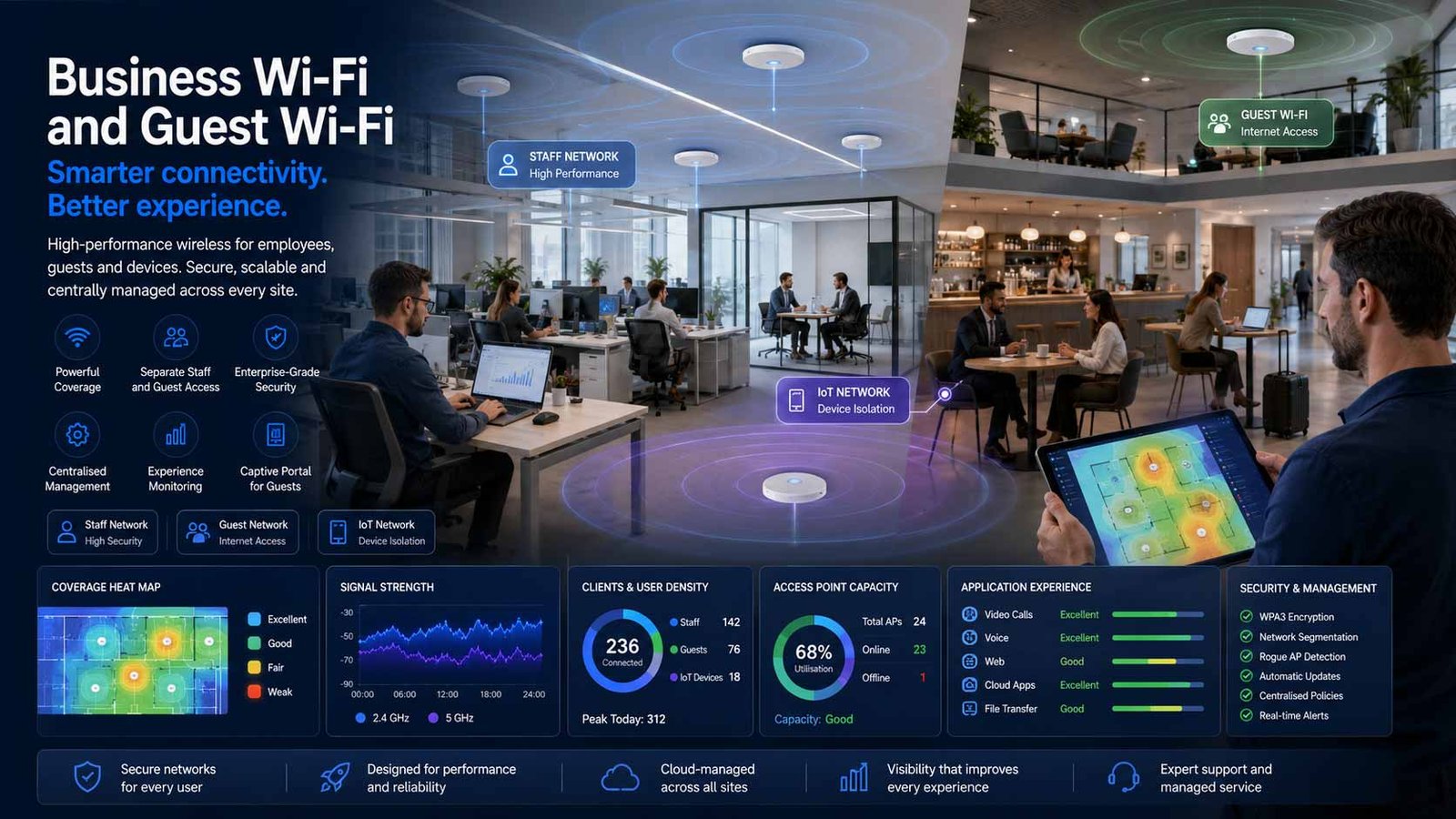
Why Business Wi-Fi Is A Separate Buying Decision
A business wireless network must translate a site, workforce and device estate into dependable radio coverage, capacity, access policy and operational support. The decision is therefore about the complete wireless service rather than a single piece of equipment.
- Measure coverage and interference before deciding access-point quantity
- Design capacity for peak concurrent users, applications and connected devices
- Separate staff, visitors, operational systems and unmanaged devices
- Define who monitors, patches, supports and replaces the wireless estate
Reliable Wi-Fi begins with requirements and radio design. Floor plans alone cannot show how walls, shelving, machinery, neighbouring networks, high ceilings, outdoor areas and user movement will affect performance. A credible proposal should explain the survey method, assumptions and acceptance criteria.
The same distinction applies to guest access. A visitor network may need simple access, branded onboarding, voucher or sponsor approval, time limits, content controls, analytics or marketing consent. Those functions introduce privacy, support and data-governance decisions beyond basic connectivity.
Providers also differ in commercial scope. A managed provider may survey, supply, install, configure, monitor and support the complete wired and wireless local network. A platform-led route may give the customer or its IT partner more control but leave design, cabling, configuration and first-line support outside the licence.
The comparison should therefore separate hardware capability from service accountability. Buyers need a design that can be tested, a management model that can be operated, and contract terms that define faults, changes, replacements, software support and exit.
Compare Business Wi-Fi Providers By Design And Service Fit
Business Wi-Fi proposals may combine managed services, wireless platforms and specialist guest-access tools. Compare what is included in the survey, design, installation, licences, monitoring and support before deciding which option fits your sites.
| Provider Or Platform | Positioning | Relevant Strengths | Potential Fit | Points To Verify |
|---|---|---|---|---|
| BT Business | Managed LAN and campus networking | UK enterprise networking capability, design and managed-service options around local wired and wireless infrastructure. | Organisations seeking a recognised UK provider to coordinate network design, deployment and ongoing operations. | Confirm the exact wireless platform, survey scope, guest-access capability, support hours, change process, hardware ownership and replacement targets. |
| Virgin Media Business | Managed Wi-Fi and LAN services | End-to-end design, consultancy and installation, multi-site positioning, central management and analytics options for employees and guests. | Retail, hospitality, public venue and multi-site estates wanting a managed service rather than a hardware-only purchase. | Check geographic delivery, platform choice, portal features, data handling, support boundaries, cabling assumptions and service-level commitments. |
| Wavenet | Managed LAN and Wi-Fi | Wireless survey, network design, implementation and managed operations covering switches, access points, security and workplace performance. | UK organisations wanting one managed-service partner across local network design, deployment, monitoring and support. | Verify vendor platform, survey deliverables, configuration ownership, monitoring depth, incident escalation, licence renewal and exit assistance. |
| Cisco Meraki | Cloud-managed wireless platform | Central dashboard, enterprise access points, wireless assurance, policy controls, guest splash-page options and broad partner availability. | Multi-site organisations wanting consistent cloud management and a large UK partner ecosystem. | Compare licence edition, term, support route, access-point model, analytics, identity integration, data residency, renewal exposure and configuration export. |
| HPE Aruba Networking | Enterprise wireless and access control | Broad access-point portfolio, central management, identity and policy integration, location services and options for demanding campus environments. | Larger workplaces, education, healthcare, hospitality or complex estates requiring granular policy and scalable wireless operations. | Confirm controller or cloud architecture, licence stack, identity components, design partner capability, support ownership and upgrade pathway. |
| RUCKUS Networks | High-density enterprise and venue Wi-Fi | Wireless platforms positioned for hospitality, public venues, education and other environments where density, coverage and guest experience are important. | Venues, hotels, campuses and challenging RF environments that need specialist design and resilient client performance. | Validate the proposed management platform, access-point and antenna selection, partner design credentials, guest portal integration, support and lifecycle terms. |
| Ubiquiti UniFi | Controller-led wireless platform | Integrated access points, switching and network management with guest isolation, hotspot portals and a wide range of hardware options. | Smaller and mid-sized estates with capable internal IT or a trusted managed partner seeking control and flexible hardware economics. | Establish who designs and supports the service, controller hosting, backups, firmware policy, spares, monitoring, escalation and long-term licence or platform dependencies. |
| Purple | Guest, staff and multi-tenant Wi-Fi platform | Branded captive portals, visitor onboarding, analytics, data capture, CRM integration and staff or tenant access functions across compatible network hardware. | Retail, hospitality, venues, workplaces and property operators where guest experience or visitor insight is a primary requirement. | Confirm hardware compatibility, lawful data use, consent design, retention, integrations, portal availability, support ownership and the boundary with the underlying wireless network. |
Use the table to identify relevant options, then confirm current platform availability, partner capability, licence terms and service scope in a written proposal. Request a site-specific design and responsibility matrix from every shortlisted provider.
Evaluate The Complete Wireless Operating Model
Coverage, capacity, access control, guest experience, management and support must work together. A provider should be able to evidence each design decision and define how the service will be operated after installation.
Comparison Criterion
Coverage Survey And RF Design
Require a predictive design supported by an on-site or validation survey where risk justifies it. The provider should identify coverage targets, wall and material assumptions, interference, channel planning, mounting constraints, outdoor areas and any locations needing specialist antennas.
Comparison Criterion
Capacity And User Density
Size the network for concurrent users, device counts and application behaviour rather than headline access-point speed. Meeting rooms, event spaces, tills, scanners, voice devices and dense visitor areas may need different radio and capacity assumptions.
Comparison Criterion
Access-Point And Antenna Choice
Compare the proposed Wi-Fi generation, radio design, uplink, power requirements, environmental rating and antenna pattern. A high-specification access point in the wrong position can perform worse than a correctly selected model installed to a measured design.
Comparison Criterion
Segmentation And Access Policy
Separate corporate users, visitors, operational technology, payment devices, building systems and unmanaged equipment using appropriate identities, VLANs, policies and firewall controls. Ask how access is revoked and how exceptions are governed.
Comparison Criterion
Guest Onboarding And Captive Portal
Review click-through, voucher, sponsor, passwordless and identity-based options, plus branding, accessibility, language, terms and privacy notices. Test the full login journey across common devices before accepting the service.
Comparison Criterion
Central Management And Experience Monitoring
Compare client visibility, RF health, application experience, alerts, logs, configuration history, site comparison and remote troubleshooting. Confirm which information the customer can see and how long operational records are retained.
Comparison Criterion
Security, Patching And Administration
Assess administrative MFA, role-based access, encryption, firmware policy, vulnerability handling, certificate support, rogue-device detection, logging and secure configuration backups. Security responsibilities must be explicit across the provider, platform and customer.
Comparison Criterion
Support, Spares And Lifecycle
Define support hours, severity levels, remote diagnosis, on-site attendance, access-point replacement, spare stock, licence renewal, end-of-support handling and refresh planning. A network can remain connected while user experience is still materially degraded.
Compare Total Wireless Service Cost, Not Access-Point Price
Business Wi-Fi pricing is normally quotation-based because building conditions, user density, cabling, licences, guest functions and support scope vary. Compare the same design assumptions and service boundary across every proposal.
| Cost Area | Typical Charging Basis | Lower-Complexity End | Higher-Complexity End | What To Verify |
|---|---|---|---|---|
| Discovery And Wireless Survey | One-off per site, building or survey day | Small open office with current drawings | Multi-floor, warehouse, hospitality, outdoor or high-density environment | Survey type, deliverables, heatmaps, validation and redesign allowance |
| Access Points And Antennas | Per device plus mounting accessories | Standard indoor access point | High-density, outdoor, hazardous or directional design | Model, Wi-Fi generation, radio count, uplink, warranty and replacement policy |
| Switching, Power And Cabling | Per switch, port or access-point location | Existing compliant cabling and available PoE capacity | New cable routes, switch upgrades, fibre uplinks or difficult access | PoE budget, cabling standard, containment, testing, certification and building works |
| Cloud Or Controller Licensing | Per access point, device or site for a fixed term | Core management and monitoring | Advanced assurance, identity, security, analytics or longer support coverage | Edition, minimum term, renewal price, grace period and consequences of expiry |
| Guest Portal And Analytics | Per venue, user volume, feature tier or data volume | Simple branded access and acceptable-use notice | Identity, CRM integration, multi-language journeys, analytics and marketing workflows | Data controller roles, consent, retention, export, integrations and portal availability |
| Installation And Configuration | Per site, engineer day or project milestone | Normal-hours deployment with easy access | Out-of-hours work, multiple contractors, complex change control or phased migration | Scope, prerequisites, access, testing, documentation, rollback and acceptance |
| Managed Monitoring And Support | Per access point, site or service tier each month | Business-hours remote support | 24/7 monitoring, proactive optimisation, on-site response and service reporting | Support boundary, SLA, exclusions, changes, reporting and service credits |
| Lifecycle And Refresh | Planned project, subscription or hardware-as-a-service model | Customer-owned estate with scheduled review | Provider-managed replacement, spares and technology refresh | Ownership, depreciation, end-of-support notices, secure disposal and exit terms |
Build a five-year cost model. Include survey, hardware, switching, cabling, installation, licences, guest-platform fees, managed support, changes, replacement stock, inflation assumptions and exit. A lower first-year price can become expensive when licences, coverage remediation or support are excluded.
Ask providers to state every assumption, dependency and optional item. Proposals should use the same site list, user and device estimates, coverage targets, guest requirements, support hours and contract period so commercial differences remain meaningful.
Match The Wireless Design To The Operating Environment
Site materials, user movement, density, device types, privacy requirements and support capability change the right provider and architecture. Use measured operating needs rather than a generic access-point count.
Professional Office
Strong fit where staff depend on meetings, cloud applications and mobile working across desks, meeting rooms and shared spaces. Priorities usually include predictable roaming, identity-based access, secure visitor connectivity and straightforward support.
Retail And Hospitality Venue
Guest experience, payment and operational traffic may share the same physical estate but require strict policy separation. Density, portal usability, analytics governance and rapid fault response are often central to the comparison.
Warehouse Or Logistics Site
High ceilings, racking, scanners, handheld devices, vehicles and moving stock can create unusual RF conditions. Specialist survey methods, antenna selection, roaming and resilient operational coverage become important.
Education Or Training Campus
Large user populations, varied device ownership, safeguarding controls, multiple buildings and seasonal peaks require scalable policy, visibility and support. Procurement may also demand formal standards and installation evidence.
Healthcare Or Care Environment
Coverage and security may need to support clinical, administrative, visitor and connected-device use without mixing trust zones. Change windows, resilience and support procedures can be more important than headline throughput.
Multi-Tenant Or Flexible Workspace
Tenant isolation, branded onboarding, delegated administration, move-in changes and shared infrastructure require a platform and operating model designed for multiple organisations rather than one flat network.
Multi-Site Organisation
Central templates, consistent security, remote monitoring, licence visibility and repeatable deployment can reduce operational variation. The provider must still adapt each design to local radio conditions and building constraints.
Small Single-Site Business
A managed wireless service can still be valuable when the business lacks network expertise or cannot tolerate poor coverage. Scope should remain proportionate, with clear ownership and no unnecessary enterprise complexity.
Discovery And Survey Control Design Risk
Begin with business use cases, site plans, existing network information, device categories, peak occupancy, critical areas, security zones, guest requirements and support expectations. The survey should record interference, materials, mounting restrictions, power and cabling dependencies.
Every design should state measurable targets such as intended coverage, minimum signal, capacity assumptions, roaming areas and accepted exclusions. Where a site is complex, require post-installation validation rather than treating installation completion as acceptance.
- Agree floor plans, critical zones and peak occupancy assumptions
- Identify existing switches, PoE budgets, cabling and uplink limits
- Document staff, guest, operational and connected-device access policies
- Set survey, installation and acceptance deliverables before ordering
Pilot, Validate And Roll Out In Controlled Waves
Use a representative area or site to test onboarding, roaming, application performance, segmentation, monitoring, support and operational handover. A pilot should prove the service model, not only whether a device can connect.
- Baseline the current user experience and known coverage complaints.
- Install a pilot using the proposed production configuration and support route.
- Test staff, guest and operational devices under realistic load and movement.
- Validate coverage, capacity, policies, portal journeys, logs and alerts.
- Correct design issues before repeating the deployment across further sites.
- Complete documentation, training, acceptance and post-rollout optimisation.
Ask Questions That Expose Design And Support Risk
Strong answers should be specific to your sites, users and operating model. Generic feature lists do not prove that the proposed service will deliver usable coverage or accountable support.
What Survey And Acceptance Evidence Will We Receive?
Ask whether the proposal includes predictive, on-site and post-installation validation, plus heatmaps, AP locations, assumptions, test results and a correction process where targets are missed.
Which Hardware, Licences And Feature Tiers Are Included?
Request exact access-point, switch, antenna, controller and licence details. Confirm the term, renewal treatment, support entitlement and what stops working if a subscription expires.
How Are Staff, Guests And Connected Devices Separated?
Require a written access-policy design covering identities, VLANs, firewall rules, internet-only access, device isolation, certificate or credential handling and revocation.
Who Owns The Guest Portal And Personal Data?
Establish controller and processor roles, data fields, lawful basis, notices, consent, retention, location or behaviour analytics, marketing integrations, subject requests and deletion at exit.
What Does The Managed Service Actually Monitor?
Compare AP availability, client experience, RF health, application performance, switches, uplinks, configuration changes and security alerts. Clarify what triggers proactive action rather than a customer ticket.
How Will Faults, Changes And Exit Be Managed?
Define severity, response, on-site attendance, replacement, routine changes, emergency work, configuration export, documentation, hardware ownership, licence transfer and secure data deletion.
Build A Weighted Business Wi-Fi Provider Shortlist
Use the same evidence pack and scoring definitions for every bidder. Change the weights only where your operating environment clearly requires a different priority.
| Score Area | Suggested Weight | Evidence To Review |
|---|---|---|
| Coverage And RF Design | 20% | Survey method, heatmaps, assumptions, AP placement, interference plan and acceptance targets |
| Capacity And User Experience | 15% | Peak-density modelling, application needs, roaming, uplinks, airtime and performance validation |
| Security And Segmentation | 15% | Identity, encryption, isolation, policy, administration, logging, firmware and vulnerability management |
| Guest Experience And Privacy | 10% | Portal usability, accessibility, authentication, notices, consent, data minimisation, retention and export |
| Management And Visibility | 10% | Dashboards, client diagnostics, RF analytics, alerts, configuration history, reporting and customer access |
| Deployment And Local Infrastructure | 10% | Cabling, PoE, switching, mounting, project control, site access, testing, documentation and handover |
| Support And Service Levels | 15% | Support hours, severity, proactive action, on-site response, replacement, escalation and service reviews |
| Commercial And Exit Terms | 5% | Total cost, licence renewal, ownership, price changes, data deletion, configuration export and transition support |
Score each area from 0 to 5, multiply by the agreed weighting and record the evidence used. Apply a mandatory-fail rule for requirements such as guest isolation, administrative MFA, critical-zone coverage, privacy controls or a required support window.
Keep commercial scoring separate from technical compliance until minimum requirements are met. A low-cost proposal should not outrank a service that can evidence better coverage, safer access, clearer support and lower operational risk.
How To Compare Business Wi-Fi Provider Proposals
Ask every provider to respond to the same site list, user and device profile, guest-access requirements, security policies, support expectations and contract term. This makes differences in design, coverage assumptions, licences and managed-service scope easier to identify.
Compare written evidence for survey quality, capacity planning, platform fit, segmentation, guest experience, privacy controls, deployment, monitoring, support, pricing and exit. Record every assumption, exclusion and customer responsibility before scoring the proposals.
Shortlist providers only after receiving a site-specific design, commercial schedule, implementation plan, responsibility matrix and acceptance criteria. These documents should show what will be delivered, who owns each task and how performance will be tested.
What A Strong Proposal Should Confirm
A long feature list does not prove that the proposed network will meet coverage, capacity, guest-access or support requirements. Strong proposals connect the site survey, technical design, licences, implementation work and service commitments to measurable acceptance criteria.
- Written coverage, density and acceptance assumptions
- Named hardware, licences, support and lifecycle terms
- Clear security, guest-data and administrative responsibilities
- Documented installation, testing, handover and escalation processes
- Transparent total cost and practical exit assistance
Use This Sequence Before Signing A Business Wi-Fi Contract
A disciplined evidence pack helps providers quote the same requirement and gives the buyer measurable criteria for design, deployment and service acceptance.
- List every site, floor, outdoor area and critical coverage zone in scope.
- Record peak staff, visitor and connected-device counts by area and time.
- Define critical applications, voice, video, scanning and operational use cases.
- Provide current drawings, cabling information, switches, PoE capacity and known interference.
- Separate staff, guest, operational, payment and unmanaged-device access requirements.
- Decide whether guest access needs branding, vouchers, sponsors, analytics or marketing consent.
- Agree survey type, heatmaps, design assumptions and post-installation validation.
- Require exact access-point, switch, antenna, controller and licence specifications.
- Document administrative access, MFA, logging, firmware, backup and vulnerability handling.
- Compare customer portal access, monitoring depth, reporting and configuration history.
- Agree support hours, severity definitions, on-site response, replacement and spares.
- Build a multi-year cost model including licences, support, changes and refresh.
- Define hardware ownership, configuration export, data deletion and transition at exit.
- Pilot a representative area or site before broad deployment.
- Use measurable acceptance criteria and retain final design and test evidence.
Frequently Asked Questions
Answers to common commercial, design, security and privacy questions from UK organisations comparing business Wi-Fi and guest Wi-Fi solutions.
What is the difference between business Wi-Fi and an internet connection?
An internet connection brings external connectivity to the site. Business Wi-Fi distributes network access wirelessly across the premises. Wi-Fi performance depends on access-point design, local interference, cabling, switching, user density, configuration and support, even when the underlying connection is operating normally.
Does every business need a wireless site survey?
The survey depth should match the risk and complexity. A small open office may use a predictive design with validation, while warehouses, hotels, campuses, multi-floor buildings, outdoor areas and high-density venues usually justify more detailed on-site measurement and post-installation testing.
How many wireless access points will a business need?
There is no reliable universal ratio. The quantity depends on floor area, materials, interference, ceiling height, user density, device capabilities, applications, mounting positions and coverage targets. Providers should justify the number and model through a documented design rather than a simple square-metre estimate.
Should guest Wi-Fi be separated from the staff network?
Yes. Guest devices should normally be isolated from trusted corporate, payment, operational and connected-device networks. The design should also consider client-to-client isolation, content policy, bandwidth controls, time limits, logging and how authorised support staff administer the service.
What is a captive portal?
A captive portal is the page or sign-in journey presented before a guest receives network access. It may provide terms, privacy information, branding, vouchers, sponsor approval or identity options. Buyers should test usability, accessibility, privacy, availability and device compatibility.
Should a business choose Wi-Fi 6, Wi-Fi 6E or Wi-Fi 7?
The correct choice depends on client-device support, density, spectrum conditions, uplinks, power, lifecycle and budget. A newer standard does not correct poor survey or placement. Ask providers to explain the operational benefit of the proposed generation for each site and device estate.
What privacy issues apply to guest Wi-Fi analytics?
Data such as names, email addresses, device identifiers, location or behavioural insights may be personal data. The organisation should define purposes, lawful basis, transparency, minimisation, retention, security, third-party roles and rights handling. Marketing consent should not be bundled into access where it is not necessary for the service.
What should a managed Wi-Fi SLA cover?
The SLA should identify managed components, support hours, severity definitions, response and restoration targets, monitoring, on-site attendance, hardware replacement, software support, planned maintenance, changes, reporting, service credits and exclusions. Coverage or user-experience faults should not be reduced to access-point uptime alone.
Can one platform manage Wi-Fi across several locations?
Yes. Cloud or centrally managed platforms can apply templates, monitor sites and support remote troubleshooting. However, every location still needs a suitable local design, cabling, power and acceptance test. Central consistency should not become a reason to ignore building-specific radio conditions.
How long should business Wi-Fi hardware remain in service?
Lifecycle depends on vendor support, licences, client devices, capacity growth, security updates, environmental conditions and business change. Contracts should include regular health and capacity reviews, end-of-support notices, a refresh plan, configuration export and secure disposal or return procedures.
Provider Information And Wireless Security Resources
Use the resources below to verify current hardware, licences, guest-access features, security controls and managed-service scope. Product portfolios and partner capabilities can change, so confirm the proposed platform, survey method, data handling, support commitments and contract terms in writing.
Reviewed by: Bhav Giva for CompareServices.co.uk. For complex security, personal-data or compliance requirements, include the appropriate IT, security and privacy specialists in the supplier review.
Reviewed: 16 July 2026.
- BT Business Campus Managed LAN
- Virgin Media Business WiFi Solutions
- Virgin Media Business Managed LAN Services
- Wavenet Managed LAN And WiFi Services
- Cisco Meraki Cloud-Managed Wi-Fi Access Points
- HPE Aruba Networking
- RUCKUS Networks
- Ubiquiti UniFi Guest Wi-Fi Best Practices
- Purple Guest, Staff And Multi-Tenant Wi-Fi
- NCSC Network Security Fundamentals
- ICO Guidance On Location Data
- ICO Electronic Mail Marketing Guidance