
Compare Time & Attendance Systems Providers UK
Compare Clocking Methods, Mobile And Kiosk Access, Timesheet Rules, Breaks, Overtime, Approvals, Privacy, Reporting, Integrations, Support And Complete System Cost
Compare time attendance systems UK providers by employee clocking method, fixed-site and mobile workforce coverage, kiosk reliability, GPS or geofence controls, break and overtime rules, scheduled-versus-worked comparisons, exception handling, manager approvals, employee corrections, audit history, privacy safeguards, biometric alternatives, reporting, downstream data export, implementation, support, resilience, contract terms and complete lifecycle cost. Give every provider the same workforce profile, sites, shift patterns, clocking rules, approval workflow, record-retention standard and integration assumptions before comparing proposals.
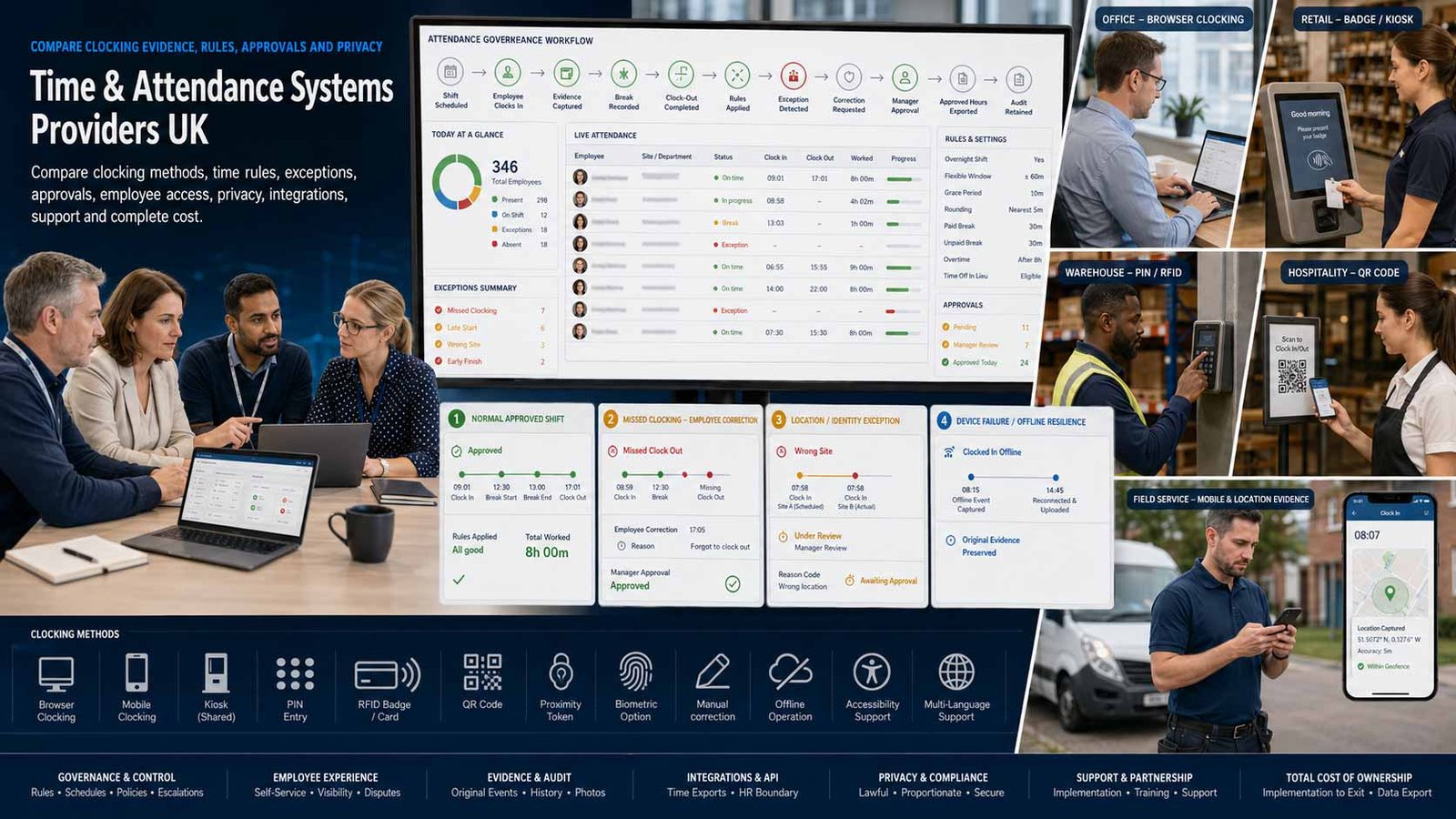
Buy A Verifiable Working-Time Record, Not Just A Clocking App
A useful system should capture dependable attendance evidence, apply agreed working-time rules and provide a controlled correction and approval process without creating disproportionate monitoring or avoidable employee friction.
- Match clocking methods to fixed, mobile, remote and multi-site work
- Separate raw clock events from approved working-time records
- Define exceptions, corrections, approvals and audit ownership
- Confirm privacy, retention, resilience, support and exit in writing
A time and attendance system records when employees start, stop and pause work, then converts those events into structured timesheets and attendance reports under the organisation’s agreed rules. Clocking may use a browser, mobile app, shared kiosk, PIN, RFID card, QR code, proximity token or biometric device. Managers normally review exceptions such as missed clockings, unscheduled work, late arrival, early departure, overtime and break discrepancies before records are approved.
The right solution depends on workforce type, number of sites, connectivity, shift complexity, employment agreements, device access, trust model, privacy expectations, record-retention requirements, manager capacity and the downstream systems that consume approved hours. A feature-rich platform is not automatically better when frontline employees cannot use it reliably or supervisors spend more time resolving exceptions than they did with the previous process.
This page compares time and attendance capture, rules, approvals, reporting and approved-hours export. It does not compare HR software or payroll processing. Those adjacent services contain different records, statutory responsibilities, provider capabilities and commercial criteria and should be evaluated independently.
Choose The Right Time And Attendance Operating Model
Clocking technology should reflect how people actually work, where they work and how exceptions are reviewed—not the method that looks most impressive in a demonstration.
| System Model | What It Usually Includes | Best-Fit Question |
|---|---|---|
| Mobile Clock-In App | Employees clock in and out through a smartphone, often with a location stamp, geofence, QR code or permitted flexible clocking option. | Will every worker have a suitable device, lawful location policy and reliable data connection? |
| Shared Tablet Or Kiosk Clock | A tablet or browser acts as a common on-site terminal using PINs, photos, signatures, QR codes or another identity method. | Can the kiosk withstand peak changeovers, outages, queueing and shared-device security risks? |
| RFID, Badge Or Proximity Terminal | Employees present a card, fob or badge to a fixed clocking unit, with records synchronised to local or cloud software. | How are lost badges, buddy clocking, offline storage, replacement and multi-site transfers handled? |
| Biometric Clocking System | Fingerprint or facial recognition is used to verify the individual at the clocking point, sometimes alongside PIN or proximity options. | Is biometric processing necessary, proportionate, lawful and supported by a non-biometric alternative? |
| Web And Desktop Time Clock | Employees record attendance through a browser or workstation, often suited to offices, remote teams or controlled computer-based work. | How does the system prevent accidental, duplicate or off-site entries without intrusive monitoring? |
| Field And Job-Site Attendance | Mobile clocking, GPS, geofences, job or site codes and offline capture support construction, service, cleaning and dispersed teams. | Can records distinguish attendance from job time while remaining usable in low-connectivity environments? |
| Enterprise Workforce Time System | Rules engines, multiple agreements, extensive permissions, hardware estates, multi-company structures and advanced reporting support complex organisations. | Can configuration be governed and tested without creating a system only the implementation consultant understands? |
| Hybrid Multi-Method System | The same organisation uses kiosks, mobile, browser, badge or biometric methods for different workforce groups under one record model. | Are identity, rules, approvals and reporting consistent when several clocking channels are combined? |
Eight Areas That Determine Time And Attendance Fit
Use the same employees, sites, shifts, clocking methods, rules, exception scenarios, approval stages, privacy requirements and reporting period for every provider.
Comparison Criterion
Clocking Methods And Workforce Accessibility
Compare mobile, web, kiosk, PIN, QR, badge, proximity, biometric and manual-entry options. Check accessibility, language, device ownership, shared-terminal queues, protective equipment, dirty or outdoor environments and reasonable alternatives for workers who cannot use the default method.
Comparison Criterion
Time Rules, Breaks And Overtime
Define scheduled hours, flexible windows, rounding, grace periods, paid and unpaid breaks, overnight shifts, overtime thresholds, time-off-in-lieu rules and exceptions. Require the supplier to demonstrate how raw clock events become a calculated record and where managers can override the result.
Comparison Criterion
Location, Identity And Anti-Buddy Controls
Assess site restrictions, geofences, GPS stamps, kiosk photos, PINs, badges, facial or fingerprint verification and duplicate-entry controls. Stronger identity controls can improve evidence but also increase privacy, fairness and implementation risk, so select the least intrusive method that meets the documented need.
Comparison Criterion
Exceptions, Corrections And Approval Workflow
Test missed clockings, late starts, early finishes, no break, long break, unscheduled work, incorrect site, device failure and employee correction requests. Compare who can edit, who approves, whether reasons are mandatory, whether the original value remains visible and how overdue exceptions are escalated.
Comparison Criterion
Employee Visibility And Dispute Handling
Employees should be able to view their own clockings, calculated hours, breaks, changes and approval status through an appropriate channel. Confirm how they submit corrections, how managers respond, what evidence is retained and how the business resolves disagreement before records are finalised.
Comparison Criterion
Reporting, Audit And Record Retention
Review attendance registers, lateness, overtime, absence codes, scheduled-versus-worked hours, exceptions, audit trails, manager actions, exports and retention controls. Confirm that reports can be reproduced for the required period and that historic records remain intelligible after rule or organisational changes.
Comparison Criterion
Security, Privacy And Data Governance
Assess UK data location where relevant, encryption, MFA, SSO, role-based access, administrator logs, data minimisation, employee notices, DPIA support, biometric-template handling, subcontractors, deletion, backups and breach response. Location or biometric features should never be enabled solely because they are available.
Comparison Criterion
Implementation, Integration, Support And Exit
Compare configuration workshops, data import, device installation, policy design, testing, training, support hours, service levels, release management, API or approved-hours export, business continuity, contract term, price review, data extraction and decommissioning. The organisation must be able to leave without losing attendance evidence.
Measures To Define Before Selecting A System
Translate claims about accuracy, compliance and productivity into testable clocking, rule, approval, privacy, support and portability evidence.
| Measure | What It Should Define | Evidence To Request | Common Weakness |
|---|---|---|---|
| Clocking reliability | Whether employees can record start, stop and break events consistently in normal and adverse conditions | Device and browser matrix, offline behaviour, terminal capacity, queue test, duplicate handling and availability history | The demo works on a strong connection but the live workplace has dead zones or shared-device queues |
| Calculated-hours accuracy | How raw events are converted into payable or reportable working-time records under defined rules | Rule catalogue, worked examples, overnight shifts, breaks, rounding, overtime and change-control process | A generic rules engine cannot reproduce the organisation’s actual arrangements without manual fixes |
| Exception workload | The number and type of records requiring employee or manager intervention | Exception definitions, dashboard, bulk actions, reminders, escalation, correction and approval timing | Automation creates a larger review queue because tolerances and schedules are poorly configured |
| Identity assurance | Whether a clock event can be attributed to the intended worker at the intended location | PIN, badge, kiosk image, GPS, geofence, biometric or supervisor verification and fallback | The method either permits buddy clocking or introduces disproportionate monitoring |
| Employee transparency | Whether workers can see, understand and challenge records about them | Self-service view, correction request, reason codes, notifications, privacy information and response target | Managers can edit records invisibly and employees discover changes only after downstream processing |
| Auditability | Whether the organisation can reconstruct who changed what, when, why and under which rule version | Immutable history, actor, timestamp, previous value, new value, reason, approval and configuration version | Exports show the final total but not the underlying event or manager adjustment |
| Privacy control | Whether monitoring is necessary, proportionate and limited to the documented purpose | Data map, lawful basis, DPIA support, retention, role access, alternatives, worker notice and processor terms | Location or biometric data is collected continuously when event-level verification would be enough |
| Record resilience | Whether clocking and approved records remain available through outages, migration and staff turnover | Backup, recovery target, offline capture, data export, retention, archive format and restore test | The business can export a summary but not the detailed clock events and approval evidence |
| Support performance | How device, clocking, configuration and record problems are diagnosed and resolved | Support hours, channels, priority definitions, target response, hardware replacement and escalation | The sales team promises rapid help but live incidents enter a generic software queue |
| Contract portability | Whether the business can change supplier or system design without losing operational evidence | Term, notice, renewal, price review, export, device ownership, deletion, transition help and final archive | A proprietary device or export format creates avoidable lock-in at renewal |
Time And Attendance Providers UK Businesses Can Consider
Shortlist providers whose clocking methods, rule capability, exception workflow, privacy position, implementation and support model fit the workforce. Confirm the current product, contracting entity, modules and complete terms before purchase.
Provider Profile
RotaCloud
RotaCloud offers cloud-based time and attendance alongside rota tools for growing and shift-based businesses. Employees can clock through mobile devices or a shared terminal, with automatic timesheets, GPS restrictions, lateness reporting and manager review. Include it where fast deployment and straightforward multi-site clocking are priorities. Confirm the selected base plan and time-attendance add-on, employee and site scaling, kiosk security, photo use, GPS rules, exception workflow, reports, exports, support, annual pricing and contract changes.
Review official RotaCloud time and attendance informationProvider Profile
Deputy
Deputy provides mobile, tablet and web time clocks with real-time attendance visibility, location verification, break recording, timesheets and approval controls for shift-based teams. Include it where hospitality, retail, care, services or multi-location operations need app-led attendance and rapid manager oversight. Confirm the UK plan, clocking channels, unscheduled shifts, break rules, photo or GPS settings, employee edits, approval levels, offline behaviour, integrations, support and complete subscription cost.
Review official Deputy UK time and attendance informationProvider Profile
TimeKeeper
TimeKeeper is a UK and Ireland-focused platform designed particularly for construction, field service and mobile workforces. It supports mobile, kiosk and browser clocking, job-site geofences, facial verification, live attendance, timesheets and approval workflows. Include it where dispersed teams and site-level evidence matter. Confirm Core or Pro scope, annual or monthly billing, facial-recognition governance, offline use, job and attendance separation, device setup, reporting, integrations, support, retention and exit.
Review official TimeKeeper time and attendance featuresProvider Profile
BrightHR Blip
Blip is BrightHR’s clock-in and clock-out application for BrightHR customers. It supports geofenced, QR-code and flexible clocking, break records, location information, timesheet reports and real-time status. Include it where a small business already uses or is considering the wider BrightHR subscription and wants a relatively simple mobile attendance method. Confirm the required BrightHR package, location policy, employee device access, correction workflow, reporting limits, flexible clocking, support, retention and the cost of the parent subscription.
Review official BrightHR Blip informationProvider Profile
Papershift
Papershift provides online time tracking and a tablet time clock with PIN or signature options, automatic synchronisation, timesheets, employee records and manager review. Include it where cloud deployment, shared-device clocking and straightforward attendance workflows are important. Confirm the UK-facing subscription, employee limits, kiosk devices, offline behaviour, authentication choices, working-time rules, approvals, exports, support location, data processing terms, renewal and portability.
Review official Papershift time tracking informationProvider Profile
Kelio
Kelio supplies configurable time and attendance software with terminal, web and mobile clocking, multi-site rules, real-time records, permissions, reporting and implementation support. Include it where a mid-sized or complex organisation needs structured rules, hardware options and multi-company control. Confirm the proposed modules, terminal estate, biometric alternatives, agreement configuration, integration boundaries, implementation responsibilities, hosting, support, security, change requests, recurring fees and decommissioning.
Review official Kelio UK time and attendance informationProvider Profile
OneAdvanced Time And Attendance
OneAdvanced offers an enterprise time and attendance product with mobile, desktop and hardware clocking, automated alerts, permissions, reporting, rules-based schedules and smart biometric devices. Include it where manufacturing, logistics, retail, care, government or other desk-free workforces require scale and configuration depth. Confirm product scope, clock hardware, identity services, biometric necessity, rule design, implementation, support tiers, service commitments, security controls, data export, annual changes and transition assistance.
Review official OneAdvanced Time and Attendance informationProvider Profile
ClockRite
ClockRite provides UK time and attendance clocking systems with proximity, fingerprint, facial-recognition, Wi-Fi, 4G and cloud options, supported by its own attendance software. Include it where a business wants a physical terminal-led system, local support or a fixed-site alternative to employee smartphones. Confirm hardware capacity, connectivity, installation, biometric lawfulness, non-biometric options, licences, support after the included period, upgrades, backup, multi-site management, export, warranty and terminal ownership.
Review official ClockRite attendance clocking systemsWhat Changes Time And Attendance System Cost
Compare the complete cost of accurate, approved and retrievable attendance records—not the app licence or clocking terminal in isolation.
| Cost Driver | Why It Changes Spend | What A Comparable Quote Should Show |
|---|---|---|
| Employees and active users | Many cloud products scale by employee, active worker, manager or a company size band | Show included users, inactive records, leavers, seasonal workers, minimum charge and growth bands |
| Base subscription and add-ons | Time and attendance may be the core product, a flat add-on or a feature inside a wider subscription | Separate the required base licence, attendance module, optional features and any bundled products not needed |
| Clocking terminals and devices | Kiosks may use existing tablets, while badge or biometric systems can require dedicated terminals, readers, installation and spares | List every terminal, mount, enclosure, badge, network component, SIM, warranty, installation and replacement cost |
| Implementation and configuration | Complex shifts, overnight rules, overtime, multiple sites, agreements and approvals increase discovery, configuration and testing effort | Show workshops, data import, rule build, pilot, acceptance testing, training, project management and change requests |
| Identity and monitoring features | Photos, GPS, geofences or biometrics can add product cost and governance work | Identify licence cost, device requirement, DPIA effort, worker communication, alternative method and ongoing review |
| Integrations and data export | Standard reports may be included while APIs, custom files or managed connectors can cost extra | Show standard exports, API limits, connector charges, mapping, testing, maintenance and failure handling |
| Support and service level | Basic support may be included; named account management, 24/7 assistance or rapid hardware replacement may be chargeable | Show hours, channels, priority targets, escalation, customer success, onsite help and replacement terms |
| Storage, retention and archive | Long retention periods, images, biometric templates and detailed audit logs can affect storage or migration cost | Show included retention, archive access, export format, deletion, backup and retrieval charges |
| Contract term and annual increase | Monthly, annual and multi-year commitments may carry different discounts, renewal rules and price-review clauses | Show minimum term, notice, renewal, indexation, employee true-up, downgrade rights and early termination |
| Internal operating workload | Managers must review exceptions, approve time, maintain users and resolve disputes even after automation | Estimate weekly administration, super-user cover, policy ownership, training refresh and audit review |
| Indicative Commercial Model | Typical Position | What Must Be Confirmed |
|---|---|---|
| App-First Cloud Attendance | Often a low single-figure amount per employee each month or a small flat attendance add-on, depending on provider and workforce size | Confirm minimum subscription, base-product dependency, active-user definition, annual billing and feature limits |
| Shared Tablet Or Existing-Device Kiosk | Software subscription plus the organisation’s tablet, stand, charging, network and device-management cost | Confirm supported devices, kiosk locking, replacement, photo storage, offline behaviour and concurrent changeover capacity |
| Dedicated Badge Or Biometric Terminal | Commonly a hardware purchase from a few hundred pounds per terminal before installation, software, licences and continuing support | Confirm verification method, user capacity, installation, warranty, support renewal, spares, connectivity and privacy work |
| Enterprise Multi-Site Deployment | Usually custom quoted for users, modules, devices, implementation, integration, support and contract term | Require a five-year cost model, implementation assumptions, change-control rates, service commitments and exit assistance |
Match The System To The Workforce And Work Environment
The right shortlist depends on how employees clock, how managers approve, how intrusive verification would be and how much operational complexity the organisation can govern.
Small Office Or Single-Site Team
Prioritise simple browser, mobile or shared-kiosk clocking, clear employee correction, easy manager approval, understandable reports and low administration. Avoid complex identity technology when a PIN, QR code or supervised kiosk meets the documented need.
Hospitality, Retail Or Care Operation
Prioritise quick shift-change clocking, break rules, lateness and absence visibility, multiple locations, shared devices, mobile manager access, high-volume approvals and reliable operation during peak handovers.
Construction, Cleaning Or Field-Service Workforce
Prioritise mobile and kiosk choice, job-site or geofence options, offline capture, live who-is-in information, supervisor review, worker device alternatives and evidence that distinguishes site attendance from productive job time.
Manufacturing Or Complex Multi-Site Organisation
Prioritise robust terminals, overnight and rotating shifts, multi-agreement rules, role-based access, resilient connectivity, hardware support, auditable change control, high-volume reporting and a governed implementation model.
How To Compare Time And Attendance Proposals
Issue one workforce and rules profile containing employee numbers, worker groups, locations, shift patterns, overnight work, breaks, overtime, flexible time, clocking channels, device access, connectivity, correction rights, approval stages, privacy restrictions, retention, reports, exports, support and contract assumptions. Require a response matrix and live scenario demonstration rather than relying on a polished dashboard.
- Every worker group has an accessible and lawful clocking route
- Raw events, calculated hours and approved records remain distinct
- Missed clockings and disputed changes follow a visible workflow
- Biometric or location processing is justified and minimised
- Audit, retention, export, recovery and deletion are demonstrated
- Implementation, support, renewal and exit are explicit
Run The Same Exception Test
Ask every provider to process an identical week containing a normal shift, missed clock-out, early start, long break, overnight shift, unscheduled attendance, overtime, mobile-site change, employee correction and manager adjustment.
A system is not comparable when one supplier demonstrates only perfect clockings while another includes real exception handling, privacy controls, audit evidence and implementation effort.
Six Questions To Put To Every Time And Attendance Provider
The answers expose unusable clocking, hidden exception workload, disproportionate monitoring, weak resilience and record lock-in.
How Can Every Worker Clock Reliably?
Request the exact method for office, site, mobile, remote, outdoor, low-connectivity and shared-device users, including accessibility and fallback when the preferred method fails.
How Are Raw Events Converted Into Approved Hours?
Ask the provider to demonstrate rules, rounding, breaks, overnight shifts, overtime, manual changes, employee corrections, manager approval and the retained audit trail.
Which Location Or Identity Data Is Collected?
Confirm whether GPS, geofencing, photos, badges or biometrics are used, when collection occurs, why it is necessary, who can view it, how long it is retained and what alternative exists.
What Happens During An Outage Or Device Failure?
Test offline clocking, terminal storage, duplicate prevention, later synchronisation, mobile fallback, manual emergency records, recovery targets and evidence reconciliation.
Can We Retrieve Complete Records Years Later?
Review raw clock events, calculated results, corrections, approvals, rule versions, reports, exports, backups, leaver records, archive access and migration format.
What Happens At Implementation, Renewal And Exit?
Confirm configuration ownership, acceptance testing, worker communication, training, support targets, device warranty, annual increases, notice, export, deletion and transition help.
A Seven-Stage Time And Attendance Provider Evaluation
Move from real working patterns and privacy requirements to a tested attendance record rather than selecting software from a feature list.
- Create a verified attendance baseline covering worker groups, contracts or agreements relevant to working-time rules, sites, shift patterns, clocking methods, current timesheets, missed entries, correction volumes, manager workload, disputes, record retention and accountable owners.
- Map operating environments, including fixed offices, retail or care sites, production floors, outdoor areas, client premises, construction sites, remote work, shared devices, connectivity gaps, peak clocking times, accessibility and workforce consultation needs.
- Define mandatory rules and controls for start and finish times, breaks, overnight shifts, overtime, flexible windows, location evidence, identity assurance, employee corrections, manager adjustments, approval levels, audit reasons, privacy, retention and exports.
- Prepare one supplier brief and test week with identical employees, locations, devices, clock events, missed clockings, overtime, break exceptions, mobile work, correction requests, approvals, report requirements, support incidents and contract assumptions.
- Shortlist providers by usable clocking coverage, rule fit, exception workload, employee transparency, privacy design, security, reporting, resilience, implementation competence, support evidence, financial stability and referenceable customers with comparable work patterns.
- Pilot the preferred system with representative worker groups and managers. Test normal and abnormal clockings, device failure, low connectivity, badge or PIN replacement, employee challenge, supervisor adjustment, audit review, export, backup and support escalation.
- Roll out through controlled configuration, worker information, training, device deployment, super-user cover and baseline reporting. Review failed clockings, manager edits, exception age, overtime anomalies, employee disputes, system availability, support performance and record integrity before renewal.
Time And Attendance Systems Comparison Checklist
Use this table before buying, replacing or renewing a time and attendance system for a UK organisation.
| No. | Requirement | Evidence To Obtain Before Award | Confirmed |
|---|---|---|---|
| 01 | Workforce and attendance baseline complete | Worker groups, sites, shifts, methods, exceptions, disputes, manager workload, records and owners | |
| 02 | Clocking environments mapped | Office, mobile, remote, outdoor, client site, connectivity, peak queues, devices and accessibility | |
| 03 | Clocking methods approved | Mobile, web, kiosk, PIN, QR, badge, proximity, biometric, manual fallback and worker alternatives | |
| 04 | Working-time rules documented | Schedules, overnight shifts, breaks, rounding, grace, overtime, flexible windows and rule ownership | |
| 05 | Exception workflow tested | Missed clock, duplicate, early, late, no break, long break, unscheduled work, correction and escalation | |
| 06 | Employee visibility accepted | Own records, correction request, notifications, reasons, response target and dispute route | |
| 07 | Manager adjustment controls accepted | Permissions, mandatory reason, previous value, new value, approval, bulk edit and audit review | |
| 08 | Location and identity processing justified | Purpose, necessity, proportionality, DPIA, notice, access, retention and less intrusive alternative | |
| 09 | Security and administrator access approved | MFA, SSO, roles, super-admin, logs, encryption, processors, breach response and leaver removal | |
| 10 | Reports and retention mapped | Raw events, calculations, approvals, attendance register, overtime, exceptions, archive and retrieval period | |
| 11 | Outage and continuity tested | Offline capture, terminal storage, mobile fallback, emergency process, synchronisation, backup and restore | |
| 12 | Implementation responsibilities agreed | Discovery, configuration, data import, devices, policy, consultation, training, testing and go-live owners | |
| 13 | Support and hardware service confirmed | Hours, priority, response, escalation, terminal warranty, replacement, onsite help and customer success | |
| 14 | Commercial terms approved | Users, modules, devices, setup, integration, storage, support, term, renewal, annual increase and termination | |
| 15 | Export and decommissioning proven | Detailed export, rule history, audit data, images or templates, device ownership, deletion and closure confirmation |
Common Time And Attendance Buying Mistakes
Most avoidable problems begin with a clocking method chosen too early, unclear rules, invisible corrections, excessive monitoring or weak record portability.
| Mistake | Why It Creates Risk | Better Control |
|---|---|---|
| Buying a clocking method before mapping the workforce | Mobile-only or terminal-only designs exclude employees, create queues or fail at remote locations | Map every worker group, environment, device and fallback first |
| Treating clock events as automatically correct hours | Missed events, breaks, overnight shifts and overtime still require rules and controlled review | Separate raw events, calculation and approval |
| Copying old rounding rules without challenge | Historic tolerances can create unfair results, disputes or systematic errors | Document, test and approve each rule with worked examples |
| Enabling GPS or biometrics because the feature exists | Intrusive monitoring creates legal, fairness, trust and security risk without a documented need | Use necessity, proportionality and least-intrusive-method tests |
| Hiding manager edits from employees | Invisible changes undermine trust and make disputes harder to resolve | Provide transparent records, reasons and correction routes |
| Ignoring kiosk queues and device failure | Peak shift changes can produce missed clockings and supervisor workarounds | Load-test terminals and define offline and emergency processes |
| Underestimating exception administration | A poorly configured system can replace manual timesheets with a permanent correction queue | Measure exception rate and approval time during the pilot |
| Assuming a standard export proves record integrity | A final total may omit underlying clock events, edits, approvals and rule history | Test detailed audit and archive exports |
| Skipping workforce communication and training | Employees may clock incorrectly or distrust the system when purpose and rights are unclear | Provide clear policy, privacy information, demonstrations and support |
| Allowing renewal without performance evidence | Worker patterns, sites, rules, devices, prices and privacy expectations change over time | Review reliability, exception workload, disputes, cost and fit before notice dates |
Frequently Asked Questions
Answers to common questions from UK organisations comparing clocking methods, rules, privacy, records, resilience and supplier terms.
What Is A Time And Attendance System?
A time and attendance system records employee start, finish and break events, applies the organisation’s defined working-time rules and produces structured timesheets or attendance reports. Clocking may use mobile, browser, kiosk, PIN, badge, QR, proximity or biometric methods.
How Do Time And Attendance Systems Work For UK Businesses?
Employees record attendance through an approved method. The system stores the raw event, applies configured rules for schedules, breaks and overtime, flags exceptions and sends records through employee correction and manager approval before they are used for reporting or exported downstream.
Do UK Employers Have To Record Working Hours?
UK employers need adequate records for relevant Working Time Regulations requirements and sufficient evidence for obligations such as National Minimum Wage compliance. The precise records needed depend on the workforce and legal context, so organisations should obtain employment and tax advice where required.
Can Employees Clock In Using A Mobile Phone?
Yes. Many systems support mobile clocking, sometimes with a location stamp, geofence, QR code or flexible clocking. Employers should confirm device access, data use, offline behaviour, privacy, accuracy and an alternative for employees who cannot reasonably use a personal phone.
Should A Business Use Biometric Clocking?
Biometric clocking is not automatically the best option. Biometric identification can involve special-category personal data and significant worker-monitoring risk. The employer should establish necessity, proportionality, a lawful basis and condition, complete an appropriate DPIA and consider less intrusive alternatives.
What Is Buddy Clocking Or Buddy Punching?
Buddy clocking occurs when one worker records attendance for another. PINs, badges, kiosk images, location controls and biometrics may reduce the risk, but each method has limitations. A proportionate design combines suitable identity checks, alerts, manager oversight and fair investigation.
How Much Does A Time And Attendance System Cost?
Cost depends on employee numbers, base subscription, modules, clocking devices, implementation, rules, integrations, support and contract term. Cloud products may use low single-figure monthly employee pricing or flat add-ons, while dedicated terminals can add hardware, installation and continuing support costs.
What Should A Time And Attendance Audit Trail Show?
A useful audit trail should retain the original clock event, calculated result, employee correction, manager change, previous and new values, actor, timestamp, reason, approval status and relevant rule version. A final hours total alone is not enough to reconstruct the record.
Can Time And Attendance Systems Work During An Internet Outage?
Some mobile apps and terminals can store clockings offline and synchronise later, but capability varies. Buyers should test data capacity, duplicate prevention, timestamp handling, conflict resolution, recovery and the manual emergency process rather than relying on a general offline claim.
How Should UK Businesses Compare Time And Attendance Providers?
Give every provider the same workforce profile, clocking environments, rules, exception week, approval stages, privacy constraints, retention period, reports, support incident and contract assumptions. Score usable evidence, employee transparency, exception workload, resilience and lifecycle cost—not feature count alone.
Official Guidance And Provider Resources
Reviewed by Bhav Giva, Founder & Lead Analyst at CompareServices.co.uk, on 31 July 2026.
Use current GOV.UK, legislation, ICO and provider documentation to verify working-time record duties, minimum-wage evidence, monitoring lawfulness, biometric safeguards, clocking capability, prices, implementation, support and contract terms. Employment arrangements and lawful monitoring depend on the organisation’s circumstances, so obtain professional advice where required.
- GOV.UK — Maximum Weekly Working Hours
- UK Legislation — Working Time Regulations 1998, Regulation 9 Records
- GOV.UK — National Minimum Wage Employer Record Responsibilities
- HMRC — National Minimum Wage Records And Evidence
- ICO — Monitoring Workers Guidance
- ICO — Biometric Data For Time And Access Control
- ICO — Biometric Recognition Guidance
- ICO — Serco Leisure Biometric Attendance Enforcement
- RotaCloud — Time And Attendance
- Deputy UK — Time And Attendance
- TimeKeeper — Time And Attendance Features
- BrightHR — Blip Clocking-In App
- Papershift — Time Tracking
- Kelio UK — Time And Attendance Software
- OneAdvanced — Time And Attendance
- ClockRite — Attendance Clocking Systems