
Compare Photocopiers / MFDs Providers UK
Compare A4 And A3 Devices, Colour And Mono Output, Print And Scan Capacity, Security, Finishing, Lease Terms, Page Charges, Servicing, Installation And Whole-Contract Cost
Compare photocopier leasing UK business providers by device format, monthly print and scan volumes, peak demand, colour ratio, paper sizes, print speed, scanning throughput, document feeders, finishing, secure release, user authentication, cloud and network integration, accessibility, energy use, supplies, service response, uptime commitments, purchase or lease structure, minimum term, page charges, excess volume, installation, training, relocation, end-of-term obligations and full lifecycle cost. Give every provider the same volume history, workflow, locations, security controls, service levels and commercial assumptions before comparing proposals.
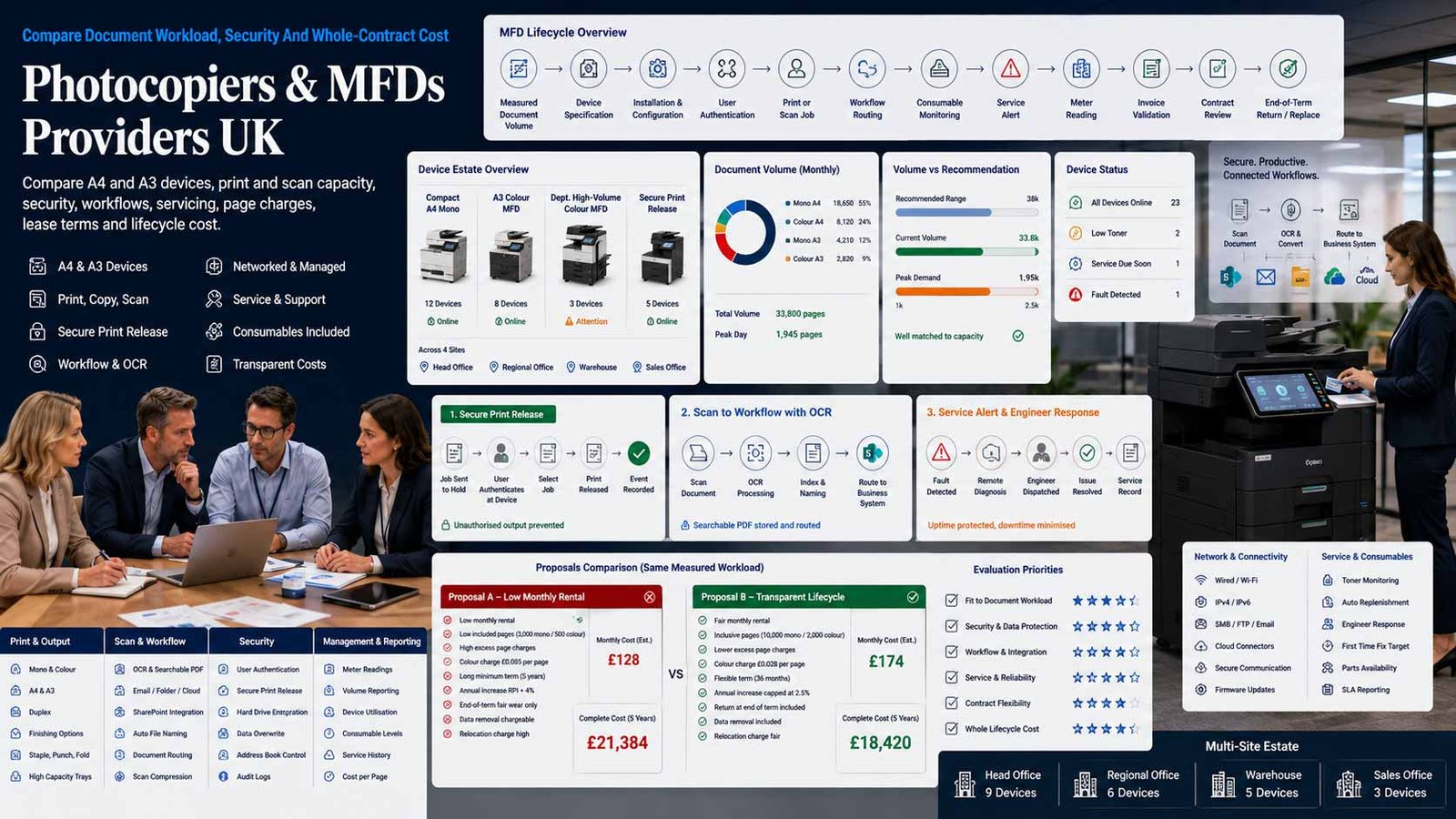
Select A Business Document Device, Not A Generic Copier Deal
A well-specified multifunction device should handle real document volumes, protect information, fit office workflows and remain supportable for the complete contract term without hidden excess charges or end-of-lease surprises.
- Size the device from measured print, copy and scan demand
- Separate hardware, finance, page charges and optional software
- Test security, workflow, accessibility and service response
- Document ownership, relocation, renewal and data-erasure duties
A business multifunction device, or MFD, combines printing, copying and scanning in one networked system, with fax, document routing, OCR, finishing, secure release and cloud connections available on selected models. Devices range from compact A4 desktop units to floor-standing A3 systems serving departments, schools, professional firms and multi-site organisations.
The right choice depends on monthly and peak volumes, colour use, paper sizes, scan workload, finishing, user numbers, confidential documents, network architecture, accessibility, office space, power, internal support and whether the business prefers outright purchase, hire purchase, lease or rental. A high-speed device is poor value when its contract assumes volumes the business never uses; a low-capacity model creates queues, failures and expensive supplies when workload is underestimated.
This page compares business photocopiers and multifunction devices together with the service and finance arrangements required to operate them. It does not compare standalone managed print programmes that optimise a complete printer fleet, and it does not cover domestic or home printers. Those are separate buying intents with different scope, providers and evaluation criteria.
Choose The Right Photocopier Or MFD Operating Model
Match format, workload, scanning, security and finishing to the business before considering brand, lease rate or headline speed.
| Device Model | What It Usually Includes | Best-Fit Question |
|---|---|---|
| Compact A4 Desktop MFD | Print, copy and scan for a small team, often with duplex output, wireless or network connection and a modest paper supply. | Will its real monthly duty, consumable yield and scan feeder support the team without repeated intervention? |
| High-Capacity A4 Workgroup MFD | Faster A4 colour or mono output, larger paper capacity, stronger scanning and user controls for departments that do not require A3. | Does avoiding A3 reduce cost without forcing staff to outsource common document sizes? |
| A3 Colour Floor-Standing MFD | General office print, copy and scan across A4 and A3 with multiple trays, higher speeds and optional finishing. | Which users genuinely need A3, colour and finishing, and what volume assumptions drive the contract? |
| A3 Mono High-Volume MFD | Cost-focused black-and-white output for document-heavy teams, education, legal, finance or administrative environments. | Can the device sustain peak jobs while preserving secure scanning and occasional colour needs elsewhere? |
| Secure Departmental MFD | Authentication, pull printing, encrypted storage, audit logs, address-book controls and policy-based access for sensitive environments. | Are security controls included, correctly configured and supported through updates and end-of-life data removal? |
| Document-Capture MFD | High-speed duplex scanning, OCR, searchable PDF, routing to folders, email, cloud platforms or line-of-business systems. | Is scanning throughput and workflow integration more important than headline print speed? |
| Finishing-Enabled MFD | Stapling, hole punching, booklet making, folding or higher paper capacity for regular internal document production. | Will actual finishing volumes justify the module, space, maintenance and contract cost? |
| Multi-Site Standard Device Family | Common models, settings, drivers, security policies and service processes deployed across several offices. | Can the supplier maintain consistent configuration, response and reporting while avoiding unnecessary fleet complexity? |
Eight Areas That Determine Photocopier And MFD Fit
Use one measured requirement and score every provider against the same device, service, security and commercial evidence.
Comparison Criterion
Measured Volume, Peak Demand And Device Capacity
Use at least twelve months of meter readings or print reports where available. Separate mono and colour pages, A4 and A3, copies and prints, duplex use, scans, peak jobs and growth. Compare recommended monthly volume, duty cycle, paper capacity, warm-up, first-page time and the consequences of operating consistently near the device limit.
Comparison Criterion
A4, A3, Colour, Mono And Media Requirements
Confirm the paper sizes, weights, envelopes, labels, letterheads and specialist stock the business genuinely uses. Decide where colour is operationally necessary and where policy can default to mono and duplex. Check trays, bypass handling, automatic size detection, borderless or banner requirements and whether the quoted configuration includes every required paper source.
Comparison Criterion
Print Speed, Scan Throughput And Finishing
Compare pages per minute only after checking first-page speed, mixed-document performance, duplex rate, scan images per minute, automatic document feeder capacity and simultaneous tasks. Specify stapling, hole punching, booklet or folding from actual job patterns. Optional finishing can materially increase footprint, lease cost and maintenance complexity.
Comparison Criterion
Scanning, OCR And Document Workflow
Test single-pass duplex scanning, blank-page removal, deskew, OCR accuracy, searchable PDF, file compression, naming, metadata and routing to email, folders, SharePoint, OneDrive or approved business systems. Confirm user authentication, address-book governance, scan failure handling and licence costs for connectors or workflow applications.
Comparison Criterion
Device, Network And Information Security
Review secure print release, PIN or card authentication, role-based access, encryption, signed firmware, port and protocol control, audit logs, administrator separation, certificate management, hard-drive or solid-state storage, overwrite, remote support, vulnerability updates and end-of-contract data sanitisation. Treat the MFD as a networked information system, not only office equipment.
Comparison Criterion
Service Response, Uptime And Consumables
Define fault-reporting channels, remote diagnostics, engineer coverage, response and fix targets, parts availability, loan or replacement procedures, toner delivery, waste collection and meter-read responsibilities. Ask how repeat faults, missed service levels and obsolete parts are handled and whether service continues throughout finance disputes or contract transition.
Comparison Criterion
Purchase, Lease, Rental And Page-Charge Structure
Separate device price, finance payment, maintenance, included pages, minimum billing, mono and colour click charges, excess volume, scans, toner, drums, staples, delivery, installation, network work, software, training, relocation, insurance and end-of-term fees. Clarify whether the finance company and service provider are different legal entities.
Comparison Criterion
Implementation, User Adoption, Change And Exit
Plan surveys, power and network readiness, delivery access, print queues, drivers, identity integration, scan destinations, security hardening, testing, training and acceptance. Document moves, additions, reductions, early termination, upgrades, auto-renewal, ownership, collection, final meters, data export, storage wiping and evidence of disposal before signing.
Measures To Define Before Ordering A Device
Convert speed, saving, security and service claims into measurable acceptance criteria and contract evidence.
| Measure | What It Should Define | Evidence To Request | Common Weakness |
|---|---|---|---|
| Volume suitability | Whether the configuration supports normal and peak print, copy and scan demand | Meter history, mono/colour split, A4/A3 use, scan counts, peak jobs, duty guidance and sizing rationale | A supplier sizes from employee count or estimated pages rather than evidence |
| Output and media fit | Whether paper sizes, colour, quality and finishing match real document production | Representative files, stock weights, trays, duplex, finishing samples and acceptance test | A low quote excludes a tray, feeder or finisher required after installation |
| Scan workflow performance | Whether documents can be captured, named, searched and routed reliably | Timed scan test, OCR sample, connector list, authentication, error handling and licence schedule | The device scans quickly but manual renaming and filing remain |
| Security control | Whether the MFD protects stored, transmitted and printed information | Configuration baseline, secure release, encryption, firmware policy, logs, admin roles, overwrite and erasure certificate | Security features exist in the brochure but are not enabled or maintained |
| User accessibility | Whether staff can operate the device safely and consistently | Panel demonstration, language, accessibility options, remote panel, card login and training plan | Complex screens create support calls and workarounds |
| Service resilience | Whether faults and consumable shortages are resolved within operational tolerance | Coverage map, response targets, fix measure, parts, escalation, loan process, service reports and credits | A response target measures engineer arrival but not restoration |
| Cost-per-page integrity | Whether included and excess page charges reflect actual usage and exclusions | Mono/colour rates, coverage assumptions, minimums, annual increases, meter rules, samples and invoice format | A cheap lease payment is offset by minimum volume or rising click charges |
| Contract flexibility | Whether volumes, devices, offices and needs can change without punitive restructuring | Term, upgrade, downgrade, relocation, additional device, early termination, renewal and ownership terms | A replacement device starts a new term without closing the old obligation |
| Data and invoice usability | Whether finance and IT can reconcile device, page and service information | Device-level invoice, meter reports, cost centre data, service history, asset list and exports | Charges are consolidated without enough detail to challenge errors |
| Exit and disposal | Whether equipment and stored information can leave the business safely | Final meters, collection, settlement, ownership, sanitisation method, certificate, export and deletion | The device is collected before the business receives erasure evidence or replacement continuity |
Photocopier And MFD Providers UK Businesses Can Consider
Shortlist providers and authorised partners whose device range, service coverage, security, finance and contract structure fit the measured requirement. Confirm the current model and complete written terms before ordering.
Provider Profile
Canon
Canon offers business office printers and multifunction devices ranging from compact A4 systems to larger imageRUNNER ADVANCE and imageFORCE-style office platforms, with print, copy, scan, workflow and security options varying by model and route to market. Include Canon where the business needs a broad device family, established dealer or direct-service choices and document workflow options. Confirm the exact device, authorised supplier, configuration, security licences, installation, page plan, service entity, response targets, firmware support, finance agreement and end-of-term responsibilities.
Review official Canon office-printer informationProvider Profile
Ricoh
Ricoh supplies all-in-one office printers from compact A4 devices to higher-volume A3 systems, with scanning, workflow, cloud, security and sustainability capabilities depending on configuration. Include Ricoh where the business wants a device-led proposal that can extend into document applications and workplace support. Confirm model sizing, optional trays and finishers, scan connectors, authentication, service coverage, consumable process, click charges, annual increases, installation, remote support, data handling, finance ownership and contract exit.
Review official Ricoh all-in-one printersProvider Profile
Xerox
Xerox provides business multifunction printers across compact and workgroup ranges, including colour and monochrome A4 and A3 devices with ConnectKey-style applications, scanning, authentication and workflow options on selected models. Include Xerox where consistent user experience, app-enabled workflows or a broad office MFD range is relevant. Confirm whether the quote is direct or through a partner, current model status, recommended volume, applications and licences, security configuration, service delivery, supplies, meter method, page charges, finance term, upgrades and final device sanitisation.
Review official Xerox multifunction printersProvider Profile
Konica Minolta
Konica Minolta offers bizhub multifunction devices across A4 and A3 formats, with colour and mono output, scanning, finishing, card-reader support, mobile printing and document workflow capabilities varying by model. Include it where floor-standing office systems, a consistent control panel or stronger scan and finishing options suit the requirement. Confirm the legal supplier, exact i-Series configuration, optional hardware, embedded applications, security settings, support and engineer coverage, meter collection, service and finance agreements, annual changes, relocation and return conditions.
Review official Konica Minolta MFD informationProvider Profile
Sharp
Sharp supplies office multifunction printers from compact desktop units to floor-standing A3 colour and monochrome systems, with scanning, cloud connections, collaboration integrations, finishing and security features depending on model. Include Sharp where an integrated office-device range and configurable business workflow are relevant. Confirm model, paper and finishing options, user authentication, Microsoft and cloud connectivity, security maintenance, remote diagnostics, local service ownership, toner process, click charges, lease or rental entity, response commitments and end-of-life data handling.
Review official Sharp multifunction printersProvider Profile
Toshiba Tec
Toshiba Tec offers e-STUDIO multifunction systems across A4 and A3 colour and mono ranges, with e-BRIDGE-based integration, scanning, customisable interfaces, cloud printing and finishing options. Include Toshiba where document capture, configurable workflows or high-volume departmental output are important. Confirm the exact series, controller and storage, required options, OCR and connector licences, security configuration, service resources, replacement procedure, supplies, billing, finance relationship, term changes, device collection and sanitisation evidence.
Review official Toshiba Tec MFD informationProvider Profile
Kyocera Document Solutions
Kyocera provides ECOSYS and TASKalfa multifunction devices across A4 and A3, with mono and colour choices, long-life-component design, scanning, HyPAS customisation and security options depending on model. Include Kyocera where device durability, workgroup flexibility and configurable document solutions fit the requirement. Confirm recommended volume, component and consumable coverage, optional OCR or workflow software, authentication, security level, engineer network, parts and loan equipment, meter and click terms, installation, finance agreement, upgrade and exit process.
Review official Kyocera MFP informationProvider Profile
Brother
Brother offers office-focused A4 multifunction laser and inkjet devices for small and medium teams, with print, copy, scan and fax, wireless or network connectivity and security capabilities varying by range. Include Brother where the requirement is primarily A4, space is limited and outright purchase or a simpler subscription and support model may be preferable to a floor-standing copier lease. Confirm monthly suitability, consumable yield, warranty or managed-service scope, security, scan destinations, paper expansion, onsite support, replacement timing, page plan, minimum commitment and the limits of A3 or advanced finishing.
Review official Brother all-in-one printersWhat Changes Photocopier Leasing And MFD Cost
Compare total cost across hardware, finance, pages, support, software, changes and exit—not the monthly device payment alone.
| Cost Driver | Why It Changes Spend | What A Comparable Quote Should Show |
|---|---|---|
| Device specification | A4 or A3, colour or mono, speed, paper capacity, scan feeder, storage, display and durability materially affect hardware cost | Exact model, base specification, required options, new or refurbished status, warranty and expected support life |
| Acquisition method | Outright purchase, hire purchase, finance lease, operating rental or subscription allocate ownership, cash flow and risk differently | Cash price, deposit, monthly payment, term, interest or finance disclosures, ownership, insurance and tax treatment advice |
| Included page volume | Contracts may include a monthly or quarterly allowance, minimum billed volume or no allowance at all | Mono and colour pages, unused-page treatment, pooled devices, minimum charge, scan counts and true-up frequency |
| Page or click charge | Charges normally differ for mono and colour and may include toner, parts and service but exclude paper, staples or selected consumables | Current rates, coverage assumptions, annual increase, A3 counting, colour detection, meter rules and excluded items |
| Optional hardware and software | Extra trays, high-capacity feeders, finishers, card readers, fax, OCR, workflow connectors and print-management licences add cost | One-off and recurring price, support, compatibility, licence owner, upgrades and removal at exit |
| Installation and network work | Site surveys, stairs, delivery access, power, data cabling, print queues, identity integration, scanning and security hardening require labour | Survey, delivery, installation, configuration, testing, training, project management and out-of-hours work |
| Service commitment | Faster response, broader engineer coverage, guaranteed fix, loan devices and extended hours usually increase the service price | Coverage, response, restore target, exclusions, service credits, parts, consumables, travel and escalation |
| Volume variance and excess | Colour growth, seasonal peaks and changed workflows can create excess charges or require a larger device | Scenario pricing at low, expected and peak volumes, colour ratio, excess rate and contract review mechanism |
| Moves, changes and growth | Relocation, additional trays, new offices, reduced headcount or replacement devices may trigger charges or a new minimum term | Move fee, reinstallation, contract variation, device swap, added and removed units, co-termination and approval rights |
| End of term and disposal | Collection, settlement, ownership transfer, damage, meter reconciliation, storage sanitisation and continued billing can affect final cost | Notice, automatic renewal, return standard, collection, final meters, buyout, erasure certificate and deletion of cloud data |
| Indicative Commercial Model | Typical Planning Position | What Must Be Confirmed |
|---|---|---|
| Compact A4 Purchase | A broad planning range of roughly £250 to £1,500 can cover many business A4 multifunction devices before optional supplies, warranty extensions or support | Confirm monthly duty, included starter consumables, yield, onsite support and replacement economics |
| Higher-Capacity A4 Purchase | Workgroup models with faster scanning, larger paper capacity and stronger controls can move from around £1,000 into several thousand pounds | Compare total supplies and service, not only hardware purchase price |
| A3 Floor-Standing Lease Or Rental | Quote-led arrangements can range from tens to several hundred pounds per month depending on specification, term, volume and service | Separate finance payment, included pages, click charges, annual increases and optional modules |
| High-Volume Or Finishing Configuration | Departmental systems with higher speed, large feeders and finishing can reach several hundred pounds per month or more | Require workload proof and scenario pricing before accepting the larger platform |
| Per-Page Service Model | Mono pages are usually materially cheaper than colour; rates vary by coverage, volume, device and contract | Obtain exact mono, colour and A3 counting rules plus all minimums and annual changes |
Match The Device To The Document Workload
The right shortlist depends on measured pages and scans, security, paper and finishing needs, office locations, internal support and the preferred commercial model.
Small Office Or Professional Practice
Prioritise a reliable A4 colour or mono MFD, strong scanning, secure release, low intervention, transparent consumable cost and a support model proportionate to the team. Avoid a long floor-standing lease when outright purchase and support could meet the workload.
Growing Multi-Department SME
Prioritise measured capacity, user authentication, cost controls, A3 where justified, strong scan workflows, multiple trays, predictable page charging, named service ownership and a contract that can add or replace devices without restarting every term.
Education, Legal, Healthcare Or Regulated Team
Prioritise secure release, administrator separation, encryption, audit logs, storage overwrite, address-book control, high-volume scanning, accessible operation, rapid fault restoration and documented end-of-life data sanitisation.
Multi-Site Or Document-Heavy Organisation
Prioritise a standard device family, central configuration, consistent security, device-level reporting, regional service coverage, spare capacity, workflow integration, co-terminous contracts, moves and changes, asset records and controlled replacement planning.
How To Compare Photocopier And MFD Proposals
Issue one device brief containing locations, user groups, twelve-month mono and colour meters, A4 and A3 use, monthly scans, peak jobs, paper stock, finishing, current queues, document workflows, security standards, identity platform, cloud destinations, accessibility, service tolerance, installation constraints, preferred term and change assumptions. Require a response matrix rather than accepting a bundled monthly figure.
- The exact device and every optional module are listed
- Finance, service and page charges are separated
- Volume assumptions and excess scenarios are documented
- Security configuration and update ownership are explicit
- Response, restoration, consumables and repeat faults are governed
- Renewal, return, ownership and data sanitisation are written
Compare The Same Forty-Eight-Month Scenario
Ask every provider to price the same configuration and low, expected and peak page volumes across the same term, including installation, options, page charges, annual increases, likely service events, relocation and exit.
A low monthly rental is not comparable when colour minimums, software, finishing, delivery, meter increases or end-of-term obligations are excluded.
Six Questions To Put To Every Photocopier Or MFD Provider
The answers expose poor sizing, bundled costs, security gaps, weak service commitments and restrictive finance terms.
Why Is This Exact Device Sized For Our Workload?
Request the meter history, volume assumptions, recommended monthly range, peak test, A4 and A3 split, colour ratio, scanning demand, paper capacity and explanation for every optional module.
Who Are The Seller, Service Provider And Finance Company?
Identify each legal entity, its responsibilities, invoice streams, complaint route, data role, assignment rights and what happens when the equipment or service agreement changes.
What Is Included In The Page Charge And What Is Excluded?
Confirm mono, colour, A3 and minimum billing, toner, drums, parts, labour, staples, paper, waste, remote monitoring, meter collection, annual increases and excess volume.
How Will The Device And Its Stored Data Be Secured?
Review authentication, secure release, encryption, administrator roles, firmware, ports, scan destinations, logs, remote support, storage overwrite, breach support and final sanitisation evidence.
What Happens When The Device Fails Or Supplies Run Out?
Ask for reporting channels, service hours, response and restore measures, engineer coverage, parts, repeat-fault escalation, loan or replacement equipment, toner timing and service credits.
What Happens If Our Volumes, Offices Or Needs Change?
Confirm upgrades, downgrades, device swaps, relocation, additional sites, reduced headcount, early termination, renewal, ownership, final meters, collection, export and deletion obligations.
A Seven-Stage Photocopier And MFD Provider Evaluation
Move from verified meters and workflows to tested devices, controlled implementation and accountable contract governance.
- Create a verified baseline from meter readings, invoices and user interviews covering devices, locations, mono and colour pages, A4 and A3, scans, peaks, paper, finishing, consumables, faults, service calls, workflow delays, security issues, internal effort and current contract dates.
- Map required document workflows from print submission and secure release through copying, scanning, OCR, file naming, cloud or system delivery, exception handling, retention and confidential disposal. Identify where an MFD can remove manual work and where it must not create a new uncontrolled data route.
- Define mandatory specification, volume range, security baseline, identity and network integration, scan destinations, accessibility, service levels, consumable process, invoice detail, implementation, training, contract structure, changes, renewal, ownership, sanitisation and exit evidence.
- Prepare one supplier brief and full-term pricing scenario with identical devices, options, term, page bands, colour ratio, annual change assumption, installation, software, support, relocation and end-of-term treatment.
- Shortlist providers by device fit, technical competence, local service capacity, security capability, implementation resources, financial stability, current references and ability to separate hardware, service and finance obligations clearly.
- Run a proof or detailed demonstration with representative print files, duplex scans, OCR, secure release, card or identity login, cloud route, paper sizes, finishing, accessibility and administrator controls. Complete network, security and service acceptance before signing installation completion.
- Go live through controlled delivery, configuration, testing, user training, meter baseline and asset registration. Review page volumes, colour use, scan success, faults, service response, invoice accuracy, security updates, user feedback and forecast cost before every renewal or upgrade decision.
Photocopier And MFD Comparison Checklist
Use this table before purchasing, leasing, replacing or renewing business multifunction devices.
| No. | Requirement | Evidence To Obtain Before Award | Confirmed |
|---|---|---|---|
| 01 | Current device and contract baseline complete | Devices, locations, owners, meters, invoices, terms, renewal dates, service history, supplies, faults and internal effort | |
| 02 | Volume and peak workload verified | Mono, colour, A4, A3, prints, copies, scans, duplex, peaks, growth and seasonal patterns | |
| 03 | Paper and finishing requirements approved | Sizes, weights, trays, envelopes, labels, letterhead, stapling, punching, booklet, folding and sample output | |
| 04 | Scan and workflow design approved | Feeder, speed, duplex, OCR, searchable PDF, naming, metadata, destinations, errors and licences | |
| 05 | Security baseline accepted | Authentication, secure release, encryption, firmware, ports, roles, logs, remote access, overwrite and sanitisation | |
| 06 | Network and identity integration confirmed | Drivers, print queues, Wi-Fi, certificates, directory, cards, SSO, cloud, firewall and administrator ownership | |
| 07 | Accessibility and usability tested | Panel, language, reach, visual and audio options, remote operation, common tasks and training | |
| 08 | Exact device configuration itemised | Model, new/refurbished, trays, feeder, finisher, fax, storage, card reader, software, stands and accessories | |
| 09 | Finance and ownership terms approved | Cash price, deposit, payment, term, finance company, ownership, insurance, assignment, settlement and tax advice | |
| 10 | Page-charge schedule approved | Included volume, minimums, mono, colour, A3 counting, excess, annual increases, meter reads and excluded supplies | |
| 11 | Service and consumable commitments accepted | Hours, response, restoration, engineer coverage, parts, toner, waste, repeat fault, loan device and credits | |
| 12 | Implementation responsibilities agreed | Survey, access, delivery, power, network, security, workflow, testing, training, acceptance and project owner | |
| 13 | Moves, changes and growth governed | Relocation, added trays, new office, device swap, volume change, upgrade, downgrade and co-termination | |
| 14 | Renewal and exit requirements documented | Notice, automatic renewal, ownership, final meters, collection, damage, settlement, export and cloud deletion | |
| 15 | Data sanitisation and disposal evidence required | Storage inventory, overwrite or destruction method, certificate, chain of custody and accountable approver |
Common Photocopier And MFD Buying Mistakes
Most avoidable problems begin with poor sizing, bundled pricing, weak security or contract obligations that were not reviewed together.
| Mistake | Why It Creates Risk | Better Control |
|---|---|---|
| Choosing from employees rather than meter data | Headcount does not reveal colour, A3, scans, peaks or workflow demand | Use device and print-system evidence plus representative jobs |
| Comparing only the monthly lease payment | Service, page minimums, software and end-of-term cost can be larger than the rental difference | Model the complete term under several volume scenarios |
| Over-specifying speed and finishing | Unused capacity and modules increase finance, space and maintenance cost | Require a sizing rationale for every option |
| Underestimating scanning and workflow needs | A device may print well while staff continue slow manual filing and naming | Test real scan batches, OCR and destinations |
| Treating the MFD as a trusted appliance | Networked devices can store and transmit confidential information | Apply an IT security baseline and update ownership |
| Accepting “four-hour response” as uptime | Engineer arrival does not guarantee restoration, parts or a loan device | Contract for measurable restore and repeat-fault handling |
| Ignoring minimum volumes and colour detection | Low usage or colour elements can create unexpected billing | Review meter and invoice examples at low and peak use |
| Signing linked contracts without mapping legal entities | Hardware, maintenance and finance disputes may follow separate agreements | Identify responsibility and termination across every contract |
| Allowing automatic renewal without meter review | Workload, offices, technology and service performance change during the term | Review requirement and notice dates well before renewal |
| Returning a device without sanitisation evidence | Stored address books, scans, credentials or documents may leave the organisation | Require controlled erasure and a certificate before collection |
Frequently Asked Questions
Answers to common questions from UK businesses comparing photocopiers, multifunction devices, leases, page charges, security and service.
What Is A Multifunction Device Or MFD?
A multifunction device combines printing, copying and scanning in one networked system. Some models also provide fax, OCR, secure print release, cloud connections, workflow applications and finishing. Business MFDs range from compact A4 units to floor-standing A3 systems.
Is An MFD The Same As A Photocopier?
The terms overlap in business procurement. A modern office photocopier is usually a multifunction device because it can print and scan as well as copy. The important comparison is the exact format, capacity, workflow, security, service and contract—not the label used by the supplier.
Should A UK Business Buy Or Lease A Photocopier?
Buying can suit smaller, stable requirements where the business wants ownership and can arrange support. Leasing or rental can spread cost and bundle service but creates term, volume and return obligations. Compare the full cash price, finance, pages, service, changes and exit before deciding.
How Long Is A Business Photocopier Lease?
Terms commonly run for several years, but the exact period varies by finance agreement and provider. A longer term may lower the monthly payment while increasing total commitment and technology risk. Confirm notice, automatic renewal, ownership, settlement and upgrade consequences in writing.
What Is A Photocopier Click Charge?
A click charge is a per-page service charge, usually different for mono and colour. It may include toner, parts and maintenance while excluding paper, staples and selected items. Check minimum billing, A3 counting, colour detection, annual increases, meter rules and excess volume.
How Many Pages Per Minute Does A Business Need?
Choose speed from peak workload, first-page time, simultaneous users, document length and scan demand rather than headcount alone. A faster device does not solve poor paper capacity, slow scanning, weak workflow or service downtime. Test representative jobs before selecting.
What Security Features Should A Business MFD Have?
Relevant controls can include user authentication, secure release, encryption, signed firmware, administrator separation, port and protocol control, audit logs, storage overwrite, secure scanning, certificate management, update support and verified data sanitisation when the device leaves.
Does A Photocopier Store Copies Or Scans?
Many modern MFDs use internal storage or memory for jobs, settings, address books, applications and logs. Storage behaviour varies by model and configuration. The business should understand what is retained, restrict access, enable overwrite where appropriate and require sanitisation evidence at disposal or return.
What Should Be Included In A Photocopier Service Contract?
Define fault reporting, service hours, response and restoration targets, engineer coverage, parts, labour, toner, drums, waste, meter reads, remote monitoring, repeat-fault escalation, loan or replacement devices, exclusions, service reporting and credits. Do not assume every consumable is included.
How Should UK Businesses Compare Photocopier And MFD Providers?
Give every provider the same meter history, page and scan profile, paper, finishing, workflow, security, installation, service and term assumptions. Compare the exact device, legal entities, complete page charges, response and restoration, annual increases, changes, renewal, ownership and data-erasure evidence—not the monthly rental alone.
Official Guidance And Provider Resources
Reviewed by Bhav Giva, Founder & Lead Analyst at CompareServices.co.uk, on 31 July 2026.
Use current ICO, GOV.UK and provider documentation to verify data security, tax treatment, device capability, service coverage, page charges, finance and contract terms. Models, software, supplies, finance rates and service arrangements change. Obtain accounting, legal, information-security or procurement advice where the organisation requires it.
- ICO — A Guide To Data Security
- GOV.UK — Claim Capital Allowances
- GOV.UK — Self-Employed Office, Property And Equipment Expenses
- Canon — Office Printers And Scanners
- Ricoh — All-In-One Printers
- Xerox — Multifunction Printers
- Konica Minolta — Multifunctional Printers
- Sharp — Multifunction Printers
- Toshiba Tec — MFPs And Printers
- Kyocera Document Solutions — Multifunction Printers
- Brother — All-In-One Printers