
Compare CCTV / Business Security Systems Providers UK
Compare Camera Coverage, Image Quality, Recording, Analytics, Intruder Detection, Remote Monitoring, Cyber Security, Privacy, Installation, Maintenance And Whole-System Cost
Compare business CCTV systems UK providers by the risks and operational outcomes each system must address: deterrence, detection, live verification, evidential recording, staff safety, loss prevention, perimeter protection and incident response. Evaluate camera purpose, field of view, lighting, resolution, frame rate, identification quality, network capacity, recording location, retention, export, analytics, alarm integration, remote monitoring, cyber hardening, user permissions, privacy controls, installer certification, commissioning, maintenance, response times, software licences, cloud subscriptions, upgrade paths and secure decommissioning. Give every bidder the same site drawings, operational requirement, threat scenarios, privacy constraints, retention assumptions and support levels before comparing proposals.
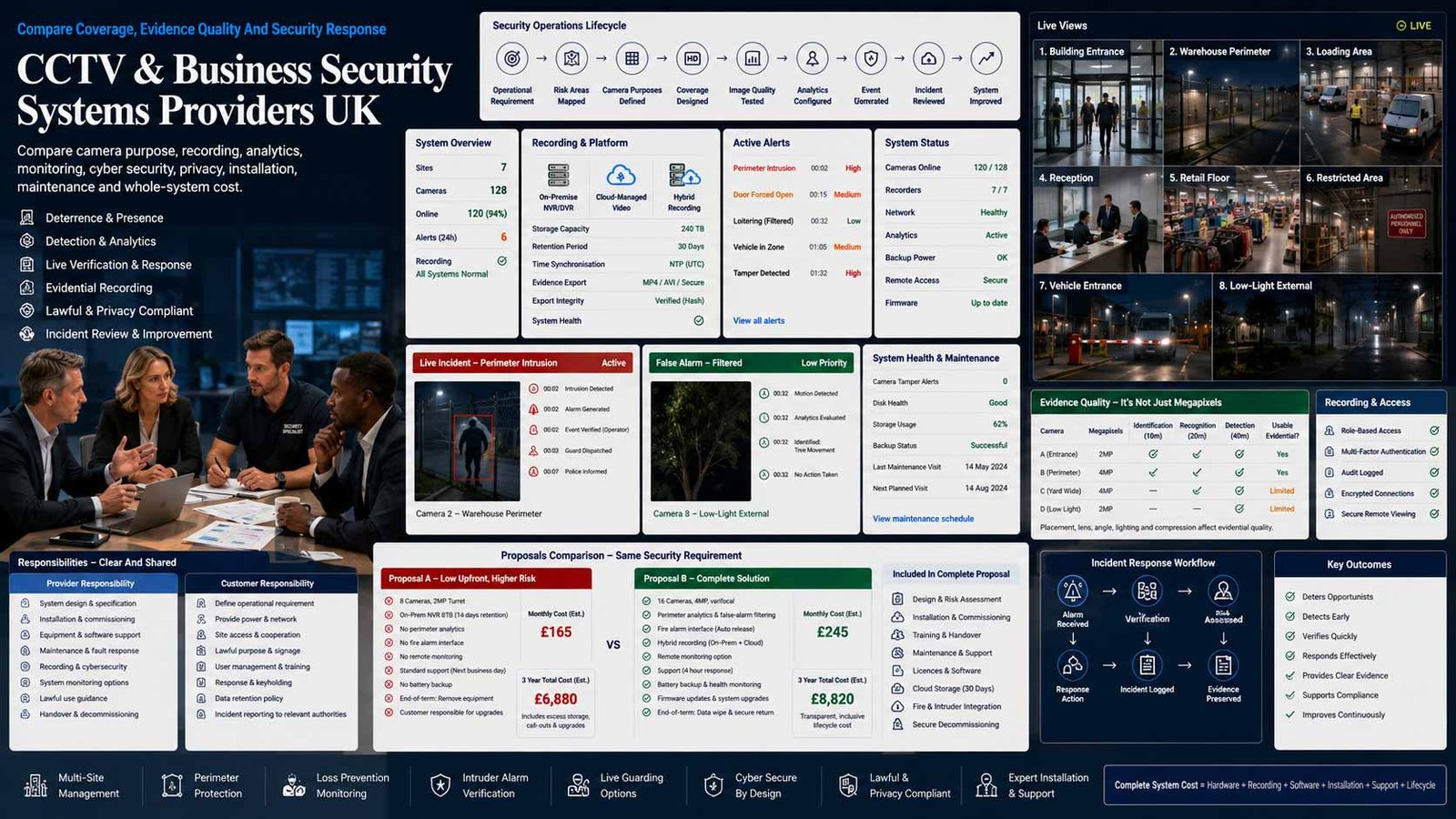
Buy A Security Outcome, Not A Camera Count
A credible commercial system starts with what must be observed, detected, verified, recorded and acted upon. Camera quantity and megapixels are secondary to a tested operational requirement.
- Define the threat, target, location and required response
- Specify observation, recognition or identification performance
- Test lighting, blind spots, retention, export and outage behaviour
- Assign privacy, cyber, maintenance and incident responsibilities
A business CCTV or video-surveillance system combines cameras, transmission, recording, viewing, analytics, monitoring and operational procedures to deter, detect, verify and document security events. A broader business security system may also include commercial intruder detection, perimeter sensors, video verification, alarm signalling and a monitored response. The value comes from the complete process: a meaningful alert must reach the right person, footage must be usable, and evidence must be preserved lawfully.
The right system depends on site layout, threat level, people and vehicle movement, lighting, operating hours, staff availability, response arrangements, network security, retention, privacy impact and the need to reuse existing infrastructure. A warehouse perimeter, retail till, office reception, construction site and multi-site estate require different camera positions, analytics, recording and monitoring.
This page compares commercial CCTV and physical business security systems. It does not compare residential alarm systems. Access-control systems are covered on their own service page; where door events are linked to video, treat that as an integration rather than allowing the CCTV specification to absorb the access-control procurement.
Choose The Right CCTV And Monitoring Model
Recording location, monitoring responsibility, connectivity, response and subscription structure determine how the system behaves after installation.
| System Model | What It Usually Includes | Best-Fit Question |
|---|---|---|
| Local Recorder CCTV | IP or HD-over-coax cameras record to an NVR or DVR on the business premises, with local or secured remote viewing. | Can the recorder, disks, network and backup arrangement meet the required retention and survive theft, fire or equipment failure? |
| On-Premises Video Management System | Servers and VMS software manage larger camera estates, operator workstations, maps, permissions, evidence and integrations. | Does the business have the IT, storage, patching and support capability to run the platform throughout its lifecycle? |
| Cloud-Managed Video Security | Cameras or gateways are administered through a hosted platform, often with subscriptions, remote access, health monitoring and cloud storage options. | What continues locally during an internet outage, where is data processed, and what happens to footage and devices when the subscription ends? |
| Hybrid Cloud And Local Recording | Video is recorded locally for resilience while cloud services provide remote management, health, analytics, backup or selected archive. | Are local and cloud retention, bandwidth, failover, licence and export responsibilities clearly separated? |
| Detector-Activated Remote Monitoring | Cameras or detectors generate verified alarms for a remote video receiving centre, which follows an agreed escalation and response plan. | Are detection zones, false-alarm controls, audio challenge, keyholding, police response eligibility and monitoring standards defined? |
| Commercial Intruder And Video Verification | Intruder sensors, signalling and cameras are integrated so alarm events can be visually checked before a response is initiated. | Which system controls the alarm, who owns signalling, and can video verification be maintained when a camera, network or platform fails? |
| Temporary And Rapid-Deployment Security | Battery, solar, cellular or relocatable towers protect construction sites, vacant premises, compounds and short-term projects. | Are detection range, power autonomy, communications, environmental ratings, relocations, monitoring and response included in one service? |
| Enterprise Multi-Site Security Platform | A central platform manages cameras, alarms, users, health, evidence and policy across many sites, sometimes with control-room operations. | Can the architecture scale without excessive bandwidth, proprietary lock-in, administrator risk or inconsistent local response? |
Eight Areas That Determine CCTV And Security-System Fit
Use the same site risk, camera purposes, retention, monitoring, privacy, network and service requirements for every provider.
Comparison Criterion
Operational Requirement And Risk Fit
Define what the system must achieve before selecting products. For each scene, specify the target, distance, direction, lighting, likely behaviour and required outcome: monitor, detect, observe, recognise, identify or obtain evidential detail. Link alerts to a named response process. A camera that records activity without enabling a decision may add cost without reducing risk.
Comparison Criterion
Camera Coverage, Optics And Image Quality
Compare field of view, focal length, pixel density, resolution, frame rate, shutter, wide dynamic range, infrared, thermal or low-light performance, weather and impact ratings, mounting, vibration and privacy masking. Demand day, night and adverse-condition samples from the proposed positions rather than accepting manufacturer demo footage.
Comparison Criterion
Recording, Retention And Evidence Export
Confirm continuous, scheduled, motion or event recording; local, server, edge or cloud storage; usable retention under expected activity; redundancy; time synchronisation; watermarking; audit trails; export formats; playback tools and evidence procedures. Test retrieval for a defined date, camera and event and verify that exported footage can be viewed by an authorised recipient.
Comparison Criterion
Analytics, Detection And False-Alarm Control
Assess line crossing, intrusion zones, loitering, people or vehicle classification, ANPR, object search, occupancy or other analytics against the actual environment. Require test cases, confidence thresholds, masking, seasonal and lighting considerations, alert routing and a process for tuning. AI labels support human decisions; they do not remove the need for governance and verification.
Comparison Criterion
Remote Monitoring And Incident Response
Compare self-monitoring, guarding, remote video receiving centres, keyholding, audio challenge, alarm verification, escalation, police or emergency contacts and evidence preservation. Define who receives each event, response times, hours, contact failures, duplicate alerts, out-of-hours authority, incident reporting and responsibility when no responder is available.
Comparison Criterion
Network, Cyber Security And Resilience
Treat cameras, recorders, servers, gateways and cloud portals as network-connected security technology. Compare unique credentials, MFA, role-based access, encryption, signed firmware, vulnerability handling, patching, certificate management, secure remote support, network segregation, logs, backup, power protection, bandwidth and operation during internet, server or cloud failure.
Comparison Criterion
Privacy, Lawful Use And Worker Monitoring
Document purpose, lawful basis, necessity, proportionality, camera boundaries, audio recording, signage, privacy notice, retention, access, disclosure and rights handling. Complete a DPIA where the use is likely to create high risk. Give additional scrutiny to workplace monitoring, audio, facial recognition, ANPR and analytics that infer or track people.
Comparison Criterion
Installer Competence, Maintenance And Lifecycle
Compare surveyed design, certification, staff screening, manufacturer training, drawings, network documentation, commissioning tests, user training, certificates, maintenance, cleaning, focus checks, vegetation and lighting reviews, disk health, software updates, spares, response targets, remote access controls, end-of-life notices, data export and secure decommissioning.
Measures To Define Before Selecting A CCTV Provider
Translate camera, AI, cloud and monitoring claims into testable design, evidence, privacy, cyber-security and service commitments.
| Measure | What It Should Define | Evidence To Request | Common Weakness |
|---|---|---|---|
| Operational requirement | The security problem, target, scene, required image purpose and action | Site risk assessment, annotated plan, camera purpose schedule, response matrix and acceptance tests | The quote lists equipment but never defines what success looks like |
| Coverage and image performance | Whether each camera produces useful detail in real operating conditions | Lens calculation, field-of-view drawing, day/night samples, lighting survey and test target | High resolution is promised while the target occupies too few pixels |
| Recording and retention | How footage is captured, protected, found and exported for the required period | Storage calculation, activity assumption, redundancy, time sync, retrieval test and export sample | Quoted retention assumes low motion, low frame rate or lower quality than live view |
| Detection and alert quality | Whether analytics and sensors detect relevant events without unmanageable false alarms | Scenario tests, tuning plan, seasonal review, event logs, alert routes and accuracy reporting | AI features are enabled without site-specific configuration or ownership |
| Monitoring and response | Who receives alarms and what they do with verified information | Monitoring schedule, standards, response targets, escalation, keyholding and incident report | A notification reaches an app but nobody is accountable for acting |
| Cyber-security control | How connected security devices, software and remote access are protected | Architecture, asset list, firmware policy, MFA, encryption, vulnerability process, logs and recovery | Default passwords, flat networks or unmanaged remote-support accounts remain active |
| Privacy compliance | Whether surveillance is necessary, proportionate, transparent and controlled | DPIA, lawful basis, signage, notice, retention, access, disclosure and rights procedure | Cameras collect more area, audio or retention than the stated purpose requires |
| Commissioning and handover | Whether the installed system is demonstrably complete and maintainable | As-built drawings, credentials, configuration backup, test sheets, certificates, licences and training | The business receives live pictures but not the information needed to operate or change the system |
| Maintenance and availability | How faults, dirty lenses, storage failures, vegetation, lighting and software are managed | Planned schedule, health alerts, SLA, remote diagnostics, engineer coverage, spares and reports | The first evidence of failure is missing footage after an incident |
| Portability and exit | How footage, configurations, licences and hardware are handled at contract end | Export, data return, administrator transfer, subscription expiry, device reuse, wiping and disposal | Ending monitoring or cloud service removes access before evidence is preserved |
CCTV And Video-Security Ecosystems UK Businesses Can Consider
Shortlist technology and delivery partners whose architecture, imaging, recording, monitoring, cyber-security, privacy and support model fit the operational requirement. Confirm the legal supplier, installer, monitoring centre and complete contract before award.
Provider Profile
Axis Communications
Axis offers a broad network-video ecosystem including fixed, panoramic, PTZ, thermal and specialist cameras, analytics, audio, radar, intercom and video-management options. Include Axis where open network architecture, varied camera types, edge analytics and long-term enterprise deployment are priorities. Confirm the exact camera models, lensing, software platform, licences, storage, cyber-hardening baseline, firmware support, analytics compatibility, installer capability, warranty, replacement lifecycle and whether cloud, edge or on-premises management is proposed.
Review official Axis UK informationProvider Profile
Hanwha Vision
Hanwha Vision provides cameras, recorders, video-management software, edge AI and cloud-connected options for retail, transport, manufacturing and other commercial environments. Include it where varied imaging, analytics and hybrid deployment are relevant. Confirm the Wisenet product generation, cybersecurity features, lens and low-light performance, analytics licences, recorder or server design, supported integrations, cloud partner responsibilities, firmware lifecycle, installer accreditation, spares and evidence-export workflow.
Review official Hanwha Vision informationProvider Profile
Avigilon
Avigilon, part of Motorola Solutions, offers on-premises and cloud video security, cameras, analytics, search, video management and integrated physical-security options. Include it where enterprise investigation workflows, analytics, central management or Motorola’s broader ecosystem are relevant. Confirm whether Unity, Alta or another architecture is quoted, camera and storage sizing, cloud dependence, subscription terms, identity controls, data location, upgrade path, integration ownership, installer support, service levels and end-of-contract data access.
Review official Avigilon informationProvider Profile
Verkada
Verkada provides cloud-managed video security with onboard camera processing and storage, browser-based administration, analytics, health monitoring and optional cloud backup within a broader physical-security platform. Include it where rapid multi-site deployment and central cloud management are priorities. Confirm retention by model, bandwidth, local operation, cloud region, licence period, renewal, administrator security, export, privacy features, camera replacement, integration scope, support ownership and what remains usable if subscriptions or connectivity are unavailable.
Review official Verkada UK informationProvider Profile
Eagle Eye Networks
Eagle Eye Networks provides a cloud video management platform designed to work with many existing and new camera models through cloud-managed gateways and services. Include it where phased migration, mixed-camera estates, multi-site administration, cloud recording, APIs and avoiding a full camera replacement are priorities. Confirm supported-device compatibility, bridge or gateway sizing, recording location, UK or selected data region, upload bandwidth, AI licences, retention, encryption, support, installer responsibilities, subscription changes and exit migration.
Review official Eagle Eye Networks UK informationProvider Profile
Hikvision
Hikvision supplies an extensive range of network, analogue-HD, thermal, recorder, video-management and analytics products through UK distribution and installation channels. Include it where breadth, retrofit options and competitive hardware availability are relevant, subject to the organisation’s security, supply-chain and policy requirements. Confirm exact model and firmware, secure configuration, update support, network isolation, vulnerability process, data flows, procurement restrictions, installer competence, analytics behaviour, warranty, lifecycle and any sector-specific eligibility requirements.
Review official Hikvision UK informationProvider Profile
Dahua Technology
Dahua offers network and HDCVI cameras, recorders, video-management platforms, thermal, AI analytics and commercial security integrations through UK partners. Include it where mixed analogue-to-IP migration, broad hardware choice and intelligent video functions are relevant, subject to organisational procurement and cyber-security policy. Confirm models, firmware support, secure deployment, data paths, remote services, vulnerability handling, network controls, analytics licences, installer responsibility, warranty, replacement support and any public-sector or sensitive-site restrictions.
Review official Dahua UK informationProvider Profile
IQSIGHT / Keenfinity
Keenfinity’s IQSIGHT video portfolio evolves the former Bosch-branded video systems with cameras, visual intelligence and enterprise security capabilities, supported through partner channels. Include it where engineering-led video, integration and long-term commercial support are priorities. Confirm the current brand and product roadmap, camera and VMS compatibility, analytics, licences, system architecture, cybersecurity support, partner competence, warranty, software maintenance, migration from legacy Bosch products, spare availability and lifecycle commitments.
Review official Keenfinity UK informationWhat Changes CCTV And Business Security System Cost
Compare the complete installed and supported system over its intended life—not the camera unit price or monthly subscription alone.
| Cost Driver | Why It Changes Spend | What A Comparable Quote Should Show |
|---|---|---|
| Site survey and design | Complex layouts, high-risk areas, listed buildings, working at height and detailed operational requirements increase design effort | Survey scope, drawings, camera schedule, lighting, network, privacy review, project management and acceptance tests |
| Camera quantity and type | Fixed domes, bullets, panoramic, PTZ, thermal, ANPR, explosion-protected or specialist cameras vary materially in cost | Exact model, lens, mount, housing, accessories, licences, warranty and intended scene purpose |
| Cabling, network and power | New containment, fibre, switches, PoE budgets, wireless links, civil works, UPS and segregation can exceed camera hardware cost | Cable routes, switch ports, bandwidth, power, UPS runtime, network ownership, testing and reinstatement |
| Recording and storage | Resolution, frame rate, compression, activity, retention, redundancy and cloud upload drive disk, server and subscription requirements | Storage calculation, usable capacity, RAID, edge storage, cloud archive, growth and retrieval performance |
| Software and analytics | VMS licences, device licences, AI packs, maps, operator workstations, health monitoring and integrations create recurring or upgrade costs | Per-device and per-feature licences, support agreement, version rights, API, upgrade and renewal assumptions |
| Remote monitoring and response | 24/7 monitoring, event volume, audio challenge, keyholding, guard response, SIMs and signalling are usually recurring services | Monitoring hours, event allowance, false alarms, response, contacts, reports, annual increase and termination |
| Cyber and privacy implementation | Secure build, network changes, MFA, certificates, DPIA support, masking, signage and administrator controls require project effort | Responsibility matrix, configuration standard, documentation, testing, training and ongoing review |
| Maintenance and service levels | Planned visits, cleaning, disk replacement, health checks, remote support, engineer callouts and priority response affect lifecycle reliability | Visit frequency, included labour, parts, travel, software, loan equipment, SLA and exclusions |
| Legacy migration and integration | Reusing coax, cameras, servers or third-party systems may reduce capital cost but increase compatibility and support risk | Supported-device list, condition survey, gateway, phased migration, responsibilities and fallback |
| End-of-life and exit | Secure footage return, cloud export, account transfer, disk wiping, equipment removal and disposal can create final costs | Notice, final archive, administrator transfer, licences, data deletion, certificates and equipment ownership |
| Indicative Commercial Model | Typical Position | What Must Be Confirmed |
|---|---|---|
| Small Commercial Local System | A limited number of cameras with local recorder, remote viewing and basic support may start in the low thousands once professional installation, storage and commissioning are included | Confirm usable night images, retention, mobile security, network setup, privacy controls, warranty and maintenance—not a kit-only price |
| Multi-Camera Site With Analytics | A warehouse, office, retail or yard system with broader coverage, PoE network, analytics, server or larger recorder and resilience commonly moves into five-figure project territory | Require itemised cameras, lenses, infrastructure, storage calculation, analytics, commissioning, training and annual support |
| Cloud Or Hybrid Subscription Model | Hardware may be purchased or financed while management, retention, AI, health and support are charged per camera or site each month or year | Model subscription increases, retention tier, data region, bandwidth, licences, replacement, minimum term and exit |
| Monitored Security Service | Capital or rental equipment is combined with remote video monitoring, signalling, keyholding or response as recurring service | Separate installation, monitoring, event, SIM, keyholding, callout, false-alarm, annual increase and termination charges |
| Enterprise Multi-Site Programme | Central VMS or cloud platform, control-room functions, integrations, migration and policy standardisation create a custom programme budget | Compare five-to-seven-year total cost, internal staffing, network, licences, storage, maintenance, refresh and decommissioning |
Match The Security Model To The Site And Response Capability
The right shortlist depends on risk, premises, operating hours, internal security resources, connectivity, evidence needs and who will respond.
Small Office, Shop Or Clinic
Prioritise clear entrance, till, reception or vulnerable-area coverage, simple retrieval, secure remote access, proportionate retention, visible signage, reliable night images, health alerts and local support. Avoid intrusive interior coverage or complex analytics without a defined purpose.
Warehouse, Yard Or Industrial Site
Prioritise perimeter detection, loading bays, vehicle and pedestrian routes, long-range optics, low light, thermal or radar where justified, resilient networking, control-room visibility, incident response and maintenance that covers height, dust, vibration and changing stock layouts.
Retail Or Hospitality Estate
Prioritise evidential till and entrance images, loss-prevention workflows, staff safety, privacy boundaries, rapid search, multi-site health, controlled sharing, incident export and a support model that works across opening hours without giving excessive access to local users.
Construction, Vacant Or Remote Site
Prioritise temporary towers or relocatable cameras, cellular resilience, autonomous power, verified detection, remote audio, monitoring, guard or keyholder response, environmental protection, relocation process, false-alarm tuning and clear ownership of equipment and recordings.
How To Compare CCTV And Security Proposals
Issue one operational requirement containing the site plan, threat and incident history, target areas, hours, lighting, camera purposes, expected image outcomes, retention, user roles, monitoring and response, network standard, privacy constraints, integrations, support levels and contract term. Require a compliance matrix and camera-by-camera schedule rather than accepting a generic product list.
- Every camera has a stated purpose and acceptance test
- Coverage and storage calculations use the same assumptions
- Analytics and monitoring are demonstrated with real scenarios
- Cyber, privacy and administrator controls are documented
- Installation, commissioning and handover evidence is itemised
- Maintenance, licences, refresh and exit costs are explicit
Compare The Same Incident Scenarios
Ask every provider to show how the proposal handles the same events: a person entering a perimeter at night, a vehicle at a gate, a forced door event, a camera obstruction, loss of internet, disk failure, missing footage request and authorised police or insurer disclosure.
A lower camera count is not necessarily cheaper when blind spots, weak storage, unmanaged alerts or poor support force a second project after an incident.
Six Questions To Put To Every CCTV Provider
The answers expose weak operational design, optimistic storage, unmanaged alerts, insecure connectivity, privacy gaps and service ambiguity.
What Must The System Detect, Show Or Prove?
Ask for a camera-purpose schedule defining target, distance, lighting, required image quality, alert, operator action and acceptance test for every scene.
How Is Retention Calculated And Evidence Exported?
Request storage assumptions, continuous and event recording settings, redundancy, time sync, search, audit trail, sample export and a tested incident-retrieval process.
What Happens When Power, Internet Or Cloud Services Fail?
Confirm UPS runtime, local recording, edge storage, failover, alarm signalling, health alerts, recovery, missing-footage reporting and responsibility for restoring service.
How Are Cameras And Remote Access Secured?
Require unique credentials, MFA, roles, encryption, firmware support, vulnerability handling, secure installer access, network segregation, logs and removal of unused services.
How Will The Organisation Meet Privacy Duties?
Ask who completes the DPIA, lawful-basis record, signage, privacy notice, retention schedule, access controls, disclosure process, worker-monitoring review and rights handling.
Who Maintains, Monitors And Responds Throughout The Contract?
Confirm planned maintenance, remote health, callout SLA, monitoring centre, escalation, keyholding, evidence support, annual testing, software licences, end-of-life notices and exit.
A Seven-Stage CCTV And Security-System Evaluation
Move from risk and operational requirements to tested evidence, response and lifecycle governance rather than selecting products from a camera catalogue.
- Create a site security baseline covering premises, people, assets, operating hours, incident history, current cameras and alarms, lighting, network, monitoring, response, evidence requests, privacy concerns, faults, costs and accountable owners.
- Develop an operational requirement for each risk area. Define the target, scene, likely behaviour, required image purpose, detection or alert, operator decision, response and evidence outcome rather than beginning with product brands.
- Complete site, lighting, network, power and privacy assessments. Mark blind spots, public areas, neighbouring property, staff workspaces, sensitive spaces, cable routes, heights, environmental exposure, bandwidth, UPS and data-processing risks.
- Issue one bidder brief with drawings, camera-purpose schedule, retention, integrations, analytics, monitoring, cyber baseline, privacy controls, maintenance, service levels, licences, contract period and acceptance tests.
- Shortlist providers by design competence, certification, system architecture, supply-chain fit, imaging, cyber support, monitoring arrangements, financial stability, local engineering coverage and relevant customer evidence.
- Witness a pilot or demonstration using representative day, night and incident scenarios. Test identification detail, analytics, false alarms, retrieval, export, permissions, masking, outage behaviour, health alerts and escalation.
- Commission through documented acceptance, as-built drawings, asset and credential registers, configuration backup, certificates, user training, privacy materials and maintenance schedule. Review incidents, false alarms, uptime, footage availability, permissions, retention and system fit before renewal.
CCTV And Business Security Comparison Checklist
Use this table before installing, replacing, outsourcing or renewing a commercial video-security system.
| No. | Requirement | Evidence To Obtain Before Award | Confirmed |
|---|---|---|---|
| 01 | Site risk and incident baseline complete | Premises, assets, threats, operating hours, historical events, current controls, responders, evidence needs and owners | |
| 02 | Operational requirement approved | Target, location, image purpose, detection, alert, decision, response and acceptance test for each risk area | |
| 03 | Camera coverage and lighting proven | Drawings, lensing, pixel density, day/night samples, WDR, infrared, lighting, blind spots and privacy masking | |
| 04 | Recording and retention calculated | Quality, frame rate, compression, activity, usable storage, redundancy, time sync, search and export | |
| 05 | Analytics and detection validated | Scenario tests, thresholds, zones, false-alarm plan, seasonal tuning, alert route and human verification | |
| 06 | Monitoring and response agreed | Hours, RVRC or internal team, escalation, keyholding, guard or police route, response targets and incident reports | |
| 07 | Cyber-security baseline accepted | Asset list, network segregation, unique passwords, MFA, encryption, signed updates, logs, remote support and recovery | |
| 08 | Privacy governance complete | Purpose, lawful basis, DPIA, signage, privacy notice, audio decision, retention, access, disclosure and rights handling | |
| 09 | Supply-chain and policy checks complete | Manufacturer, country and data flows, procurement restrictions, vulnerability history, support lifecycle and approved alternatives | |
| 10 | Installer competence evidenced | NSI, SSAIB or relevant certification where required, manufacturer training, staff screening, insurance and references | |
| 11 | Commissioning and acceptance defined | Camera tests, alarms, exports, permissions, failover, health monitoring, as-built drawings, certificates and snag closure | |
| 12 | Maintenance and service levels contracted | Cleaning, focus, storage health, batteries, firmware, software, remote checks, engineer response, parts and reports | |
| 13 | Licence and subscription exposure modelled | Device, AI, storage, cloud, support and monitoring licences, annual increases, minimum term and renewal | |
| 14 | Evidence and administrator handover complete | System credentials, roles, configuration backup, asset register, manuals, training, privacy records and supplier contacts | |
| 15 | Exit and decommissioning controlled | Footage export, account transfer, data deletion, disk wiping, licence closure, equipment ownership, disposal and evidence certificate |
Common CCTV And Business Security Buying Mistakes
Most avoidable failures begin with product-first buying, untested image assumptions, weak cyber controls, unmanaged alerts or incomplete governance.
| Mistake | Why It Creates Risk | Better Control |
|---|---|---|
| Buying by camera count or megapixels | Quantity and headline resolution do not prove that a target can be detected or identified | Write an operational requirement and acceptance test for every scene |
| Using one camera view for several incompatible purposes | A wide overview may not provide the detail needed for faces, plates or transactions | Separate overview, detection and evidential purposes where needed |
| Ignoring night, glare and weather conditions | Daytime demonstrations can hide noise, blur, headlight glare, rain, insects and infrared reflection | Witness day, night and adverse-condition testing |
| Accepting an unexplained retention claim | Storage estimates can assume low activity, low frame rate or quality settings that are not used after handover | Require a transparent storage calculation and measure actual retention |
| Enabling analytics without an owner | Untuned alerts create noise and are eventually ignored | Assign tuning, review, escalation and performance reporting |
| Exposing cameras or recorders to the internet | Weak passwords, old firmware and uncontrolled remote access can turn a security system into a cyber risk | Use segmented networks, MFA, secure support and patch governance |
| Recording staff or public areas without proportionality checks | Excessive surveillance creates legal, employee-relations and reputational risk | Document purpose, DPIA, boundaries, signage, retention and access |
| Assuming cloud means footage is always safe | Connectivity, subscriptions, account compromise and configuration errors still affect availability | Define local resilience, backup, cloud region, recovery and exit |
| Skipping formal commissioning and handover | The business may not know whether alarms, export, failover or permissions work | Witness tests and obtain as-built, backup, credentials, training and certificates |
| Renewing maintenance without performance evidence | Cameras can be dirty, misaligned, obsolete or unsupported while the contract appears active | Review health, incidents, false alarms, retention, response and lifecycle before renewal |
Frequently Asked Questions
Answers to common questions from UK businesses comparing CCTV cameras, recording, cloud platforms, monitoring, privacy and commercial support.
What Is A Business CCTV System?
A business CCTV system is a commercial video-surveillance arrangement that uses cameras, transmission, recording, software, viewing and operating procedures to deter, detect, verify and document events. A complete solution may also include analytics, intruder detection, remote monitoring and a defined incident response.
How Should A Business Decide Where CCTV Cameras Go?
Camera positions should follow a documented operational requirement and site risk assessment. For each scene, define the target, distance, likely direction, lighting, required image purpose and action. Avoid placing cameras solely because mounting is convenient or because an old camera was already there.
How Much Does Commercial CCTV Cost In The UK?
Cost depends on camera purpose and type, quantity, cabling, network, storage, servers or cloud subscriptions, analytics, monitoring, working at height, installation, commissioning and maintenance. A small professionally installed system may begin in the low thousands, while multi-site, monitored or enterprise projects require surveyed custom proposals.
How Long Can A Business Keep CCTV Footage?
There is no universal retention period for every business. Keep footage only for as long as necessary for the documented purpose, considering incident discovery, investigation, claims and legal obligations. Record the retention decision, configure it consistently and review whether the system actually deletes footage as intended.
Does A Business Need Signs For CCTV?
Businesses should normally provide clear information that surveillance is taking place and explain who operates it and why. Signage is only part of transparency; the organisation should also maintain an appropriate privacy notice, lawful-basis record, retention policy, access controls and a process for individual rights and disclosures.
Can Employers Monitor Staff With CCTV?
CCTV may be used in workplaces where it is necessary, proportionate and transparent, but employers should consider less intrusive methods, consult where appropriate and avoid continuous or covert monitoring without strong justification. A DPIA can help assess risk, especially for extensive monitoring, audio or advanced analytics.
Is Cloud CCTV Better Than An On-Premises Recorder?
Cloud management can simplify remote access, health monitoring and multi-site administration. On-premises recording can provide local control and reduce upload dependence. Hybrid designs combine both. Compare outage behaviour, bandwidth, retention, data region, cybersecurity, subscription, export, support and exit rather than assuming one model is always better.
What Is Remote CCTV Monitoring?
Remote monitoring sends selected camera or detector events to trained operators or an internal security team. Operators verify the situation and follow an agreed escalation, such as contacting a keyholder, issuing an audio warning or requesting a response. The monitoring value depends on detection quality, operating hours and a realistic response plan.
How Often Should Commercial CCTV Be Maintained?
Maintenance frequency depends on risk, environment, camera height, lighting, storage, software and monitoring requirements. Planned service should include image and focus checks, cleaning, obstruction and vegetation review, recording and retention tests, disk and power health, time synchronisation, user review, firmware or software updates and alarm tests.
How Should UK Businesses Compare CCTV Providers?
Give every provider the same site plan, operational requirement, camera purposes, retention, analytics, monitoring, cyber-security, privacy, service levels and contract assumptions. Compare the exact design, image tests, storage calculation, response process, installer competence, commissioning evidence, licences, maintenance, lifecycle support and exit—not camera price alone.
Official Guidance, Standards And Provider Resources
Reviewed by Bhav Giva, Founder & Lead Analyst at CompareServices.co.uk, on 31 July 2026.
Use current data-protection, physical-security, network-security, certification, standards and manufacturer information to verify system design, surveillance purpose, image performance, monitoring, cyber security, installation, maintenance and lifecycle claims. Guidance can change, particularly following updates to UK data-protection law. Obtain competent site-specific security, privacy, networking and legal advice where required.
- ICO — CCTV And Video Surveillance Guidance
- ICO — Guidance On Video Surveillance Including CCTV
- ICO — CCTV For Your Organisation: Things You Need To Do
- ICO — Checklist For Limited CCTV Systems
- ICO — Monitoring Workers Guidance
- NSI — CCTV Systems For Business And Commercial Premises
- NSI — Security Systems Certification
- BSIA — Video Surveillance Systems
- BSIA — Security Industry Guidance
- NPSA — CCTV Guidance
- NPSA — Security Update On Surveillance Equipment
- NPSA And NCSC — Network Connected Security Technologies Guidance
- NPSA — Security Control Rooms Guidance
- Axis Communications — Network Video Solutions
- Hanwha Vision — Video-Surveillance Solutions
- Avigilon — Video-Security Solutions
- Verkada UK — Cloud-Managed Physical Security
- Eagle Eye Networks — Cloud CCTV Systems UK
- Hikvision UK And Ireland — Video-Security Products
- Dahua Technology UK — Video-Security Solutions
- Keenfinity UK — IQSIGHT Video Systems