Microsoft Teams Phone UK: Operator Connect & Direct Routing Guide (2026)
Choose the right Teams calling route before porting numbers or replacing your PBX
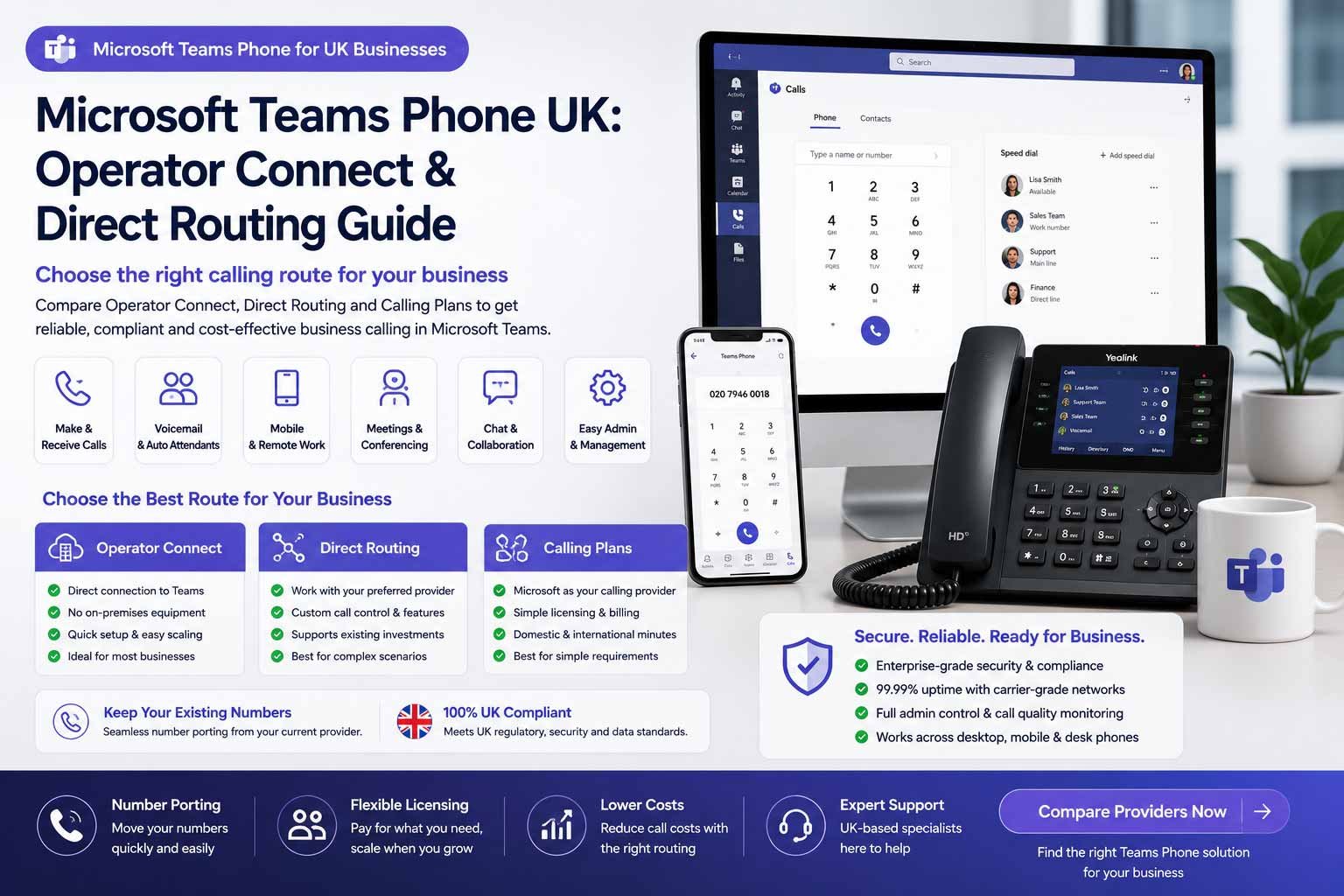
Microsoft Teams Phone lets UK businesses add external calling to Teams using Calling Plans, Operator Connect or Direct Routing. The right route depends on licences, existing numbers, operators, call queues, auto attendants, recording, emergency calling, support ownership and whether your business needs a simple Teams-native phone system or a more complex voice setup.
Route choice matters
Calling Plans, Operator Connect and Direct Routing can create very different costs, support models and migration risks.
Four Ways To Think About Microsoft Teams Phone
Teams Phone can be simple or complex depending on whether Microsoft, an Operator Connect partner, a Direct Routing carrier or a hybrid design owns the external calling route.
Calling Plans
Best when Microsoft-provided numbers and calling bundles are available and the business wants a simpler Microsoft-managed route.
Operator Connect
Best for UK businesses that want certified operator connectivity managed through the Teams admin centre.
Direct Routing
Best where a carrier, SBC, complex routing, existing SIP estate or multi-country voice strategy is required.
Hybrid / Phased
Best where Teams Phone is rolled out alongside an existing PBX, contact centre or site-by-site migration plan.
Microsoft Teams Phone lets UK businesses add external calling to Teams using Calling Plans, Operator Connect or Direct Routing. The right route depends on licences, existing numbers, operators, call queues, auto attendants, recording, emergency calling, support ownership and whether your business needs a simple Teams-native phone system or complex setup.
Last updated: June 2026
Reviewed by: CompareServices Editorial Team
Reading time: 16–18 minutes
Quick Verdict
Microsoft Teams Phone is best for UK businesses that already live inside Microsoft Teams and want external business calling in the same workspace. It is not always the cheapest or simplest phone-system route, but it can be the cleanest option when Microsoft 365 governance, Teams adoption and centralised administration are already in place.
For most UK businesses, the decision is not just “Teams Phone or not”. The real decision is whether external calling should be handled through Microsoft Calling Plans, Operator Connect, Direct Routing or a phased hybrid design.
| Business situation | Best Teams Phone route | Why it fits | Check before choosing |
|---|---|---|---|
| Small Microsoft 365-led team | Calling Plans or Operator Connect | Simpler administration and Teams-native calling | Licence cost, number availability, calling bundle |
| SME with existing telecoms provider | Operator Connect | Provider-managed PSTN with Teams admin integration | Operator coverage, support, porting, call charges |
| Complex PBX/SIP estate | Direct Routing | More control over carriers, routing and infrastructure | SBC design, resilience, security, support ownership |
| Multi-site or regulated business | Direct Routing or hybrid | Supports staged migration and governance requirements | Emergency addresses, recording, retention, failover |
| Simple low-cost phone need | Compare against hosted VoIP | A basic cloud phone system may be easier | Total cost versus features actually used |
Important: do not treat Teams Phone as a plug-in replacement for every existing phone line. Audit numbers, call queues, analogue devices, emergency calling, recording requirements and support responsibility before porting numbers.
Why Trust CompareServices?
CompareServices is an independent UK business services comparison platform. This guide is written for business owners, IT managers, operations teams and procurement leads comparing Teams Phone against hosted VoIP, cloud PBX, SIP trunking and hybrid phone-system routes.
We keep this guide focused on buyer decision-making: Microsoft licensing, PSTN connectivity route, number porting, call routing, operational fit, implementation risk and where a different phone-system route may be better.
- UK business focus rather than consumer calling advice
- Clear separation between Calling Plans, Operator Connect and Direct Routing
- Practical buyer tables and implementation checklist
- Internal links limited to already-published CompareServices telecom guides
What Is Microsoft Teams Phone?
Microsoft Teams Phone is a cloud-based phone system built into Microsoft Teams. It lets users make and receive external phone calls through the Teams app, desk phones certified for Teams, headsets or mobile devices, provided the business has the right Teams Phone licence and PSTN connectivity route.
Microsoft describes Teams Phone as a cloud-based phone system that can make and receive calls over the PSTN or an internet connection, with PSTN service added through Calling Plans, Operator Connect or Direct Routing. For UK buyers, those three route choices drive cost, support and complexity.
What Teams Phone can replace
- Traditional PBX systems used for office calling
- Some hosted PBX or cloud VoIP requirements
- Desk-phone-only workflows where Teams is already widely used
- Some legacy call-routing needs when auto attendants and queues are enough
What it may not replace on its own
- Complex contact-centre platforms
- Specialist call recording or regulated archiving needs
- Analogue devices such as alarms, lifts, fax or payment terminals
- Existing PBX estates that need phased SIP migration
- Advanced CRM telephony workflows without extra integration
Microsoft Teams Phone Routes Compared
The route table below is the core decision point. All three options can make Teams into a business calling platform, but they differ in ownership, complexity and support.
| Route | What it means | Best for | Main watch-out |
|---|---|---|---|
| Calling Plans | Microsoft provides the calling plan and phone numbers where available | Smaller teams wanting a Microsoft-managed route | Availability, bundle limits and total licence cost |
| Operator Connect | A participating operator provides PSTN service through Teams admin | SMEs wanting operator support and simpler carrier management | Operator choice, porting, support boundaries and quote detail |
| Direct Routing | Teams connects to a carrier through a Session Border Controller | Businesses needing custom routing, existing carriers or complex estates | Technical design, SBC management, security and resilience |
| Hybrid route | Teams Phone is used alongside existing PBX, SIP or contact-centre systems | Phased migrations, multi-site estates and regulated teams | Can become complex unless the end-state is defined |
Best starting point: if you want simplicity, compare Calling Plans and Operator Connect first. If you need control, existing carrier retention or complex routing, assess Direct Routing with a qualified Teams voice specialist.
Licensing And Cost Checks
Teams Phone pricing should not be judged only on one licence line. A complete quote may include Microsoft 365, Teams Phone, the PSTN calling route, phone numbers, user licences, shared device licences, desk phones, headsets, implementation support, porting, recording, compliance storage and operator charges.
Microsoft currently lists Teams Phone Standard in the UK from £7.70 per user/month paid yearly, excluding VAT, but businesses must check current Microsoft pricing and whether separate Microsoft 365, Teams and PSTN calling costs apply before purchase.
| Cost area | What to check | Why it matters |
|---|---|---|
| Microsoft 365 base plan | Whether the user already has the right Microsoft 365 and Teams entitlement | The phone licence may not be the only Microsoft cost |
| Teams Phone licence | Whether Teams Phone Standard or included enterprise licensing applies | Phone-system capability depends on correct licensing |
| PSTN route | Calling Plan, Operator Connect or Direct Routing charges | This determines external calling cost and support model |
| Numbers and porting | Number rental, porting, temporary routing and port-away terms | Number migration can delay go-live if records are wrong |
| Devices | Teams-certified phones, headsets, meeting-room devices and shared phones | Some users may need physical devices, not only the app |
| Implementation | Admin setup, policies, queues, auto attendants, testing and training | Teams voice rollout can fail if configuration is rushed |
Buyer note: compare Teams Phone against cloud phone systems and business phone systems using total first-year cost, not only monthly licence price.
Operator Connect: When It Makes Sense
Operator Connect is often the most practical route for UK SMEs that want Teams-native calling without building a full Direct Routing architecture. A participating telecoms operator provides PSTN connectivity, numbers and calling services, while Teams admins can manage operator relationships and numbers through the Teams admin centre.
Operator Connect is usually a good fit when:
- You already use Microsoft Teams every day
- You want external calling inside Teams
- You prefer a certified telecoms operator to manage PSTN connectivity
- You want simpler administration than Direct Routing
- You need number porting and UK support from an operator
- Your call flows are standard enough for Teams auto attendants and queues
Operator Connect watch-outs
- Not every operator supports every country, number type or use case
- Pricing is operator-specific and may include charges outside Microsoft licensing
- Complex call routing may still need additional design
- Support boundaries between Microsoft and the operator must be clear
- Contact-centre requirements should be assessed separately
Direct Routing: When It Makes Sense
Direct Routing connects Microsoft Teams Phone to a carrier through a supported Session Border Controller. It is the more controlled and technical route. It can be the right answer for businesses with existing SIP contracts, complex routing, regulated requirements, multi-country estates or staged migration needs.
Direct Routing is usually a good fit when:
- You already have SIP trunks or carrier contracts you want to keep
- You need complex routing between Teams, PBX and contact-centre systems
- You operate across multiple countries or sites
- You need detailed control over resilience and call flows
- You have IT or telecoms support capable of managing the design
- You need a phased migration rather than a clean switch
Direct Routing watch-outs
- The Session Border Controller must be specified, secured and maintained
- Support ownership can be split between Microsoft, the carrier and the SBC provider
- Emergency calling and location handling need careful configuration
- Resilience design matters for critical call handling
- Implementation is usually more complex than Operator Connect
Guardrail: Direct Routing should not be selected only because it sounds more advanced. Use it when the control, carrier flexibility or complex routing genuinely justifies the technical overhead.
Microsoft Calling Plans: When They Fit
Calling Plans are Microsoft-provided telephone services that can be combined with Teams Phone where available. Microsoft documentation describes domestic, international and pay-as-you-go calling plan options, with availability depending on the user’s country or region.
Calling Plans can be attractive for smaller or simpler teams because the buyer keeps more of the calling relationship inside Microsoft. However, the fit depends on number availability, call volumes, international needs, bundle limits and whether the final total cost compares well against Operator Connect or hosted VoIP.
Calling Plans may fit when:
- You want a simpler Microsoft-managed route
- Your required numbers and locations are supported
- Your call volumes fit the available plan structure
- You do not need specialist carrier routing
- You prefer fewer supplier relationships
Calling Plans may not fit when:
- You need a preferred telecoms provider
- You have existing number ranges or contract constraints
- You need complex routing or multi-country voice design
- You need more control over carrier-level resilience
- Operator Connect or Direct Routing gives a better quote
Teams Phone Features To Compare
Teams Phone can provide standard business phone-system features, but buyers should check exactly what is included, what needs configuration and what may require add-on products or third-party tools.
| Feature | What it does | Buyer check |
|---|---|---|
| Auto attendants | Route callers through menu options and business hours | Can non-technical admins maintain menus? |
| Call queues | Hold and distribute calls to groups of users | Are queue behaviour and reporting deep enough? |
| Voicemail | Stores missed voice messages in the Teams/Microsoft environment | How are notifications, transcripts and retention handled? |
| Call transfer and forwarding | Moves or redirects calls between users, devices or numbers | Does it work cleanly for reception and remote users? |
| Presence | Shows availability status across Teams | Will staff keep status accurate enough for routing? |
| Desk phones and devices | Teams-compatible phones and shared devices | Are devices certified and correctly licensed? |
| Reporting | Call quality and admin reporting | Is it enough for management and compliance needs? |
| Recording and compliance | Call recording or policy-based recording depending on setup | Does it meet GDPR, retention and sector requirements? |
Teams Phone Migration Plan
A Microsoft Teams Phone migration should be planned like a phone-system project, not only an IT licence change.
- Audit existing phone estate: list numbers, DDIs, users, sites, contracts, PBX hardware, SIP trunks and analogue devices.
- Confirm Microsoft licensing: check existing Microsoft 365 plans, Teams entitlement and Teams Phone requirements.
- Choose PSTN route: compare Calling Plans, Operator Connect and Direct Routing against cost, control and support needs.
- Design call flows: document main number routing, auto attendants, queues, voicemail and out-of-hours rules.
- Prepare number porting: confirm number ownership, losing provider details and porting windows.
- Configure policies: set user voice policies, emergency addresses, caller ID, voicemail and queue membership.
- Test with pilot users: test inbound, outbound, transfers, queues, mobile app, desk devices and emergency-calling behaviour.
- Train staff: show users how to answer, transfer, park, forward and manage voicemail in Teams.
- Go live and monitor: monitor call quality, missed calls, routing errors and support tickets.
- Retire legacy services carefully: cancel old services only after number porting and dependent-device checks are complete.
When To Use Or Avoid Microsoft Teams Phone
Use Teams Phone when:
- Your staff already work in Microsoft Teams daily
- You want one interface for meetings, chat and calling
- You have Microsoft 365 administration capability
- You need Teams-based user management and policies
- Your call flows are suitable for Teams queues and auto attendants
- You can get a strong Operator Connect or Direct Routing quote
Compare other options when:
- You only need a low-cost business number and simple mobile app
- Your team does not use Teams heavily
- You need specialist contact-centre features
- You need simpler support from one hosted VoIP provider
- Your call recording or compliance requirements are complex
- Your existing PBX migration is better handled through SIP or hybrid design
For wider options, compare cloud phone systems, SIP/3CX/PBX hybrid routes and the PSTN migration checklist.
Buyer Checklist: Questions To Ask Before Choosing Teams Phone
- Which Microsoft licences do we already have?
- Do we need Teams Phone Standard or is phone capability already included?
- Will external calling use Calling Plans, Operator Connect or Direct Routing?
- Who owns support: Microsoft, operator, carrier, SBC provider or IT partner?
- Can we keep all existing phone numbers and DDIs?
- How long will number porting take?
- What happens during the porting window?
- Are auto attendants and queues enough for our call flows?
- Do we need call recording, policy recording or third-party compliance tools?
- How are emergency addresses and remote workers handled?
- Do shared phones, reception devices or meeting-room phones need separate licences?
- What are the total first-year costs including implementation?
- How will call quality be tested before go-live?
- What happens if Microsoft Teams or the site internet connection is unavailable?
- Which PSTN-dependent devices still need separate migration?
Official References Checked
This guide uses current Microsoft documentation and public product information as a basis for the buyer checks. Always confirm live pricing, licensing and regional availability directly with Microsoft or your selected operator before purchase.
- Microsoft Teams Phone product page
- Microsoft PSTN connectivity options for Teams Phone
- Microsoft Operator Connect planning guidance
- Microsoft Direct Routing planning guidance
- Microsoft Teams Calling Plans guidance
Frequently Asked Questions
What is Microsoft Teams Phone?
Microsoft Teams Phone is Microsoft’s cloud phone system for Teams. It lets users make and receive external business calls through Teams when combined with a suitable PSTN route such as Calling Plans, Operator Connect or Direct Routing.
Is Microsoft Teams Phone the same as VoIP?
Microsoft Teams Phone uses VoIP-style digital calling, but it is a broader Teams-native phone system. It includes user calling features, voicemail, call queues, auto attendants and PSTN connectivity options when the correct licences and calling route are configured.
What is Operator Connect in Microsoft Teams?
Operator Connect lets a participating telecoms operator provide PSTN calling and numbers inside Teams through the Teams admin centre. It is usually simpler than Direct Routing because the operator manages more of the carrier connectivity.
What is Direct Routing in Microsoft Teams Phone?
Direct Routing connects Teams Phone to a carrier or SIP service through a certified Session Border Controller. It is typically used when businesses need more control, existing carrier contracts, complex routing or multi-country voice design.
What is the difference between Calling Plans, Operator Connect and Direct Routing?
Calling Plans are Microsoft-provided calling services, Operator Connect uses participating operators inside Teams admin, and Direct Routing uses a Session Border Controller with a carrier or SIP provider. The right route depends on control, cost, coverage and support needs.
Do UK businesses need a separate Teams Phone licence?
Usually, yes. Microsoft Teams Phone requires the appropriate Teams Phone licensing and a PSTN calling route. Some Microsoft 365 plans include phone system capability, while others require add-on licences, so always confirm the exact licensing before rollout.
Can I keep my existing business phone numbers with Teams Phone?
In many cases, yes. Existing numbers can often be ported to Microsoft Calling Plans, an Operator Connect provider or a Direct Routing carrier. Confirm number ownership, porting timescales, emergency address data and any existing contract restrictions first.
Is Teams Phone suitable for small businesses?
Teams Phone can suit small businesses already using Microsoft 365 and Teams every day. A simpler hosted VoIP system may be easier and cheaper if the business only needs a number, mobile app, voicemail and basic call routing.
Does Teams Phone support auto attendants and call queues?
Yes. Teams Phone can support auto attendants and call queues, but configuration, licensing and feature depth should be checked carefully. Businesses with complex contact-centre requirements may need specialist Teams contact-centre products or another platform.
Does Microsoft Teams Phone replace a PBX?
For many businesses, yes. Teams Phone can replace a traditional PBX for standard business calling, voicemail, queues and routing. Businesses with specialist telephony workflows, analogue devices, call recording needs or complex routing should assess the design carefully.
Is Direct Routing better than Operator Connect?
Not always. Direct Routing offers more control and flexibility, but usually needs more technical management. Operator Connect is often simpler for standard Teams voice deployments. The better option depends on carrier preference, support ownership, resilience and routing complexity.
What should be checked before moving to Teams Phone?
Check Microsoft licensing, user count, existing numbers, current contracts, emergency addresses, call queues, auto attendants, recording needs, analogue devices, broadband readiness, support ownership and whether Teams is already the daily workspace for staff.
Get Help Comparing Teams Phone Options
CompareServices helps UK businesses compare phone-system routes before committing to a supplier. If you are unsure whether Microsoft Teams Phone, Operator Connect, Direct Routing, hosted VoIP, SIP trunking or a hybrid route is the best fit, start with your current phone estate and Microsoft licensing position.
What you can compare:
- Teams Phone route suitability
- Operator Connect versus Direct Routing
- Microsoft licence and PSTN calling costs
- Number porting and implementation support
- Call queues, auto attendants and Teams voice features
- Hosted VoIP, SIP and hybrid alternatives
Start comparing Microsoft Teams Phone and business phone system options now.
Compare Teams Phone Routes Before You Port Numbers
Review Calling Plans, Operator Connect, Direct Routing and hosted VoIP alternatives before choosing a Microsoft Teams calling route for your UK business.