PSTN Switch-Off & Business VoIP Migration UK (2026)
Move business phone lines, numbers and legacy devices before the January 2027 deadline
UK businesses must move PSTN and ISDN services to digital alternatives before the 31 January 2027 deadline. Start by auditing phone lines, numbers, alarms, lifts, fax, card machines and door entry systems, then plan number porting, VoIP migration, resilience, emergency calling and supplier testing before cancelling legacy services after go-live.
Plan migration before porting
Audit every line, number, device and site before replacing PSTN or ISDN services with VoIP, Teams, SIP or hybrid voice.
Four Workstreams Every Business Should Check
The safest PSTN switch-off project is not only a phone-system replacement. It also covers number ownership, legacy devices, network readiness and go-live testing.
Line & Number Audit
Identify all phone numbers, suppliers, contracts, ISDN channels, backup lines and direct-dial numbers before anything is cancelled.
VoIP Migration Route
Choose cloud VoIP, hosted PBX, Teams Phone, SIP trunking or a hybrid route based on how your business handles calls.
Legacy Device Plan
Check alarms, lifts, fax, payment terminals, door entry, fire panels and monitoring equipment with the relevant supplier.
Resilience & Testing
Test number porting, call routing, power backup, emergency calling and failover before signing off the migration.
UK businesses must move PSTN and ISDN services to digital alternatives before the 31 January 2027 deadline. Start by auditing phone lines, numbers, alarms, lifts, fax, card machines and door entry systems, then plan number porting, VoIP migration, resilience, emergency calling and supplier testing before cancelling legacy services after go-live.
Last updated: June 2026
Reviewed by: CompareServices Editorial Team
Reading time: 18–20 minutes
Quick Verdict
The PSTN switch-off is a business continuity project, not just a telephone upgrade. The safest approach is to audit every phone line, number and connected device before choosing a digital voice route. For most UK SMEs, the replacement will be a cloud VoIP or hosted PBX system. Businesses with existing PBX investment may use SIP trunking, while Microsoft 365-led teams may choose Teams Phone through Operator Connect or Direct Routing.
Openreach says the existing analogue network is being retired by 31 January 2027, and GOV.UK’s connectivity timeline says users of the Openreach PSTN need to move to new services by that date. Businesses should still check supplier-specific migration dates because some providers may move customers earlier.
| Business situation | Best action | Why it matters | Check before cancelling old lines |
|---|---|---|---|
| Using PSTN or ISDN for calls | Move to cloud VoIP, hosted PBX, Teams Phone, SIP or hybrid | Legacy voice services are being retired | Number porting, call routing, go-live testing |
| Existing PBX still in use | Assess SIP trunking, hosted PBX or staged replacement | The PBX may depend on ISDN or analogue services | PBX compatibility, support contract, security updates |
| Alarms, lifts, fax or payment terminals connected | Speak to the device supplier before migration | These may fail if the old line is removed without replacement | Digital alternative, GSM/IP route, test certificate |
| Multiple sites or old number ranges | Create a site-by-site migration plan | Unmapped numbers can delay porting or break call flows | Supplier records, ownership, active services |
| Phones must work during outages | Plan power backup and failover routing | Digital voice relies on powered equipment and connectivity | UPS, mobile fallback, backup broadband, emergency address data |
Important: do not cancel existing phone services until your new system is live, key numbers are ported, legacy devices are tested and emergency-calling behaviour is understood.
Why Trust CompareServices?
CompareServices is an independent UK business services comparison platform. This guide is designed for business owners, operations managers, IT teams and procurement leads who need to prepare for the PSTN switch-off without confusing provider sales messaging with a migration plan.
Our approach is to separate the migration decision into practical checks: what you currently use, what must be replaced, which digital route fits your business, which devices need specialist handling, and which risks must be tested before legacy services are removed.
- UK business-focused guidance rather than consumer landline advice
- Clear separation between phone systems, broadband, SIP, Teams Phone and legacy devices
- Practical audit and checklist format for migration planning
- Related guides limited to live CompareServices pages only
What Is The PSTN Switch-Off?
The PSTN switch-off is the retirement of the UK’s older analogue Public Switched Telephone Network and related legacy services such as ISDN. Instead of calls being carried over traditional copper voice lines, businesses will use digital services delivered over internet protocol, fibre-based networks, SIP trunks or hosted platforms.
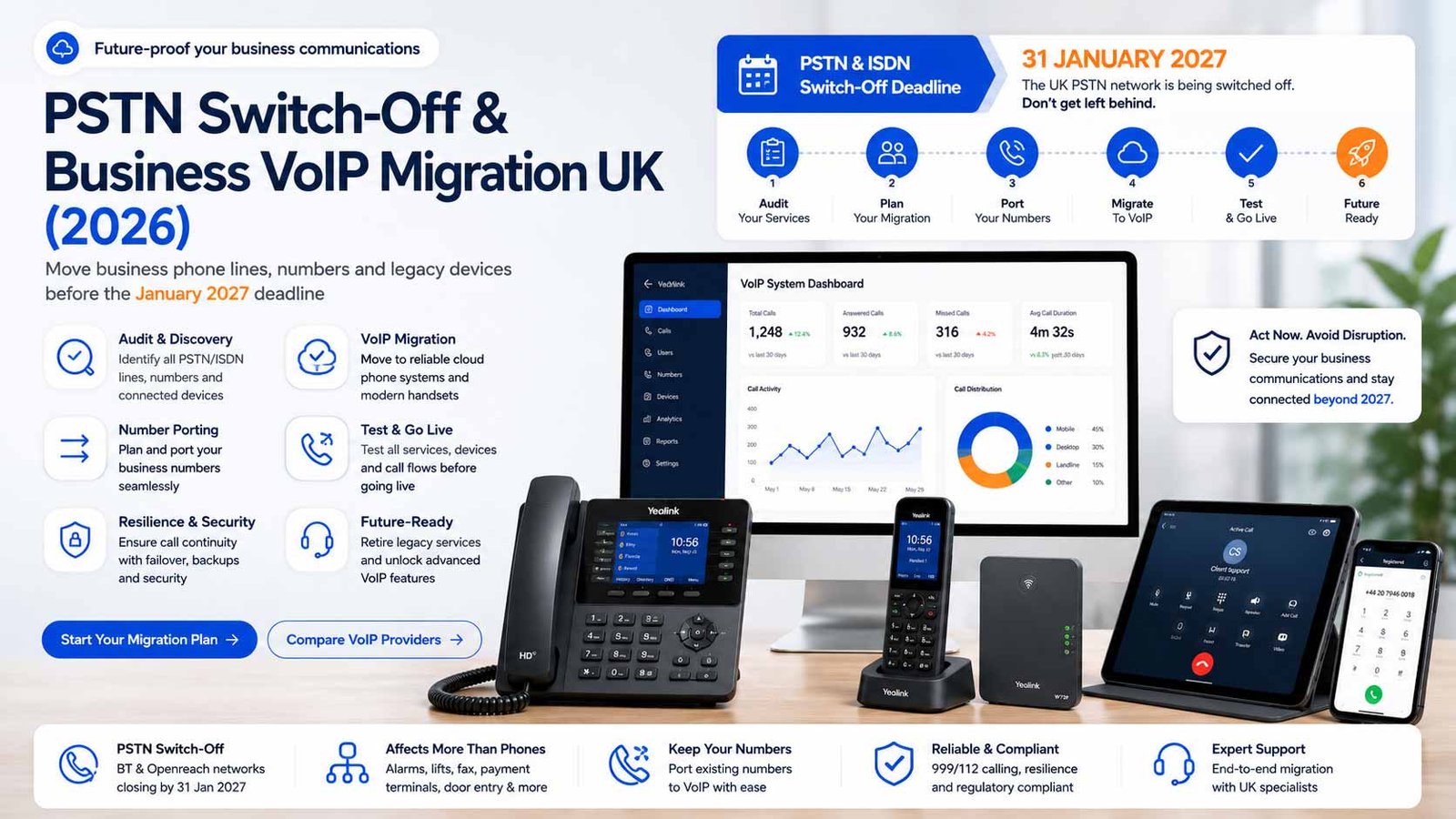
For many businesses, the change will be straightforward: move from a traditional phone line to a cloud phone system or hosted VoIP service. For others, the project is more complex because old lines may be connected to alarms, lifts, payment terminals, fax machines, door-entry systems, monitoring equipment or legacy PBX hardware.
The key mistake is assuming the office handset system is the only thing affected. A business may have one visible phone system but several hidden PSTN-dependent services across sites, outbuildings, tills, reception areas, lifts or alarm panels.
What is being retired?
- Traditional analogue PSTN lines
- ISDN2 and ISDN30 services
- WLR-linked traditional voice services
- Some older broadband/voice bundles that depend on legacy line rental
- Legacy PBX connectivity that depends on ISDN or analogue lines
What replaces it?
- Cloud VoIP or hosted phone systems
- Hosted PBX platforms
- Microsoft Teams Phone with a suitable calling route
- SIP trunking for compatible PBX systems
- IP, fibre, GSM or specialist replacements for non-voice devices
- Data-only broadband such as FTTP, SOGEA or leased-line connectivity where suitable
Who Is Affected?
Any UK business still using traditional landlines, ISDN, WLR-linked services or PSTN-connected equipment should review its setup. The risk is higher when phone services have been in place for many years, supplier records are incomplete, or different sites have different contracts.
| Affected area | Examples | Risk if ignored | Owner to involve |
|---|---|---|---|
| Business voice calling | Main numbers, DDIs, reception lines, branch numbers | Lost calls, failed porting, customer disruption | Telecoms provider, IT, operations |
| PBX and extensions | ISDN-connected PBX, old handsets, hunt groups | Internal calling and routing may fail | Telephony maintainer, IT partner |
| Safety systems | Lift emergency phones, fire panels, alarm diallers | Safety or compliance failure | Lift, alarm, fire or facilities supplier |
| Payment and retail devices | PDQ terminals, tills, franking machines | Payment interruption or transaction failure | Payment provider, finance, retail ops |
| Legacy communications | Fax, modems, remote monitoring | Lost documents, failed alerts or monitoring gaps | Device vendor, IT, compliance lead |
| Emergency calling | 999/112 address data, power resilience | Incorrect location or unavailable calling during outage | Telecoms provider, health and safety lead |
Practical rule: if a device dials a number, receives a call, sends an alert or relies on a phone line, treat it as part of the PSTN migration audit until confirmed otherwise.
Digital Migration Routes Compared
There is no single replacement that fits every business. The right digital route depends on whether you want a fully managed cloud system, need Microsoft Teams integration, want to keep existing PBX hardware, or must migrate in phases.
| Migration route | Best for | Main benefit | Main watch-out |
|---|---|---|---|
| Cloud VoIP | Most SMEs replacing landlines | Fast setup, app-based calling, simple user management | Requires suitable broadband and device testing |
| Hosted PBX | Office teams needing extensions and routing | Familiar PBX-style features without on-site hardware | Check call-flow limits and support model |
| Microsoft Teams Phone | Microsoft 365-first businesses | Calling inside Teams with Operator Connect or Direct Routing | Licensing and implementation route need careful planning |
| SIP trunking | Businesses keeping compatible PBX hardware | Replaces ISDN while retaining existing PBX investment | Needs technical ownership, PBX compatibility and resilience design |
| Hybrid migration | Multi-site or phased estates | Allows staged migration across sites and systems | Can create complexity unless the final end-state is defined |
| Specialist device replacement | Alarms, lifts, fax, PDQ and monitoring | Moves non-voice devices away from analogue dependency | Must be validated by the device supplier, not only the phone provider |
When cloud VoIP is usually enough
Cloud VoIP is usually enough when the business has simple office calling, mobile staff, a small number of locations, and no complex PBX dependency. It is often the most practical route for SMEs that want to replace traditional lines quickly and manage users through an online portal.
When SIP trunking may be better
SIP trunking may be better when a business has already invested in a compatible PBX, has an IT team or telecoms partner to manage it, or needs a phased migration away from ISDN. SIP is not the simplest route for non-technical buyers, but it can be a strong fit for existing infrastructure.
When Teams Phone makes sense
Teams Phone makes sense when Microsoft Teams is already the business’s daily communications hub. The decision is less about replacing a handset and more about choosing the correct calling route: Microsoft Calling Plans, Operator Connect or Direct Routing.
Line And Device Audit: What To Check First
The audit is the most important part of the project. It reduces the risk of missed services, failed number ports and unexpected outages.
Phone numbers and contracts
- Main published business numbers
- Direct dial numbers and number ranges
- Non-geographic numbers such as 03 or 08 numbers
- Fax numbers and historical numbers still receiving calls
- Numbers assigned to branches, departments or remote sites
- Current supplier, account number and contract end date
- Any number used in adverts, websites, signage or printed material
Existing phone system
- PBX make, model and support status
- ISDN channels or analogue lines feeding the system
- Desk phones and conference phones
- Reception, hunt groups, call queues and voicemail routing
- Call recording, reporting or CRM integration
- Out-of-hours routing and emergency contact flows
Hidden or non-obvious services
- Alarms, monitoring and remote alerts
- Lift emergency telephones
- Fire panels and safety systems
- Door entry and gate systems
- Fax machines and analogue modems
- PDQ/card machines and tills
- Franking machines and older office equipment
- Backup lines that are billed but rarely used
Best practice: build a simple spreadsheet with line number, service type, site, supplier, monthly cost, contract date, owner, migration action and test result.
How Number Porting Fits Into PSTN Migration
Number porting is the process of moving existing business numbers from one provider to another. It is often straightforward, but it can become difficult if records are wrong, numbers have been cancelled, services are bundled, or the current supplier details do not match the porting request.
Before requesting a port
- Confirm every number that needs to move
- Check whether the number is active and who currently bills it
- Match the business name and address to supplier records
- Identify whether numbers are single lines or part of a range
- Check whether broadband, alarms or other services depend on the same line
- Ask the new provider how calls will route during and after porting
During porting
- Keep old services active until the port is complete
- Agree the port date and test window
- Prepare temporary forwarding if needed
- Test inbound calls from mobile and landline networks
- Test outbound caller ID after the number moves
- Document any numbers that fail or need resubmission
After porting
- Check every main number and direct dial number
- Confirm department routing, voicemail and out-of-hours rules
- Check emergency address records where applicable
- Confirm old lines can be ceased only after device testing
- Update supplier records and internal documentation
Avoid this mistake: never cancel a line because you assume the number has moved. Confirm port completion, call routing and any dependent devices first.
Beyond Voice: Alarms, Lifts, Fax, PDQ And Door Entry
Many PSTN switch-off risks come from devices that are not usually managed by the phone-system provider. These devices may have been installed by facilities, security, payment, property or safety suppliers years before the VoIP migration project begins.
| Device or service | Typical issue | Possible replacement route | Who should confirm? |
|---|---|---|---|
| Lift emergency phone | May dial out over an analogue line | GSM, IP or specialist lift-line replacement | Lift maintenance supplier |
| Alarm dialler | May send alerts over PSTN | IP or mobile communicator | Alarm/security company |
| Fire panel | May report events over old line | Approved digital or mobile monitoring route | Fire safety supplier |
| Fax machine | Analogue fax may be unreliable over VoIP | Cloud fax, secure email or process replacement | IT/compliance owner |
| PDQ/card terminal | Older terminals may rely on dial-up | IP, Wi-Fi or mobile payment terminal | Payment provider |
| Door entry or gate | May call a handset or mobile via line | IP or mobile-enabled access system | Access-control supplier |
| Remote monitoring | Alerts may fail if line is removed | IP monitoring, SIM route or vendor replacement | Equipment vendor |
For critical devices, do not rely on a general phone-system quote. Ask the device supplier to confirm the correct migration method, installation requirements, testing process and any compliance certificate or service record needed after the change.
Step-By-Step Business VoIP Migration Plan
A practical migration plan should move from discovery to testing. The timeline below is a safe planning model; simple businesses may move faster, while multi-site or safety-critical estates need more time.
| Stage | Main actions | Output |
|---|---|---|
| 1. Discovery | List numbers, lines, sites, devices, suppliers, contracts and call flows | Line and device audit |
| 2. Requirement design | Define users, departments, routing, voicemail, recording, apps and handsets | Target phone-system design |
| 3. Supplier selection | Compare cloud VoIP, hosted PBX, Teams Phone, SIP or hybrid routes | Preferred migration route and quote |
| 4. Connectivity check | Assess broadband, router, Wi-Fi, QoS, backup and power resilience | Call-quality readiness plan |
| 5. Configuration | Create users, call flows, greetings, business hours, voicemail and caller ID | Configured test environment |
| 6. Number porting | Submit port request, agree date, keep legacy lines active | Numbers moved to new provider |
| 7. Device migration | Replace or reroute alarms, lifts, fax, PDQ, door entry and monitoring | Supplier-tested device replacements |
| 8. Go-live testing | Test inbound/outbound calls, emergency info, failover and user workflows | Signed-off migration |
| 9. Legacy cancellation | Cancel old services only after testing and documentation | Reduced risk and cleaner billing |
Training users before go-live
Staff should understand how to answer calls, transfer calls, use voicemail, change status, use mobile apps, access recordings and report call-quality issues. Even a good phone system can fail operationally if users are not trained before the switch.
Testing call flows
Test the real customer journey, not only whether one handset rings. Call main numbers, department options, direct dials, out-of-hours routes and overflow rules from different networks. Test mobile users and remote staff separately.
999, Emergency Calling And Power Cuts
Digital voice services can support emergency calling, but businesses must understand what happens if broadband or power fails. Traditional analogue phones could sometimes continue to work during a local power cut because power came from the exchange. Digital voice depends on powered equipment such as routers, switches, phones, ONTs and Wi-Fi access points.
Ofcom has published guidance around protecting access to emergency services during power cuts. For businesses, the practical point is clear: ask the provider how emergency calls work, how location/address data is maintained, and what resilience options are available for sites where phone access is critical.
Emergency-calling checks
- Confirm 999/112 support with the chosen provider
- Check address data for each site or remote user group
- Understand whether remote workers present the office location or another address
- Document what happens if broadband is down
- Document what happens if power is down
- Plan battery backup or alternative routes for critical sites
Power and failover options
- UPS battery backup for router, firewall, switches and ONT
- Mobile failover for inbound calls
- Backup broadband or leased-line resilience
- Call forwarding to mobiles during site outages
- Secondary site routing for multi-location businesses
- Documented escalation route for service failures
Compliance note: this page provides buyer guidance, not legal advice. Businesses with safety-critical systems, regulated operations or vulnerable users should confirm obligations with qualified advisers and the relevant device/provider specialists.
Costs, Contracts And Quote Checks
A PSTN migration quote should show more than a monthly user licence. The full project may include number porting, handsets, headsets, setup, training, call recording, storage, broadband upgrades, router changes, device replacements and support.
| Cost area | Questions to ask | Risk if missed |
|---|---|---|
| User licences | What features are included per user and what costs extra? | Low headline price becomes expensive after add-ons |
| Numbers and porting | Are number rental, porting and port-away charges listed? | Unexpected charges or delays during migration |
| Hardware | Are desk phones, headsets, conference devices or adapters included? | Users cannot work effectively at go-live |
| Connectivity | Does the current broadband support the expected call volume? | Call-quality issues and dropped calls |
| Legacy devices | Who pays for alarm, lift, fax, door entry or payment terminal migration? | Operational or safety-critical services fail |
| Support and training | Is migration support, user training and admin handover included? | System works technically but staff cannot use it properly |
| Contract terms | What is the minimum term, renewal process and price-change clause? | Long-term cost or exit risk |
Quote comparison guardrails
- Compare total first-year cost, not only per-user monthly cost
- Ask whether VAT is included or excluded
- Ask whether call recording, call queues and analytics are included
- Ask whether onboarding and porting support are included
- Ask whether hardware is rented, financed or purchased
- Ask whether you can reduce users during the contract
- Ask what happens if migration is delayed by number porting or third-party devices
Common PSTN Migration Mistakes To Avoid
- Only auditing desk phones: many risks sit in alarms, lifts, fax, PDQ, door entry and monitoring devices.
- Cancelling lines too early: this can risk losing numbers or breaking dependent services.
- Ignoring broadband readiness: cloud calling needs stable upload, low latency, low jitter and reliable local networking.
- Choosing the cheapest user licence: key features such as recording, queues, failover or admin controls may cost extra.
- Not testing out-of-hours calls: customers often discover routing issues only after the first evening or weekend.
- Leaving emergency calling unclear: address data, remote workers and power-cut behaviour must be understood.
- Assuming every device can use VoIP directly: some analogue devices need replacement rather than simple conversion.
- Not documenting the final setup: future support becomes harder if no one knows which numbers, users and devices moved.
PSTN Migration Checklist For UK Businesses
Use this checklist before approving a provider quote or setting a port date.
Audit checklist
- All active phone numbers listed
- All direct dial numbers and number ranges listed
- All suppliers and account numbers recorded
- Contract dates and cancellation terms checked
- PBX make, model and support status confirmed
- Alarms, lifts, fax, PDQ, door entry and monitoring devices checked
- Current monthly costs recorded
- Broadband and router readiness checked
Migration checklist
- Digital route selected: cloud VoIP, hosted PBX, Teams Phone, SIP or hybrid
- Call flows documented for main hours and out-of-hours
- User list, extensions and permissions agreed
- Number porting documentation prepared
- Temporary routing or forwarding agreed where needed
- Legacy-device suppliers contacted
- Emergency-calling and address data reviewed
- Power and broadband failover options agreed
Go-live checklist
- Inbound calls tested to every main number
- Outbound caller ID tested
- Direct dial numbers tested
- Auto-attendant and routing tested
- Voicemail and missed-call alerts tested
- Mobile apps and remote users tested
- Alarms, lifts, fax, payment terminals and door entry tested separately
- Old services cancelled only after sign-off
Official References Checked
This guide has been prepared using current UK public guidance from official and primary sources. Businesses should still confirm their own supplier timetable and contractual position before making changes.
- Openreach digital phone line upgrade guidance
- GOV.UK telecommunications modernisation connectivity timeline
- GOV.UK guidance on moving landlines to digital technologies
- Ofcom guidance on protecting customers during digital landline migration
Frequently Asked Questions
What is the PSTN switch-off in the UK?
The PSTN switch-off is the retirement of the UK’s older analogue phone network and related ISDN services. Businesses still using traditional phone lines need to move voice calling and connected devices to suitable digital alternatives before the January 2027 deadline.
When is the PSTN switch-off deadline?
The key UK deadline is 31 January 2027 for users of the Openreach PSTN. Some providers may move customers earlier, so businesses should check their own supplier dates and avoid waiting until the final months.
Does the PSTN switch-off affect business broadband?
It can. Older broadband products tied to traditional phone lines may need replacing with data-only or fibre-based services. Businesses should check whether their broadband, phone numbers, alarms, payment terminals or other devices still depend on an analogue line.
Do I need to move to VoIP before the PSTN switch-off?
Most businesses replacing traditional landlines or ISDN will move to a digital voice service such as cloud VoIP, hosted PBX, Microsoft Teams Phone, SIP trunking or another IP-based route. The right option depends on your current setup and call requirements.
Can I keep my existing business phone numbers?
In many cases, yes. Existing business numbers can usually be ported to a new provider, but you should confirm ownership, active services, required documentation, expected timing and whether any temporary routing is needed during migration.
What business devices may be affected by the PSTN switch-off?
Affected devices may include fax machines, alarm diallers, lift emergency phones, door entry systems, fire panels, payment terminals, franking machines, telecare devices and remote monitoring equipment. Each should be checked with the relevant supplier before migration.
What happens to 999 calls after moving to VoIP?
VoIP services can support emergency calling, but businesses must ensure correct address information, power resilience and failover plans are in place. Emergency-calling obligations and outage behaviour should be confirmed with the chosen provider before go-live.
Will a cloud phone system work during a power cut?
A cloud phone system depends on powered equipment such as routers, switches, handsets and internet access. Businesses that rely on phone service during outages should plan battery backup, mobile failover, alternative routing or a secondary connection.
How long does business VoIP migration take?
A simple small-business migration may be completed quickly once requirements are known, but number porting, device checks, call-flow design, training and testing can extend the project. Multi-site or device-heavy estates should plan several weeks or more.
Should I cancel my existing phone lines before porting numbers?
No. Do not cancel old lines before confirming number porting and go-live. Cancelling too early can risk losing numbers or interrupting connected services. Keep legacy services active until the migration is tested and signed off.
Is SIP trunking still relevant after the PSTN switch-off?
Yes. SIP trunking can be a suitable digital route for businesses keeping compatible PBX infrastructure. It is different from a fully hosted cloud phone system and is better suited to IT-managed or existing PBX environments.
What is the safest first step for a business?
Start with a line and device audit. List every phone number, supplier, contract, device and location that may use PSTN or ISDN. This reduces migration risk and helps providers quote accurately.
Get Help Comparing PSTN Replacement Options
CompareServices helps UK businesses compare phone-system and digital voice options without relying on a single supplier recommendation. If you are unsure whether to choose cloud VoIP, hosted PBX, Teams Phone, SIP trunking or a phased hybrid migration, start with your line and device audit.
What you can compare:
- PSTN and ISDN replacement routes
- Cloud VoIP and hosted PBX options
- Teams Phone, SIP and hybrid suitability
- Number porting and migration support
- Legacy-device risk and supplier responsibilities
- First-year costs, contract terms and support levels
Compare PSTN Replacement Options Before The Deadline
Use a structured line audit and migration checklist to compare cloud VoIP, hosted PBX, Teams Phone, SIP and hybrid routes without missing numbers, devices or resilience requirements.