Business Broadband for VoIP & Call Quality UK (2026)
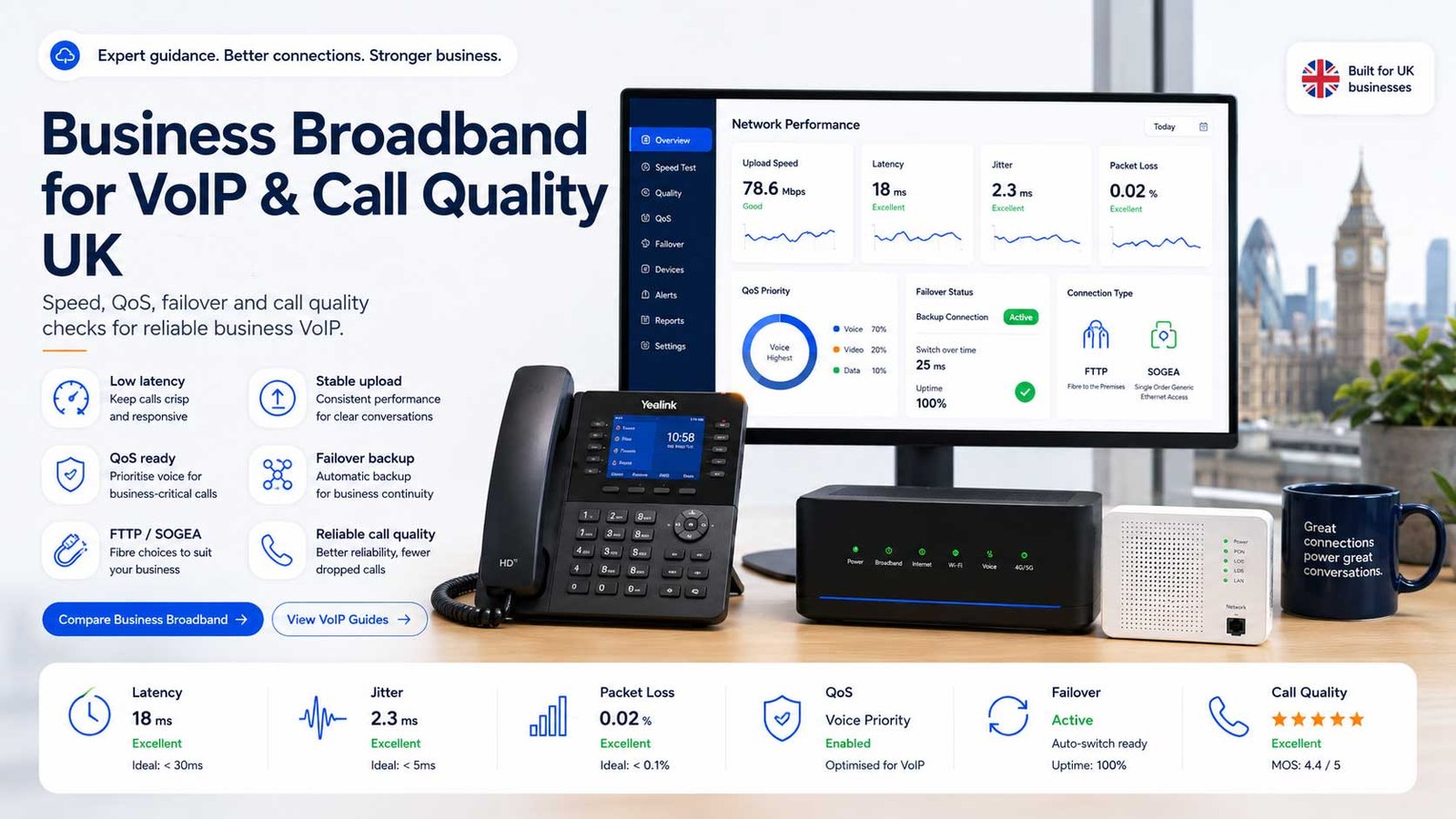
Check speed, latency, jitter, packet loss, QoS, FTTP, SOGEA and failover before moving calls to VoIP
Reliable VoIP depends on broadband quality, not only provider choice. UK businesses should check upload speed, latency, jitter, packet loss, router quality, Wi-Fi coverage, QoS, FTTP or SOGEA suitability, leased-line needs and failover before moving calls to cloud VoIP, hosted PBX, Teams Phone or UCaaS platforms for stable call quality.
Speed is not enough
A fast package can still deliver poor VoIP if latency, packet loss, Wi-Fi or router configuration are weak.
Four Network Routes To Compare Before VoIP Migration
Reliable VoIP depends on the right broadband route, a suitable router, clean local network design and a fallback plan for outages.
FTTP Broadband
Usually the best fit for SMEs that need faster, more reliable cloud calling without the cost of a dedicated leased line.
SOGEA / FTTC
Can work for small teams when the line is stable, upload capacity is enough and the router prioritises voice traffic.
Leased Line
Best for call-critical sites, larger teams or businesses that need stronger service levels, symmetrical bandwidth and rapid support.
4G / 5G Failover
Useful as a backup route so inbound calls can continue if the main broadband connection fails or power issues affect the site.
Reliable VoIP depends on broadband quality, not only provider choice. UK businesses should check upload speed, latency, jitter, packet loss, router quality, Wi-Fi coverage, QoS, FTTP or SOGEA suitability, leased-line needs and failover before moving calls to cloud VoIP, hosted PBX, Teams Phone or UCaaS platforms for stable call quality.
Last updated: June 2026
Reviewed by: CompareServices Editorial Team
Reading time: 16–18 minutes
Quick Verdict
For most UK businesses moving to cloud VoIP, hosted PBX, Microsoft Teams Phone or UCaaS, the best broadband route is usually FTTP where available, with a business-grade router, voice-prioritisation settings and a tested failover plan. SOGEA can be suitable for small teams if upload capacity and line stability are strong. A leased line is usually reserved for larger offices, call-critical operations, multi-site businesses, professional services firms or teams with high concurrent call volume.
The most common mistake is comparing phone providers before checking whether the connection, router, Wi-Fi and local network can support real-time voice. VoIP call quality depends on several factors working together, not just advertised download speed.
| Business situation | Best connectivity route | Why it fits | Check before switching calls |
|---|---|---|---|
| Sole trader or 1–3 users | Stable FTTP or SOGEA | Low call volume and simple app-based calling | Upload speed, Wi-Fi strength, mobile fallback |
| Small office with 4–20 users | FTTP with business router | Better headroom for simultaneous calls and normal data traffic | QoS, router quality, wired phones, call peaks |
| Reception or support-led team | FTTP or leased line depending on call criticality | Inbound calls need stability, low delay and consistent routing | Failover, SLA, queue behaviour during outages |
| Multi-site business | Site-by-site mix of FTTP, leased line and backup routes | Different branches may have different call patterns | Site-level failover and central call routing |
| Call-critical operation | Leased line plus backup connection | Stronger service-level commitment and symmetrical bandwidth | Fault response, router support, disaster recovery |
| Remote or hybrid team | Reliable home broadband plus mobile/desktop softphone testing | Users rely on apps, Wi-Fi and home routers | Headsets, Wi-Fi coverage, VPN impact, support policy |
What Broadband Do You Need for VoIP?
VoIP uses the internet to carry voice traffic. Unlike email or file downloads, voice is real time. If data packets arrive late, arrive out of order or fail to arrive, the caller hears delay, clipped words, robotic audio, echo or silence.
A practical planning baseline is to allow around 1 Mbps upload capacity per concurrent voice call, then add spare capacity for other business activity. This is not a guarantee, but it is a simple way to avoid underestimating upload requirements.
For a business with ten users, the important number is not ten users. It is how many people may be on calls at the same time. A ten-user office with three simultaneous calls needs less voice bandwidth than a ten-user sales team with eight simultaneous calls.
Core VoIP broadband checks
- Upload speed: enough capacity for simultaneous outbound voice traffic.
- Latency: the delay between speaker and listener.
- Jitter: variation in packet arrival time.
- Packet loss: voice data that never reaches the other end.
- Router quality: whether the router can prioritise and handle voice traffic reliably.
- Wi-Fi coverage: whether softphone users have stable wireless signal.
- Failover: what happens when broadband or power fails.
Why VoIP Call Quality Fails
Poor call quality is often blamed on the VoIP provider, but many problems start inside the local network or broadband connection. A good provider can still sound poor if the router is overloaded, the Wi-Fi is weak or large file transfers compete with voice traffic.
| Symptom | Likely cause | How to investigate | Possible fix |
|---|---|---|---|
| Robotic audio | Jitter or packet loss | Run a VoIP readiness test during busy hours | QoS, better router, wired devices, improved broadband |
| Call delay | High latency | Check round-trip latency to provider servers | Improve connection route, avoid overloaded VPNs |
| Dropped calls | Connection instability or router issues | Check logs, uptime and line errors | Replace router, improve broadband, add failover |
| One-way audio | Firewall, NAT or SIP configuration issue | Check router/firewall settings with provider | Correct SIP ALG, firewall and port handling |
| Bad mobile softphone quality | Weak Wi-Fi or mobile signal | Test on different networks and devices | Use wired headsets, stronger Wi-Fi, mobile data fallback |
| Calls fail during outages | No fallback route | Test broadband and power-failure scenario | Set automatic forwarding or 4G/5G failover |
Speed, Latency, Jitter and Packet Loss Explained
Upload speed
Upload speed matters because your voice must leave your network in real time. Download speed is useful, but many business broadband packages advertise download capacity more prominently than upload capacity. For VoIP, upload is often the tighter limit.
Latency
Latency is delay. Lower latency feels more natural because each side hears the other quickly. Many businesses use under 150ms round-trip latency as a practical maximum, with lower figures preferred where possible.
Jitter
Jitter is inconsistency in packet arrival time. Even if the average speed looks fine, jitter can make audio sound uneven or robotic. Good routers and stable connections help reduce jitter.
Packet loss
Packet loss means some voice data never arrives. Because calls happen live, lost voice packets cannot be recovered in the same way as an email attachment. Aim for packet loss as close to zero as possible.
| Metric | Practical target | Why it matters |
|---|---|---|
| Upload capacity | Plan around 1 Mbps per concurrent call, plus headroom | Avoids congestion when multiple users call at once |
| Latency | Under 150ms as a practical ceiling, lower is better | Reduces awkward delay and talk-over |
| Jitter | Keep low and consistent | Prevents robotic or uneven audio |
| Packet loss | As close to zero as possible | Prevents clipped words and dropped calls |
| Uptime | Match to business criticality | Determines whether backup broadband is needed |
FTTP, SOGEA, Leased Lines and Failover
FTTP broadband for VoIP
FTTP, or Fibre to the Premises, is usually the preferred broadband route for VoIP where available. It removes the copper segment between the street cabinet and premises, often improving speed potential, stability and latency compared with older copper-based services.
Best for: most SMEs, cloud phone systems, hosted PBX, Teams Phone, remote-friendly offices and businesses with several simultaneous calls.
SOGEA broadband for VoIP
SOGEA is a data-only broadband service that does not include a traditional analogue phone line. It can support VoIP for many smaller sites, but call quality still depends on line stability, upload capacity, router quality and how much other traffic shares the connection.
Best for: small offices, low-to-moderate call volume, sites where FTTP is not yet available and businesses that have a tested backup route.
Leased lines for VoIP
A leased line is a dedicated connection with stronger service-level commitments than standard broadband. It is usually more expensive, but can be appropriate where inbound calls are revenue-critical, many users call at once or downtime has serious operational consequences.
Best for: call-heavy teams, professional services firms, clinics, multi-site operations, larger SMEs and businesses that need stronger fault response.
4G and 5G failover
Mobile failover gives the router another way to reach the internet if the main line fails. It should be treated as a backup route, not always as the main calling connection, unless coverage and performance are proven.
Best for: resilience, temporary outages, branch offices and businesses that need inbound call continuity.
Router, Wi-Fi and QoS Readiness
The router is often the difference between technically available broadband and reliable voice service. Business VoIP should not depend on an overloaded consumer router if calls are important to daily operations.
Router checks
- Can the router prioritise voice traffic?
- Does it support stable firewall and NAT handling for VoIP?
- Can it handle the number of users and devices on the site?
- Can it support a 4G/5G backup connection?
- Is firmware maintained and secure?
- Can the supplier or IT partner troubleshoot it remotely?
Wi-Fi checks
- Do softphone users have strong signal where they make calls?
- Are there dead spots in meeting rooms, reception areas or warehouses?
- Do users roam between access points during calls?
- Are guest networks separated from business voice traffic?
- Would wired Ethernet be better for reception desks and desk phones?
QoS checks
QoS, or Quality of Service, helps prioritise voice traffic over less time-sensitive activity such as backups, downloads and updates. It does not create bandwidth, but it can protect voice traffic when the connection is busy.
Remote Workers and Home Broadband
Cloud phone systems make remote calling easier, but the business still needs a policy for home connections, headsets, Wi-Fi, support and data handling. Remote staff may use different broadband providers, routers and Wi-Fi layouts, which means call quality can vary between users.
For remote workers, check:
- Whether the user has stable home broadband and Wi-Fi coverage.
- Whether the softphone works better on Wi-Fi or mobile data.
- Whether a wired headset is required for call-heavy roles.
- Whether VPN routing affects latency or call stability.
- How users report call-quality problems.
- Whether calls can forward to mobile if the app connection fails.
Businesses with sales, support or reception staff working remotely should test the exact app, headset and connection that will be used during normal working hours.
Failover and Business Continuity
VoIP resilience is not only a broadband question. It also includes power, routers, provider failover, mobile apps, call-forwarding rules and emergency calling arrangements.
| Failure scenario | Risk | Possible continuity option |
|---|---|---|
| Main broadband fails | Desk phones and softphones may lose service | 4G/5G router failover or automatic forwarding to mobiles |
| Power cut affects office | Router, switches and phones may shut down | UPS for network equipment and mobile fallback |
| Wi-Fi fails | Laptop/mobile softphones may degrade | Wired Ethernet for critical desks and access-point checks |
| Provider issue | Cloud phone service may be disrupted | Provider status checks, mobile continuity rules, alternative numbers |
| Remote user loses home internet | User cannot answer through app | Mobile data, mobile forwarding or team rerouting |
Businesses should ask providers to explain what happens to inbound calls during a local outage, provider outage, router failure and power cut. The right answer depends on how important phone service is to the business.
VoIP Readiness Checklist
Use this checklist before signing a cloud phone, hosted PBX, Teams Phone or UCaaS contract.
- Count users and concurrent calls: estimate how many calls happen at the same time, not only how many staff need licences.
- Identify broadband type: confirm whether the site uses FTTP, SOGEA, FTTC, leased line, mobile broadband or another connection.
- Check upload capacity: allow enough headroom for simultaneous calls and normal office traffic.
- Test latency, jitter and packet loss: test during working hours, not only when the office is quiet.
- Audit router and firewall: confirm VoIP support, QoS settings, firmware and remote support.
- Check Wi-Fi coverage: test softphones in real working locations.
- Choose wired devices where needed: use Ethernet for reception, call-heavy desks and shared phones.
- Plan failover: decide what happens when broadband, power or the router fails.
- Test remote users: confirm home broadband, app quality, headsets and escalation routes.
- Confirm supplier responsibility: define who supports broadband, router, firewall, VoIP app and call-quality issues.
Costs and Quote Questions
Business broadband for VoIP can be priced very differently depending on the route. Standard broadband is cheaper than a leased line, but the cheapest connection may not be the best value if call quality problems affect missed sales, client service or staff time.
Ask these questions before accepting a quote
- Is the connection FTTP, SOGEA, FTTC, leased line or mobile-based?
- What upload speed is guaranteed or expected?
- Is the service contended or dedicated?
- What fault response is included?
- Is a business-grade router included?
- Can the router support QoS and failover?
- Is 4G/5G backup included or optional?
- Who supports call-quality issues if the VoIP provider and broadband provider are different?
- Are static IPs required?
- What contract length and price-increase terms apply?
Mistakes to Avoid
- Choosing a VoIP provider before testing the connection.
- Comparing only download speed while ignoring upload capacity.
- Using weak Wi-Fi for call-heavy desks.
- Assuming a cheap router can support business voice reliably.
- Ignoring packet loss because the broadband speed looks good.
- Moving all calls to VoIP without a failover route.
- Not testing remote workers before go-live.
- Running large backups or updates during peak calling hours.
- Not checking support responsibility between broadband, IT and VoIP suppliers.
Frequently Asked Questions
What broadband speed do I need for VoIP?
As a simple planning baseline, allow around 1 Mbps upload capacity per concurrent voice call, then add headroom for normal business traffic. Speed alone is not enough. Latency, jitter, packet loss, router quality, Wi-Fi coverage and failover can affect call quality just as much.
Is FTTP better than SOGEA for VoIP?
FTTP is usually the stronger option for VoIP because it offers better speed potential, lower latency and stronger reliability than copper-based broadband. SOGEA can still work for small teams if the line is stable, upload capacity is sufficient and call traffic is managed properly.
Can VoIP work on SOGEA broadband?
Yes, VoIP can work on SOGEA broadband for many small businesses, but the connection should be tested before migration. Check upload speed, latency, jitter and packet loss at busy times, and consider a backup route if phone calls are critical to sales or service.
Do I need a leased line for VoIP?
Not every business needs a leased line. A small office with light call volume may be fine on stable FTTP or SOGEA. A leased line becomes more relevant when calls are business-critical, many users call at once, or the business needs stronger service-level commitments and faster fault response.
Why do VoIP calls drop or sound robotic?
Dropped or robotic VoIP calls are usually caused by packet loss, jitter, weak Wi-Fi, overloaded routers, poor broadband quality or competing traffic on the network. A VoIP-ready router, QoS settings, wired desk phones and better broadband can often reduce these issues.
What is QoS for VoIP?
QoS means Quality of Service. It is a router or network setting that prioritises voice traffic over less urgent traffic such as downloads, backups and general browsing. It helps protect call quality when the internet connection is busy.
Should VoIP desk phones use Wi-Fi or wired Ethernet?
Wired Ethernet is usually more reliable for VoIP desk phones, especially in offices with multiple users. Wi-Fi can work for softphones and mobile users, but weak signal, roaming issues and interference can affect call quality.
Does cloud VoIP need a backup internet connection?
If phone calls are important to revenue, customer support or safety, a backup route is sensible. This may be 4G or 5G failover, a secondary broadband line, mobile app fallback, or automatic call forwarding to mobiles during an outage.
What latency is acceptable for VoIP calls?
Lower latency is better. Many businesses use under 150ms round-trip latency as a practical maximum, with lower figures preferred for natural conversation. High latency creates delays that make callers talk over each other.
How much packet loss is too much for VoIP?
VoIP is sensitive to packet loss because voice traffic happens in real time. Even small amounts can cause missing words, clipped audio or dropped calls. Aim for close to zero packet loss, and investigate anything approaching 1% or more.
Can existing broadband be tested before moving to VoIP?
Yes. A provider or IT partner can run a VoIP readiness test that checks upload speed, latency, jitter, packet loss and route stability. The test should be done during normal business hours, not only when the office is quiet.
Should broadband and VoIP come from the same supplier?
It can simplify support because one supplier owns both the connectivity and voice service. However, it is not always required. The key is making sure responsibilities are clear if call quality problems appear between the broadband provider, VoIP provider and internal network.
Get a VoIP-Ready Broadband Comparison
CompareServices helps UK businesses review phone-system and connectivity options before moving to cloud VoIP, hosted PBX, Teams Phone or UCaaS. Share your team size, current broadband setup and call requirements so the comparison can include call quality, resilience and migration fit.
What you can compare:
- Broadband route suitability for VoIP
- FTTP, SOGEA, leased-line and failover options
- Router and QoS requirements
- Cloud phone system readiness
- Migration and number-porting considerations
- Business continuity and support ownership
Start comparing VoIP-ready business broadband and phone options now.
Check Connectivity Before Moving Calls To VoIP
Compare phone-system and broadband options with the practical call-quality factors that matter: upload capacity, latency, jitter, packet loss, router readiness, QoS and failover.