Hosted PBX vs UCaaS UK: Which Cloud Calling Platform Fits Your Business? (2026)
Compare Hosted PBX, cloud PBX and UCaaS before choosing your next phone system
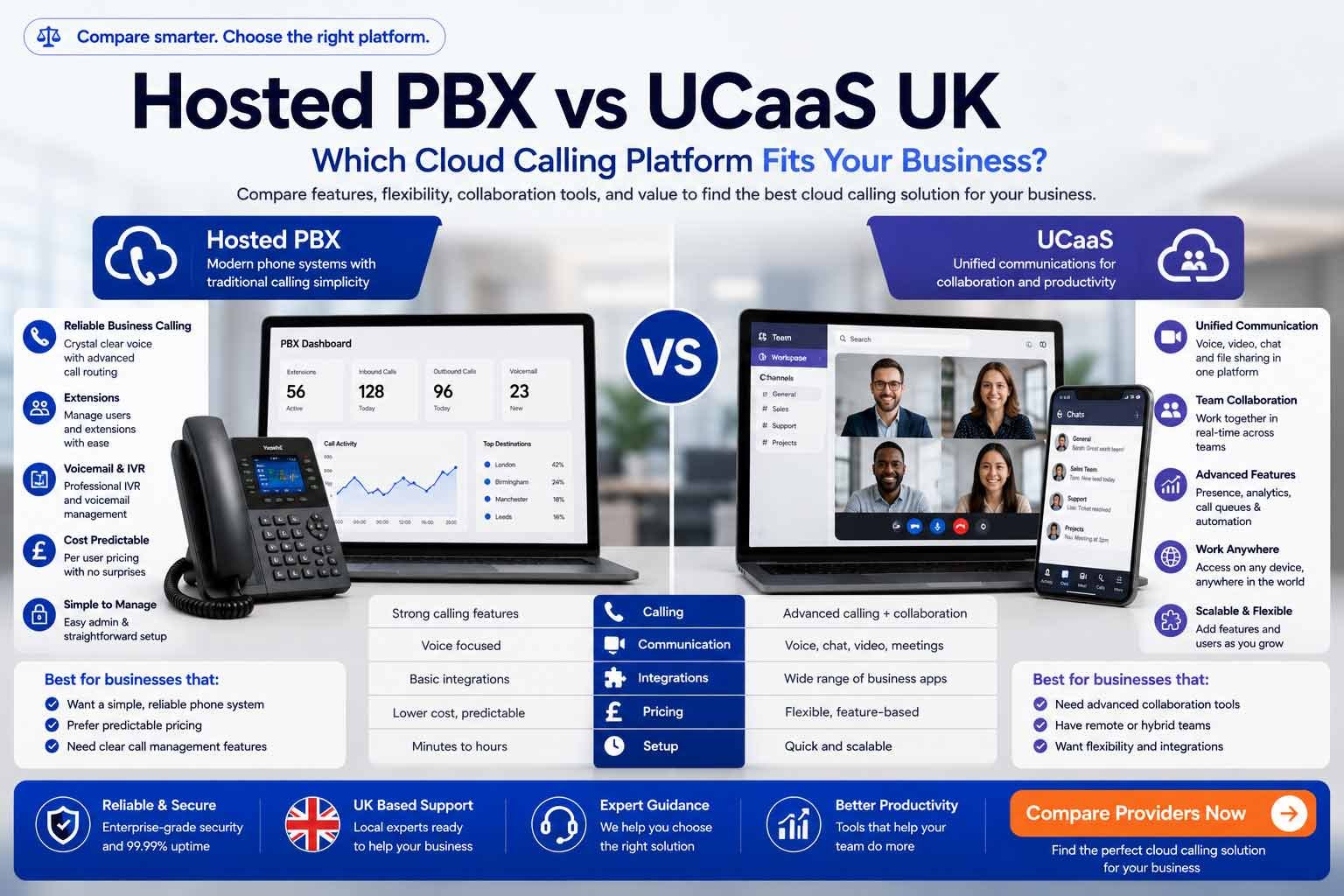
Hosted PBX and UCaaS are cloud communication models, but they solve different problems. Hosted PBX focuses on business calling, extensions, routing, voicemail and receptionist workflows. UCaaS adds voice, video, messaging, presence, meetings, analytics and integrations. UK businesses should choose based on call complexity, collaboration needs, budget and migration risk today.
Calls first or collaboration first?
Hosted PBX is usually cleaner for structured calling. UCaaS fits when voice needs to sit with meetings, messaging, presence and integrations.
Hosted PBX And UCaaS Are Not The Same Buying Decision
Hosted PBX is strongest when call handling is the priority. UCaaS is strongest when voice needs to sit alongside meetings, messaging, presence, integrations and wider team workflows.
Hosted PBX
Best for business calling, extensions, auto-attendants, hunt groups, queues, voicemail and reception-led call routing.
Cloud PBX
Best when you want PBX-style control without on-premise hardware, server maintenance or ISDN dependency.
UCaaS
Best for hybrid teams that want voice, video, messaging, presence, analytics and collaboration in one platform.
Hybrid Route
Best when Microsoft Teams, existing SIP, contact-centre tools or phased migration affect the final platform choice.
Hosted PBX and UCaaS are cloud communication models, but they solve different problems. Hosted PBX focuses on business calling, extensions, routing, voicemail and receptionist workflows. UCaaS adds voice, video, messaging, presence, meetings, analytics and integrations. UK businesses should choose based on call complexity, collaboration needs, budget and migration risk today.
Last updated: June 2026
Reviewed by: CompareServices Editorial Team
Reading time: 16–18 minutes
Quick Verdict
Hosted PBX is usually the better fit when the buying problem is mainly business calling: main numbers, extensions, auto-attendants, call queues, voicemail, direct dials, reception routing and predictable monthly phone-system management.
UCaaS is usually the better fit when calling is only one part of the communication stack. If your team also needs meetings, chat, file collaboration, user presence, analytics, CRM workflows or AI summaries in one place, UCaaS may justify the higher licence cost.
| Business situation | Better-fit route | Why it fits | Check before choosing |
|---|---|---|---|
| Office team mainly handling calls | Hosted PBX | Strong call routing without collaboration complexity | Queues, ring groups, voicemail, porting and support |
| Remote or hybrid team using several apps | UCaaS | Combines voice, video, messaging and presence | Licence tiers, app adoption and unused features |
| Reception-led small business | Hosted PBX | Simple phone-system structure and predictable setup | Auto-attendant depth and call-flow flexibility |
| Sales or service team using CRM | UCaaS or advanced cloud PBX | Integrations and analytics can reduce admin work | Native CRM support, call logging and recording policy |
| Microsoft 365-led business | Teams Phone or UCaaS comparison | Calling can sit inside the daily collaboration workspace | Calling route, licensing and support ownership |
Key guardrail: do not buy UCaaS just because it sounds more modern. If staff only need reliable calls and simple routing, Hosted PBX can be cleaner and cheaper. Do not buy Hosted PBX if your team actually needs joined-up collaboration and app consolidation.
Why Trust CompareServices?
CompareServices is an independent UK business services comparison platform. This guide is designed to help business owners, IT teams, operations managers and procurement leads separate phone-system needs from wider communication-platform needs before requesting quotes.
- UK-focused comparison structure
- Clear separation between Hosted PBX, cloud PBX, UCaaS and Teams-led routes
- No provider ranking duplication from the main Business Phone Systems guide
- Internal links limited to existing telecoms cluster pages
What Is Hosted PBX?
Hosted PBX is a cloud-hosted version of a traditional office PBX. Instead of maintaining telephone exchange hardware on site, the provider hosts the phone-system platform and the business manages users, numbers and call flows through an online portal or support process.
Hosted PBX is usually focused on structured calling rather than full collaboration. It is useful for businesses that want familiar phone-system features without maintaining on-premise PBX servers or ISDN connectivity.
Common Hosted PBX features
- Main business number and direct dial numbers
- User extensions and desk phone support
- Auto-attendant and IVR menus
- Ring groups and hunt groups
- Call queues and overflow routing
- Voicemail and voicemail-to-email
- Call forwarding and out-of-hours rules
- Call recording and basic reporting where included
Best-fit Hosted PBX buyers
- Small offices with reception workflows
- SMEs replacing old PBX or ISDN systems
- Businesses that need professional call handling but not full UCaaS
- Teams that prefer predictable phone-system administration
- Companies that still use desk phones or shared office phones
What Is UCaaS?
UCaaS means Unified Communications as a Service. It is a cloud platform that combines business phone calling with wider communication tools such as video meetings, team messaging, presence, file collaboration, screen sharing, analytics, integrations and sometimes AI-assisted call intelligence.
UCaaS is less about replacing a phone line and more about consolidating the communication stack. It can reduce tool sprawl when a business currently pays separately for phone systems, video meetings, internal chat, collaboration add-ons and call analytics.
Common UCaaS features
- Business voice calling and number porting
- Video meetings and screen sharing
- Team messaging and channels
- User presence and availability status
- Mobile, desktop and browser apps
- Call recording, analytics and dashboards
- CRM and helpdesk integrations
- AI transcription, summaries or coaching features on selected plans
Best-fit UCaaS buyers
- Hybrid and remote teams
- Growing SMEs using multiple communication tools
- Sales and support teams needing call intelligence
- Businesses wanting video, messaging and voice in one platform
- Organisations standardising communication tools across locations
Hosted PBX vs UCaaS: Side-By-Side Comparison
| Factor | Hosted PBX | UCaaS | Buyer note |
|---|---|---|---|
| Primary purpose | Business calling and call routing | Voice, video, messaging and collaboration | Start with the workflow, not the acronym |
| Best for | Office telephony, reception and call flows | Hybrid teams and communication consolidation | Different tools solve different problems |
| Complexity | Usually simpler | Usually broader and more feature-rich | Feature depth can improve or slow adoption |
| Typical users | Reception, admin, service desks, office teams | Remote teams, sales, support, multi-site teams | Some businesses need both models in different departments |
| Collaboration tools | Limited or optional | Core part of the platform | Only pay for collaboration if staff will use it |
| Desk phones | Often supported | Supported by some platforms, app-first in others | Check handset compatibility before rollout |
| Remote working | Good with apps | Stronger for full hybrid collaboration | UCaaS tends to offer richer remote workflows |
| CRM integration | May be basic or plan-dependent | Often stronger on mid/high tiers | Confirm native integration, not only Zapier-style workarounds |
| Cost pattern | Often lower for calling-only needs | Higher but may replace separate tools | Compare total software stack cost |
| PSTN readiness | Yes for business calling | Yes for business calling plus wider workflows | Legacy devices still need separate audit |
Which Option Fits Different Business Sizes?
Sole traders and 1–3 user businesses
Hosted VoIP or a simple Hosted PBX-style service is usually enough. UCaaS may be unnecessary unless video meetings, team messaging and app consolidation are part of the business model.
Small businesses with 4–20 users
Hosted PBX fits teams that mainly need better call handling. UCaaS fits teams that are already remote, use multiple communication apps or need a more joined-up workflow between calling, meetings and messaging.
Growing SMEs with 20–100 users
This is where UCaaS becomes more compelling. More users usually means more internal communication, more reporting needs, more departments and more software integration pressure. Hosted PBX still works well where phone calls remain the dominant workflow.
Larger or multi-site organisations
Both models may be used together. A business might use UCaaS for knowledge workers while keeping more structured phone-system routing for reception, branches, support desks or operational sites.
Feature Checklist: What To Compare
Hosted PBX and UCaaS providers often use similar marketing language, so compare exact features rather than broad platform labels.
| Feature area | Why it matters | Questions to ask |
|---|---|---|
| Auto-attendant and IVR | Routes callers to the right team | How many menus, levels and schedules are included? |
| Call queues and ring groups | Controls inbound call handling | Are queues included or paid add-ons? |
| Video meetings | Core UCaaS differentiator | Are meetings included, and what are participant limits? |
| Messaging and presence | Supports remote teams | Will staff actually use another messaging platform? |
| Call recording | Supports training and compliance | Is recording, storage and retention included? |
| Analytics | Improves visibility over calls and teams | Are dashboards real-time, exportable and manager-friendly? |
| Integrations | Connects calls to CRM/helpdesk workflows | Are integrations native and included in your plan? |
| Mobile and desktop apps | Supports flexible working | Are all features available in the apps? |
Costs And Quote Checks
Hosted PBX is often cheaper when you only need calling. UCaaS can be better value when it replaces separate subscriptions for meetings, messaging, team collaboration and analytics. The correct comparison is total first-year cost and total software-stack cost, not only monthly seat price.
Cost areas to separate
- User licence price
- Phone numbers and number rental
- Call bundles and excluded destinations
- Number porting charges
- Desk phones, headsets and meeting-room devices
- Call recording and storage
- CRM or helpdesk integration charges
- AI transcription or summary add-ons
- Implementation, training and support
- Contract length, renewal terms and price increases
Quote rule: ask each supplier to show a 12-month cost and a 36-month cost. This exposes setup fees, contract lock-in, renewal risk and add-ons that may not show in a headline seat price.
PSTN Migration And Legacy Phone-System Fit
Both Hosted PBX and UCaaS can support the move away from legacy PSTN and ISDN services for business calling. The bigger risk is assuming the chosen platform automatically migrates every old line or connected device.
Before migration, review the dedicated PSTN Switch-Off & Business VoIP Migration UK guide and audit:
- Main numbers and direct dial numbers
- Existing PBX and ISDN services
- Alarms, lifts, fax, payment terminals and door entry
- Broadband readiness and call-quality risks
- Emergency calling and power-cut behaviour
- Number porting timescales and supplier responsibilities
Businesses with existing PBX hardware or SIP infrastructure should also review the SIP Trunking, 3CX, On-Premise PBX & Hybrid Phone Systems UK guide before committing to a fully cloud-hosted model.
Integrations, AI And Workflow Fit
UCaaS platforms usually have the stronger story around integrations and AI, but advanced Hosted PBX or cloud phone systems can also include CRM connection, call logging, analytics and recording. The practical question is whether those features change day-to-day work.
When integrations matter
- Sales teams need click-to-call and automatic CRM call logging
- Support teams need calls linked to tickets
- Managers need queue, missed-call and team activity reports
- Compliance teams need recording access and retention controls
- Account teams need call summaries and follow-up notes
When AI features matter
- Call summaries reduce admin time
- Transcription improves handover and training
- Keyword detection helps sales or compliance review
- Sentiment and coaching tools support service teams
- Analytics can highlight missed-call and queue problems
Security, Compliance And Resilience
Hosted PBX and UCaaS both need security and governance checks. The more features a platform includes, the more important user access, recording controls, data retention and admin permissions become.
| Risk area | Hosted PBX check | UCaaS check |
|---|---|---|
| User access | Admin roles and user permissions | Admin roles across calling, meetings, messaging and integrations |
| Call recording | Recording access, notices and storage | Recording plus meeting/chat retention where relevant |
| Emergency calling | Address data and failover behaviour | Remote users, app-based calling and address governance |
| Outage planning | Mobile failover and backup routing | App, network, meeting and messaging continuity |
| Compliance | Call recording and data controls | Wider data footprint across more communication channels |
Compliance note: this guide is buyer guidance, not legal advice. Regulated businesses should confirm call recording, retention, data processing, PCI, GDPR and sector-specific requirements with qualified advisers and suppliers.
Hosted PBX vs UCaaS Buyer Checklist
- List every user, site, number and current phone service.
- Decide whether the problem is mainly calling or wider collaboration.
- Map call flows for reception, departments, out-of-hours and overflow.
- Confirm whether staff need meetings, messaging and presence in the same app.
- Check CRM, helpdesk, Microsoft 365 or Google Workspace integration needs.
- Confirm call recording, retention and reporting requirements.
- Audit PSTN-dependent devices before migration.
- Test broadband readiness, Wi-Fi, router quality and failover.
- Compare total first-year cost and 36-month cost.
- Ask for porting, setup, support and training responsibilities in writing.
- Pilot the app and call flows before full rollout.
- Only cancel legacy services after porting and testing are complete.
Frequently Asked Questions
What is the difference between Hosted PBX and UCaaS?
Hosted PBX is mainly a cloud-hosted business phone system with extensions, routing, voicemail, queues and receptionist workflows. UCaaS includes those calling features but also adds wider communication tools such as video meetings, team messaging, presence, collaboration, analytics and integrations.
Is Hosted PBX the same as cloud PBX?
Yes, in most UK buying conversations Hosted PBX and cloud PBX describe the same type of service: a PBX-style phone system hosted by a provider rather than installed on your premises. The focus is structured business calling without maintaining on-site PBX hardware.
Is UCaaS better than Hosted PBX?
UCaaS is better when your business wants voice, video, messaging and collaboration in one joined-up platform. Hosted PBX can be better when you mainly need reliable calling, reception routing, extensions, voicemail and simpler monthly pricing without paying for collaboration tools staff may not use.
Which is better for small UK businesses?
Small UK businesses with simple calling needs often do well with Hosted PBX or cloud VoIP. Small teams with remote working, frequent meetings, internal messaging and CRM workflows may get better value from UCaaS if the extra collaboration features reduce separate software costs.
Does UCaaS include business phone numbers?
Most UCaaS platforms can support business phone numbers, number porting and external calling, but the calling route, number rental and call bundles depend on the provider and plan. Always check whether PSTN calling is included or charged separately.
Can Hosted PBX support remote workers?
Yes. Hosted PBX can support remote workers through softphone apps, mobile apps, browser calling or IP desk phones connected over the internet. UCaaS may provide a richer remote-working experience because it also includes messaging, meetings, presence and collaboration tools.
Does Hosted PBX help with the PSTN switch-off?
Yes. Hosted PBX is a digital phone system route that can replace legacy PSTN or ISDN services for business calling. However, businesses must still audit analogue-dependent devices such as alarms, lift phones, fax machines, payment terminals and door-entry systems separately.
Is Microsoft Teams Phone UCaaS or Hosted PBX?
Microsoft Teams is a collaboration platform with Teams Phone adding external calling. In practice it sits closer to a UCaaS-style environment because voice is combined with meetings, chat and Microsoft 365 workflows. The PSTN route still needs Calling Plans, Operator Connect or Direct Routing.
What costs more, Hosted PBX or UCaaS?
Hosted PBX is often cheaper for basic business calling because it focuses on phone-system features. UCaaS can cost more per user, but may be better value if it replaces separate tools for meetings, messaging, collaboration, recording, analytics or customer communication workflows.
Do I need UCaaS if I already use Microsoft Teams or Google Workspace?
Not always. If your collaboration stack is already settled, a Hosted PBX or cloud VoIP system may be enough for external calling. UCaaS makes more sense when you want to consolidate voice, meetings, messaging and collaboration into one provider environment.
What should I compare before choosing?
Compare user count, call volume, inbound routing, reception workflows, remote-working needs, video and messaging usage, CRM integration, call recording, compliance controls, support model, contract term, porting support, failover and total first-year cost rather than only monthly seat price.
Can I move from Hosted PBX to UCaaS later?
Usually yes, but migration can involve user retraining, number porting, app changes, integration work and contract timing. If your business expects to need collaboration tools soon, choose a provider or architecture that offers a clear upgrade path before signing a long contract.
Get Help Comparing Hosted PBX And UCaaS Options
CompareServices helps UK businesses compare phone-system routes before speaking to suppliers. Start by deciding whether your business mainly needs structured calling, wider communication consolidation, Microsoft Teams calling, SIP infrastructure or a phased migration plan.
- Compare Hosted PBX and cloud PBX options
- Compare UCaaS platforms for hybrid teams
- Review Microsoft Teams Phone suitability
- Check PSTN migration, number porting and device risks
- Compare first-year cost, contract terms and support levels
Choose Hosted PBX Or UCaaS With Less Guesswork
Compare your call flows, collaboration needs, migration risks and total first-year costs before choosing a cloud calling platform.